Authorization Testing Automation Cheat Sheet / 授权测试自动化速查表
Introduction / 介绍
When you are implementing protection measures for an application, one of the most important parts of the process is defining and implementing the application's authorizations. Despite all of the checks and security audits conducted during the creation phase, most of the problems with authorizations occur because features are added/modified in updated releases without determining their effect on the application's authorizations (usually because of cost or time issue reasons).
在实施应用程序的保护措施时,过程的重要部分之一是定义和实施应用程序的授权。 尽管在创建阶段进行了所有检查和安全审计,但大多数授权问题发生是因为在更新版本中添加/修改功能时,没有确定它们对应用程序授权的影响(通常是因为成本或时间问题)。
To deal with this problem, we recommend that developers automate the evaluation of the authorizations and perform a test when a new release is created. This ensures that the team knows if changes to the application will conflict with an authorization's definition and/or implementation.
为了解决这个问题,我们建议开发者在创建新版本时自动化授权评估并进行测试。这确保了团队知道应用程序的更改是否会与授权的定义和/或实现冲突。
Context / 上下文
An authorization usually contains two elements (also named dimensions): The Feature and the Logical Role that accesses it. Sometimes a third dimension named Data is added in order to define access that includes a filtering at business data level.
授权通常包含两个元素(也称为维度):访问它的功能和逻辑角色。有时会添加一个名为数据的第三个维度,以便在业务数据级别定义包括过滤的访问权限。
Generally, the two dimensions of each authorization should be listed in a spreadsheet that is called an authorization matrix. When authorizations are tested, the logical roles are sometimes called a Point Of View.
通常,每个授权的两个维度应列在一个称为授权矩阵的电子表格中。在测试授权时,逻辑角色有时被称为观点。
Objective / 客观的
This cheat sheet is designed to help you generate your own approaches to automating authorization tests in an authorization matrix. Since developers will need to design their own approach to automating authorization tests, this cheat sheet will show a possible approach to automating authorization tests for one possible implementation of an application that exposes REST Services.
本速查表旨在帮助您生成自己的方法来自动化授权矩阵中的授权测试。由于开发人员需要设计自己的自动化授权测试方法,本速查表将展示一种自动化授权测试的可能方法,适用于暴露REST服务的应用程序的一种可能实现。
Proposition / 命题
Preparing to automate the authorization matrix / 准备自动化授权矩阵
Before we start to automate a test of the authorization matrix, we will need to do the following:
在我们开始自动化授权矩阵的测试之前,我们需要执行以下操作:
-
Formalize the authorization matrix in a pivot format file, which will allow you to:
中文:以交叉表格式文件形式正式化授权矩阵,这将允许您:- Easily process the matrix by a program.
中文:通过程序轻松处理矩阵。 - Allow a human to read and update when you need to follow up on the authorization combinations.
中文:当您需要跟进授权组合时,允许人类阅读和更新。 - Set up a hierarchy of the authorizations, which will allow you to easily create different combinations.
中文:设置授权的层次结构,这将允许您轻松创建不同的组合。 - Create the maximum possible of independence from the technology and design used to implement the applications.
中文:最大限度地减少与实现应用程序所使用的技术和设计之间的依赖性。
- Easily process the matrix by a program.
-
Create a set of integration tests that fully use the authorization matrix pivot file as an input source, which will allow you to evaluate the different combinations with the following advantages:
中文:创建一组集成测试,这些测试完全使用授权矩阵交叉表文件作为输入源,这将允许您评估不同的组合,并具有以下优势:- The minimum possible of maintenance when the authorization matrix pivot file is updated.
中文:在更新授权矩阵枢轴文件时,维护的最小化可能值。 - A clear indication, in case of failed test, of the source authorization combination that does not respect the authorization matrix.
中文:在测试失败的情况下,明确指示不遵守授权矩阵的源授权组合。
- The minimum possible of maintenance when the authorization matrix pivot file is updated.
Create the authorization matrix pivot file / 创建授权矩阵枢轴文件
In this example, we use an XML format to formalize the authorization matrix.
在此示例中,我们使用XML格式来形式化授权矩阵。
This XML structure has three main sections (or nodes):
此XML结构有三个主要部分(或节点):
- Node roles: Describes the possible logical roles used in the system, provides a list of the roles, and explains the different roles (authorization level).
中文:节点 roles:描述系统中使用的可能逻辑角色,提供角色列表,并解释不同角色的(授权级别)。 - Node services: Provides a list of the available services exposed by the system, provides a description of those services, and defines the associated logical role(s) that can call them.
中文:节点 services:提供系统公开的服务列表,提供这些服务的描述,并定义可以调用这些服务的相关逻辑角色(们)。 - Node services-testing: Provides a test payload for each service if the service uses input data other than the one coming from URL or path.
中文:节点 services-testing:如果服务使用来自URL或路径之外的其他输入数据,则为每个服务提供测试有效载荷。
This sample demonstrates how an authorization could be defined with XML:
此示例演示了如何使用XML定义授权:
Placeholders (values between {}) are used to mark location where test value must be placed by the integration tests if needed
中文:占位符({}之间的值)用于标记集成测试需要放置测试值的地点
  <?xml version="1.0" encoding="UTF-8"?>
  <!--
      This file materializes the authorization matrix for the different
      services exposed by the system:

      The tests will use this as a input source for the different test cases by:
      1) Defining legitimate access and the correct implementation
      2) Identifying illegitimate access (authorization definition issue
      on service implementation)

      The "name" attribute is used to uniquely identify a SERVICE or a ROLE.
  -->
  <authorization-matrix>

      <!-- Describe the possible logical roles used in the system, is used here to
      provide a list+explanation
      of the different roles (authorization level) -->
      <roles>
          <role name="ANONYMOUS"
          description="Indicate that no authorization is needed"/>
          <role name="BASIC"
          description="Role affecting a standard user (lowest access right just above anonymous)"/>
          <role name="ADMIN"
          description="Role affecting an administrator user (highest access right)"/>
      </roles>

      <!-- List and describe the available services exposed by the system and the associated
      logical role(s) that can call them -->
      <services>
          <service name="ReadSingleMessage" uri="/{messageId}" http-method="GET"
          http-response-code-for-access-allowed="200" http-response-code-for-access-denied="403">
              <role name="ANONYMOUS"/>
              <role name="BASIC"/>
              <role name="ADMIN"/>
          </service>
          <service name="ReadAllMessages" uri="/" http-method="GET"
          http-response-code-for-access-allowed="200" http-response-code-for-access-denied="403">
              <role name="ANONYMOUS"/>
              <role name="BASIC"/>
              <role name="ADMIN"/>
          </service>
          <service name="CreateMessage" uri="/" http-method="PUT"
          http-response-code-for-access-allowed="200" http-response-code-for-access-denied="403">
              <role name="BASIC"/>
              <role name="ADMIN"/>
          </service>
          <service name="DeleteMessage" uri="/{messageId}" http-method="DELETE"
          http-response-code-for-access-allowed="200" http-response-code-for-access-denied="403">
              <role name="ADMIN"/>
          </service>
      </services>

      <!-- Provide a test payload for each service if needed -->
      <services-testing>
          <service name="ReadSingleMessage">
              <payload/>
          </service>
          <service name="ReadAllMessages">
              <payload/>
          </service>
          <service name="CreateMessage">
              <payload content-type="application/json">
                  {"content":"test"}
              </payload>
          </service>
          <service name="DeleteMessage">
              <payload/>
          </service>
      </services-testing>

  </authorization-matrix>
Implementing an integration test / 实现集成测试
To create an integration test, you should use a maximum of factorized code and one test case by Point Of View (POV) so the verifications can be profiled by access level (logical role). This will facilitate the rendering/identification of the errors.
为了创建集成测试,您应该使用最大化的代码复用,并且每个视角(POV)一个测试用例,以便可以通过访问级别(逻辑角色)来分析验证。这将有助于渲染/识别错误。
In this integration test, we have implemented parsing, object mapping and access to the authorization matrix by marshalling XML into a Java object and unmarshalling the object back into XML These features are used to implement the tests (JAXB here) and limit the code to the developer in charge of performing the tests.
在这个集成测试中,我们实现了解析、对象映射以及通过将XML序列化为Java对象和将对象反序列化为XML来访问授权矩阵。这些功能用于实现测试(此处为JAXB),并将代码限制在负责执行测试的开发者手中。
Here is a sample implementation of an integration test case class:
以下是一个集成测试用例类的示例实现:
  import org.owasp.pocauthztesting.enumeration.SecurityRole;
  import org.owasp.pocauthztesting.service.AuthService;
  import org.owasp.pocauthztesting.vo.AuthorizationMatrix;
  import org.apache.http.client.methods.CloseableHttpResponse;
  import org.apache.http.client.methods.HttpDelete;
  import org.apache.http.client.methods.HttpGet;
  import org.apache.http.client.methods.HttpPut;
  import org.apache.http.client.methods.HttpRequestBase;
  import org.apache.http.entity.StringEntity;
  import org.apache.http.impl.client.CloseableHttpClient;
  import org.apache.http.impl.client.HttpClients;
  import org.junit.Assert;
  import org.junit.BeforeClass;
  import org.junit.Test;
  import org.xml.sax.InputSource;
  import javax.xml.bind.JAXBContext;
  import javax.xml.parsers.SAXParserFactory;
  import javax.xml.transform.Source;
  import javax.xml.transform.sax.SAXSource;
  import java.io.File;
  import java.io.FileInputStream;
  import java.util.ArrayList;
  import java.util.List;
  import java.util.Optional;

  /**
   * Integration test cases validate the correct implementation of the authorization matrix.
   * They create a test case by logical role that will test access on all services exposed by the system.
   * This implementation focuses on readability
   */
  public class AuthorizationMatrixIT {

      /**
       * Object representation of the authorization matrix
       */
      private static AuthorizationMatrix AUTHZ_MATRIX;

      private static final String BASE_URL = "http://localhost:8080";


      /**
       * Load the authorization matrix in objects tree
       *
       * @throws Exception If any error occurs
       */
      @BeforeClass
      public static void globalInit() throws Exception {
          try (FileInputStream fis = new FileInputStream(new File("authorization-matrix.xml"))) {
              SAXParserFactory spf = SAXParserFactory.newInstance();
              spf.setFeature("http://xml.org/sax/features/external-general-entities", false);
              spf.setFeature("http://xml.org/sax/features/external-parameter-entities", false);
              spf.setFeature("http://apache.org/xml/features/nonvalidating/load-external-dtd", false);
              Source xmlSource = new SAXSource(spf.newSAXParser().getXMLReader(), new InputSource(fis));
              JAXBContext jc = JAXBContext.newInstance(AuthorizationMatrix.class);
              AUTHZ_MATRIX = (AuthorizationMatrix) jc.createUnmarshaller().unmarshal(xmlSource);
          }
      }

      /**
       * Test access to the services from a anonymous user.
       *
       * @throws Exception
       */
      @Test
      public void testAccessUsingAnonymousUserPointOfView() throws Exception {
          //Run the tests - No access token here
          List<String> errors = executeTestWithPointOfView(SecurityRole.ANONYMOUS, null);
          //Verify the test results
          Assert.assertEquals("Access issues detected using the ANONYMOUS USER point of view:\n" + formatErrorsList(errors), 0, errors.size());
      }

      /**
       * Test access to the services from a basic user.
       *
       * @throws Exception
       */
      @Test
      public void testAccessUsingBasicUserPointOfView() throws Exception {
          //Get access token representing the authorization for the associated point of view
          String accessToken = generateTestCaseAccessToken("basic", SecurityRole.BASIC);
          //Run the tests
          List<String> errors = executeTestWithPointOfView(SecurityRole.BASIC, accessToken);
          //Verify the test results
          Assert.assertEquals("Access issues detected using the BASIC USER point of view:\n " + formatErrorsList(errors), 0, errors.size());
      }

      /**
       * Test access to the services from a user with administrator access.
       *
       * @throws Exception
       */
      @Test
      public void testAccessUsingAdministratorUserPointOfView() throws Exception {
          //Get access token representing the authorization for the associated point of view
          String accessToken = generateTestCaseAccessToken("admin", SecurityRole.ADMIN);
          //Run the tests
          List<String> errors = executeTestWithPointOfView(SecurityRole.ADMIN, accessToken);
          //Verify the test results
          Assert.assertEquals("Access issues detected using the ADMIN USER point of view:\n" + formatErrorsList(errors), 0, errors.size());
      }

      /**
       * Evaluate the access to all service using the specified point of view (POV).
       *
       * @param pointOfView Point of view to use
       * @param accessToken Access token that is linked to the point of view in terms of authorization.
       * @return List of errors detected
       * @throws Exception If any error occurs
       */
      private List<String> executeTestWithPointOfView(SecurityRole pointOfView, String accessToken) throws Exception {
          List<String> errors = new ArrayList<>();
          String errorMessageTplForUnexpectedReturnCode = "The service '%s' when called with POV '%s' return a response code %s that is not the expected one in allowed or denied case.";
          String errorMessageTplForIncorrectReturnCode = "The service '%s' when called with POV '%s' return a response code %s that is not the expected one (%s expected).";
          String fatalErrorMessageTpl = "The service '%s' when called with POV %s meet the error: %s";

          //Get the list of services to call
          List<AuthorizationMatrix.Services.Service> services = AUTHZ_MATRIX.getServices().getService();

          //Get the list of services test payload to use
          List<AuthorizationMatrix.ServicesTesting.Service> servicesTestPayload = AUTHZ_MATRIX.getServicesTesting().getService();

          //Call all services sequentially (no special focus on performance here)
          services.forEach(service -> {
              //Get the service test payload for the current service
              String payload = null;
              String payloadContentType = null;
              Optional<AuthorizationMatrix.ServicesTesting.Service> serviceTesting = servicesTestPayload.stream().filter(srvPld -> srvPld.getName().equals(service.getName())).findFirst();
              if (serviceTesting.isPresent()) {
                  payload = serviceTesting.get().getPayload().getValue();
                  payloadContentType = serviceTesting.get().getPayload().getContentType();
              }
              //Call the service and verify if the response is consistent
              try {
                  //Call the service
                  int serviceResponseCode = callService(service.getUri(), payload, payloadContentType, service.getHttpMethod(), accessToken);
                  //Check if the role represented by the specified point of view is defined for the current service
                  Optional<AuthorizationMatrix.Services.Service.Role> role = service.getRole().stream().filter(r -> r.getName().equals(pointOfView.name())).findFirst();
                  boolean accessIsGrantedInAuthorizationMatrix = role.isPresent();
                  //Verify behavior consistency according to the response code returned and the authorization configured in the matrix
                  if (serviceResponseCode == service.getHttpResponseCodeForAccessAllowed()) {
                      //Roles is not in the list of role allowed to access to the service so it's an error
                      if (!accessIsGrantedInAuthorizationMatrix) {
                          errors.add(String.format(errorMessageTplForIncorrectReturnCode, service.getName(), pointOfView.name(), serviceResponseCode,
                           service.getHttpResponseCodeForAccessDenied()));
                      }
                  } else if (serviceResponseCode == service.getHttpResponseCodeForAccessDenied()) {
                      //Roles is in the list of role allowed to access to the service so it's an error
                      if (accessIsGrantedInAuthorizationMatrix) {
                          errors.add(String.format(errorMessageTplForIncorrectReturnCode, service.getName(), pointOfView.name(), serviceResponseCode,
                           service.getHttpResponseCodeForAccessAllowed()));
                      }
                  } else {
                      errors.add(String.format(errorMessageTplForUnexpectedReturnCode, service.getName(), pointOfView.name(), serviceResponseCode));
                  }
              } catch (Exception e) {
                  errors.add(String.format(fatalErrorMessageTpl, service.getName(), pointOfView.name(), e.getMessage()));
              }


          });

          return errors;
      }

      /**
       * Call a service with a specific payload and return the HTTP response code that was received.
       * This step was delegated in order to made the test cases more easy to maintain.
       *
       * @param uri                URI of the target service
       * @param payloadContentType Content type of the payload to send
       * @param payload            Payload to send
       * @param httpMethod         HTTP method to use
       * @param accessToken        Access token to specify to represent the identity of the caller
       * @return The HTTP response code received
       * @throws Exception If any error occurs
       */
      private int callService(String uri, String payload, String payloadContentType, String httpMethod, String accessToken) throws Exception {
          int rc;

          //Build the request - Use Apache HTTP Client in order to be more flexible in the combination.
          HttpRequestBase request;
          String url = (BASE_URL + uri).replaceAll("\\{messageId\\}", "1");
          switch (httpMethod) {
              case "GET":
                  request = new HttpGet(url);
                  break;
              case "DELETE":
                  request = new HttpDelete(url);
                  break;
              case "PUT":
                  request = new HttpPut(url);
                  if (payload != null) {
                      request.setHeader("Content-Type", payloadContentType);
                      ((HttpPut) request).setEntity(new StringEntity(payload.trim()));
                  }
                  break;
              default:
                  throw new UnsupportedOperationException(httpMethod + " not supported !");
          }
          request.setHeader("Authorization", (accessToken != null) ? accessToken : "");


          //Send the request and get the HTTP response code.
          try (CloseableHttpClient httpClient = HttpClients.createDefault()) {
              try (CloseableHttpResponse httpResponse = httpClient.execute(request)) {
                  //Don't care here about the response content...
                  rc = httpResponse.getStatusLine().getStatusCode();
              }
          }

          return rc;
      }

      /**
       * Generate a JWT token for the specified user and role.
       *
       * @param login User login
       * @param role  Authorization logical role
       * @return The JWT token
       * @throws Exception If any error occurs during the creation
       */
      private String generateTestCaseAccessToken(String login, SecurityRole role) throws Exception {
          return new AuthService().issueAccessToken(login, role);
      }


      /**
       * Format a list of errors to a printable string.
       *
       * @param errors Error list
       * @return Printable string
       */
      private String formatErrorsList(List<String> errors) {
          StringBuilder buffer = new StringBuilder();
          errors.forEach(e -> buffer.append(e).append("\n"));
          return buffer.toString();
      }
  }
If an authorization issue is detected (or issues are detected), the output is the following:
如果检测到授权问题(或检测到问题),输出如下:
testAccessUsingAnonymousUserPointOfView(org.owasp.pocauthztesting.AuthorizationMatrixIT)
Time elapsed: 1.009 s  ### FAILURE
java.lang.AssertionError:
Access issues detected using the ANONYMOUS USER point of view:
    The service 'DeleteMessage' when called with POV 'ANONYMOUS' return
    a response code 200 that is not the expected one (403 expected).

    The service 'CreateMessage' when called with POV 'ANONYMOUS' return
    a response code 200 that is not the expected one (403 expected).

testAccessUsingBasicUserPointOfView(org.owasp.pocauthztesting.AuthorizationMatrixIT)
Time elapsed: 0.05 s  ### FAILURE!
java.lang.AssertionError:
Access issues detected using the BASIC USER point of view:
    The service 'DeleteMessage' when called with POV 'BASIC' return
    a response code 200 that is not the expected one (403 expected).
Rendering the authorization matrix for an audit / review
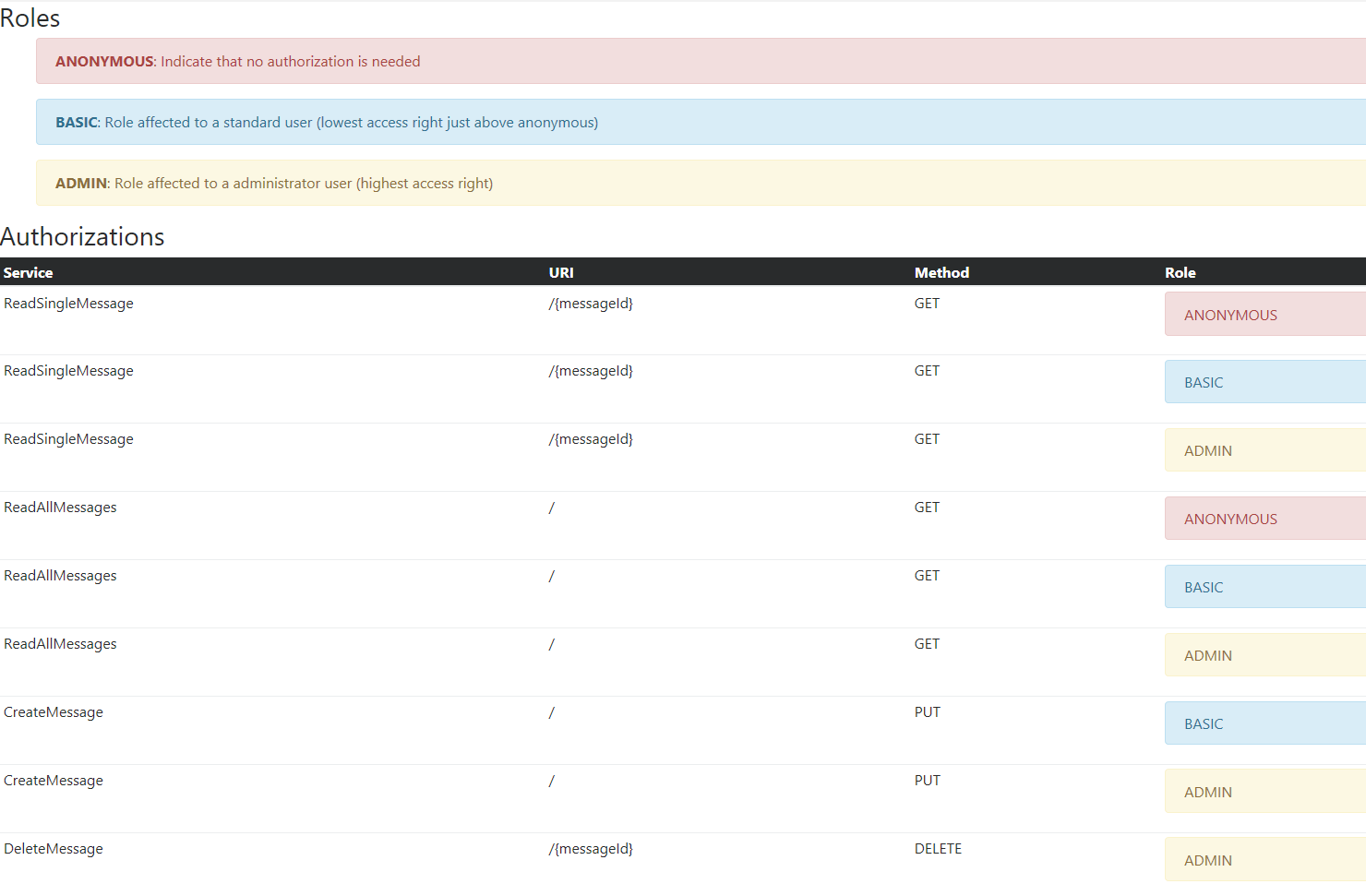
Even if the authorization matrix is stored in a human-readable format (XML), you might want to show an on-the-fly rendered representation of the XML file to spot potential inconsistencies and facilitate the review, audit and discussion about the authorization matrix.
即使授权矩阵以人类可读的格式(XML)存储,您可能还想显示XML文件的即时渲染表示,以发现潜在的不一致性,并便于审查、审计和讨论授权矩阵。
To achieve this task, you could use the following XSL stylesheet:
<?xml version="1.0" encoding="UTF-8"?>
<xsl:stylesheet xmlns:xsl="http://www.w3.org/1999/XSL/Transform" version="1.0">
  <xsl:template match="/">
    <html>
      <head>
        <title>Authorization Matrix</title>
        <link rel="stylesheet"
        href="https://maxcdn.bootstrapcdn.com/bootstrap/4.0.0-alpha.6/css/bootstrap.min.css"
        integrity="sha384-rwoIResjU2yc3z8GV/NPeZWAv56rSmLldC3R/AZzGRnGxQQKnKkoFVhFQhNUwEyJ"
        crossorigin="anonymous" />
      </head>
      <body>
        <h3>Roles</h3>
        <ul>
          <xsl:for-each select="authorization-matrix/roles/role">
            <xsl:choose>
              <xsl:when test="@name = 'ADMIN'">
                <div class="alert alert-warning" role="alert">
                  <strong>
                    <xsl:value-of select="@name" />
                  </strong>
                  :
                  <xsl:value-of select="@description" />
                </div>
              </xsl:when>
              <xsl:when test="@name = 'BASIC'">
                <div class="alert alert-info" role="alert">
                  <strong>
                    <xsl:value-of select="@name" />
                  </strong>
                  :
                  <xsl:value-of select="@description" />
                </div>
              </xsl:when>
              <xsl:otherwise>
                <div class="alert alert-danger" role="alert">
                  <strong>
                    <xsl:value-of select="@name" />
                  </strong>
                  :
                  <xsl:value-of select="@description" />
                </div>
              </xsl:otherwise>
            </xsl:choose>
          </xsl:for-each>
        </ul>
        <h3>Authorizations</h3>
        <table class="table table-hover table-sm">
          <thead class="thead-inverse">
            <tr>
              <th>Service</th>
              <th>URI</th>
              <th>Method</th>
              <th>Role</th>
            </tr>
          </thead>
          <tbody>
            <xsl:for-each select="authorization-matrix/services/service">
              <xsl:variable name="service-name" select="@name" />
              <xsl:variable name="service-uri" select="@uri" />
              <xsl:variable name="service-method" select="@http-method" />
              <xsl:for-each select="role">
                <tr>
                  <td scope="row">
                    <xsl:value-of select="$service-name" />
                  </td>
                  <td>
                    <xsl:value-of select="$service-uri" />
                  </td>
                  <td>
                    <xsl:value-of select="$service-method" />
                  </td>
                  <td>
                    <xsl:variable name="service-role-name" select="@name" />
                    <xsl:choose>
                      <xsl:when test="@name = 'ADMIN'">
                        <div class="alert alert-warning" role="alert">
                          <xsl:value-of select="@name" />
                        </div>
                      </xsl:when>
                      <xsl:when test="@name = 'BASIC'">
                        <div class="alert alert-info" role="alert">
                          <xsl:value-of select="@name" />
                        </div>
                      </xsl:when>
                      <xsl:otherwise>
                        <div class="alert alert-danger" role="alert">
                          <xsl:value-of select="@name" />
                        </div>
                      </xsl:otherwise>
                    </xsl:choose>
                  </td>
                </tr>
              </xsl:for-each>
            </xsl:for-each>
          </tbody>
        </table>
      </body>
    </html>
  </xsl:template>
</xsl:stylesheet>
Example of the rendering:
渲染示例
Sources of the prototype / 原型来源
GitHub repository) (GitHub 仓库)
References / 参考
- Authorization matrix testing prototype) (授权矩阵测试原型)
- OWASP SAMM: Security Testing) (OWASP SAMM:安全测试)