Kubernetes Security Cheat Sheet / Kubernetes安全速查表
Introduction / 介绍
This cheat sheet provides practical security guidance for securing Kubernetes clusters during deployment, configuration, and runtime operations.
本速查表提供了在部署、配置和运行时操作期间保护Kubernetes集群的实际安全指导。
Receive Alerts for Security Updates and Reporting Vulnerabilities / 接收安全更新和漏洞报告警报
Join the kubernetes-announce group (https://kubernetes.io/docs/reference/issues-security/security/) for emails about security announcements. See the security reporting page (https://kubernetes.io/docs/reference/issues-security/security) for more on how to report vulnerabilities.
加入kubernetes-announce组(https://kubernetes.io/docs/reference/issues-security/security/)以接收关于安全公告的电子邮件。有关如何报告漏洞的更多信息,请参阅安全报告页面(https://kubernetes.io/docs/reference/issues-security/security)。
What Is Kubernetes? / 什么是Kubernetes?
Kubernetes is an open source container orchestration engine for automating deployment, scaling, and management of containerized applications (Kubernetes overview). The open source project is hosted by the Cloud Native Computing Foundation (CNCF).
Kubernetes是一个开源的容器编排引擎,用于自动化容器化应用程序的部署、扩展和管理(Kubernetes概述)。该开源项目由云原生计算基金会(CNCF)托管。
When you deploy Kubernetes, you get a cluster. A Kubernetes cluster consists of a set of worker machines, called nodes that run containerized applications. The control plane manages the worker nodes and the Pods in the cluster.
当你部署Kubernetes时,你会得到一个集群。Kubernetes集群由一组运行容器化应用程序的工作节点组成,这些节点被称为节点。控制平面负责管理集群中的工作节点和Pod。
Control Plane Components / 控制平面组件
The control plane's components make global decisions about the cluster, as well as detecting and responding to cluster events. It consists of components such as kube-apiserver, etcd, kube-scheduler, kube-controller-manager and cloud-controller-manager.
控制平面组件负责对集群进行全局决策,以及检测和响应集群事件。它包括kube-apiserver、etcd、kube-scheduler、kube-controller-manager和cloud-controller-manager等组件。
Component: kube-apiserver
Description: Exposes the Kubernetes API. The API server is the front end for the Kubernetes control plane.
组件:kube-apiserver 描述:** 提供Kubernetes API。API服务器是Kubernetes控制平面的前端。
Component: etcd
Description: A consistent and highly-available key-value store used as Kubernetes' backing store for all cluster data.
组件:etcd 描述:** 一致且高可用的键值存储,用作Kubernetes所有集群数据的后端存储。
Component: kube-scheduler
Description: Watches for newly created Pods with no assigned node, and selects a node for them to run on.
组件:kube-scheduler 描述:** 监视没有分配节点的新创建的Pod,并为它们选择运行节点。
Component: kube-controller-manager
Description: Runs controller processes. Logically, each controller is a separate process, but to reduce complexity, they are all compiled into a single binary and run in a single process.
组件:kube-controller-manager 描述:** 运行控制器进程。逻辑上,每个控制器是一个单独的进程,但为了减少复杂性,它们都被编译成一个单一的二进制文件,并在单个进程中运行。
Component: cloud-controller-manager
Description: The cloud controller manager lets you link your cluster into your cloud provider's API, and separates out the components that interact with that cloud platform from components that just interact with your cluster.
组件:cloud-controller-manager 描述:** 云控制器管理器允许您将集群链接到云提供商的API,并将与该云平台交互的组件与仅与您的集群交互的组件分离出来。
Node Components / 节点组件
Node components run on every node, maintaining running pods and providing the Kubernetes runtime environment. It consists of components such as kubelet, kube-proxy and container runtime.
节点组件在每个节点上运行,维护运行中的Pod,并提供Kubernetes运行时环境。它包括kubelet、kube-proxy和容器运行时等组件。
Component: kubelet
Description: An agent that runs on each node in the cluster. It makes sure that containers are running in a Pod.
组件: kubelet 描述: 在集群中的每个节点上运行的代理。它确保容器在 Pod 中运行。
Component: kube-proxy
Description: A network proxy that runs on each node in your cluster, implementing part of the Kubernetes Service concept.
组件: kube-proxy 描述: 在您的集群中的每个节点上运行的网络代理,实现了 Kubernetes 服务概念的一部分。
Container: runtime
Description: The container runtime is the software that is responsible for running containers |
容器: 运行时 描述: 容器运行时是负责运行容器的软件 |
Securing Kubernetes Hosts / 保护 Kubernetes 主机
Kubernetes can be deployed in different ways: on bare metal, on-premise, and in the public cloud (a custom Kubernetes build on virtual machines OR use a managed service). Since Kubernetes is designed to be highly portable, customers can easily and migrate their workloads and switch between multiple installations.
Kubernetes 可以以不同的方式部署:在裸金属服务器上、在本地环境中,以及在公共云中(在虚拟机上构建自定义 Kubernetes 或使用托管服务)。由于 Kubernetes 被设计为高度可移植,客户可以轻松迁移其工作负载并在多个安装之间切换。
Because Kubernetes can be designed to fit a large variety of scenarios, this flexibility is a weakness when it comes to securing Kubernetes clusters. The engineers responsible for deploying the Kubernetes platform must know about all the potential attack vectors and vulnerabilities for their clusters.
由于 Kubernetes 可以设计来适应大量不同的场景,这种灵活性在保护 Kubernetes 集群时成为一种弱点。负责部署 Kubernetes 平台的工程师必须了解其集群的所有潜在攻击向量和漏洞。
To harden the underlying hosts for Kubernetes clusters, we recommend that you install the latest version of the operating systems, harden the operating systems, implement necessary patch management and configuration management systems, implement essential firewall rules and undertake specific datacenter-based security measures.
为了加强 Kubernetes 集群的基础主机,我们建议您安装操作系统的最新版本,加固操作系统,实施必要的补丁管理和配置管理系统,实施基本防火墙规则,并采取特定的数据中心安全措施。
Updating Kubernetes / 更新 Kubernetes
Since no one can track all potential attack vectors for your Kubernetes cluster, the first and best defense is to always run the latest stable version of Kubernetes.
由于没有人能够追踪到您 Kubernetes 集群中所有潜在的攻击向量,因此最好的防御措施是始终运行 Kubernetes 的最新稳定版本。
In case vulnerabilities are found in running containers, it is recommended to always update the source image and redeploy the containers. Try to avoid direct updates to the running containers as this can break the image-container relationship.
如果在运行中的容器中发现漏洞,建议始终更新源镜像并重新部署容器。尽量避免直接更新运行中的容器,因为这可能会破坏镜像-容器关系。
Example: apt-update
Upgrading containers is extremely easy with the Kubernetes rolling updates feature - this allows gradually updating a running application by upgrading its images to the latest version.
使用 Kubernetes 的滚动更新功能升级容器极为简单 - 这允许通过升级其镜像到最新版本来逐步更新运行中的应用程序。
Release schedule for Kubernetes / Kubernetes 的发布计划
The Kubernetes project maintains release branches for the most recent three minor releases and it backports the applicable fixes, including security fixes, to those three release branches, depending on severity and feasibility. Patch releases are cut from those branches at a regular cadence, plus additional urgent releases, when required. Hence it is always recommended to upgrade the Kubernetes cluster to the latest available stable version. It is recommended to refer to the version skew policy for further details Kubernetes version-skew policy.
Kubernetes 项目维护最近三个次要版本的发布分支,并根据严重性和可行性将这些适用的修复(包括安全修复)回滚到这三个发布分支。定期从这些分支中裁剪补丁版本,以及在必要时进行额外的紧急发布。因此,始终建议将 Kubernetes 集群升级到最新可用的稳定版本。建议参考版本偏差策略以获取更多详细信息 Kubernetes 版本偏差策略。
There are several techniques such as rolling updates, and node pool migrations that allow you to complete an update with minimal disruption and downtime.
有几种技术,如滚动更新和节点池迁移,允许您以最小的干扰和停机时间完成更新。
Securing Kubernetes Components / 保护 Kubernetes 组件
This section discusses how to secure Kubernetes components. It covers the following topics:
本节讨论了如何保护 Kubernetes 组件。它涵盖了以下主题:
- Securing the Kubernetes Dashboard
中文:保护 Kubernetes 仪表板 - Restricting access to etcd (Important)
中文:限制对 etcd 的访问(重要) - Controlling network access to sensitive ports
中文:控制对敏感端口的网络访问 - Controlling access to the Kubernetes API
中文:控制对 Kubernetes API 的访问 - Implementing role-based access control in Kubernetes
中文:在 Kubernetes 中实现基于角色的访问控制 - Limiting access to Kubelets
中文:限制对 Kubelets 的访问
Securing the Kubernetes Dashboard / 保护 Kubernetes 仪表板
The Kubernetes dashboard is a webapp for managing your cluster. It is not a part of the Kubernetes cluster itself, it has to be installed by the owners of the cluster. Thus, there are a lot of tutorials on how to do this. Unfortunately, most of them create a service account with very high privileges. This caused Tesla and some others to be hacked via such a poorly configured K8s dashboard. (Reference: Tesla cloud resources are hacked to run cryptocurrency-mining malware - https://arstechnica.com/information-technology/2018/02/tesla-cloud-resources-are-hacked-to-run-cryptocurrency-mining-malware/)
Kubernetes 仪表板是一个用于管理您的集群的 Web 应用程序。它本身不是 Kubernetes 集群的一部分,它必须由集群的所有者安装。因此,有很多关于如何做到这一点的教程。不幸的是,其中大多数都创建了一个具有非常高权限的服务帐户。这导致特斯拉和其他一些公司通过这种配置不当的 K8s 仪表板遭到黑客攻击。(参考:特斯拉云资源被黑客攻击以运行加密货币挖矿恶意软件 - https://arstechnica.com/information-technology/2018/02/tesla-cloud-resources-are-hacked-to-run-cryptocurrency-mining-malware/)
To prevent attacks via the dashboard, you should follow some tips:
为了防止通过仪表板进行攻击,您应遵循以下建议:
- Do not expose the dashboard without additional authentication to the public. There is no need to access such a powerful tool from outside your LAN
中文:不要向公众暴露仪表板而不进行额外认证。没有必要从你的局域网外访问如此强大的工具 - Turn on Role-Based Access Control (see below), so you can limit the service account the dashboard uses
中文:开启基于角色的访问控制(见下文),这样你可以限制仪表板使用的服务账户 - Do not grant the service account of the dashboard high privileges
中文:不要授予仪表板服务账户高权限 - Grant permissions per user, so each user only can see what they are supposed to see
中文:按用户授予权限,这样每个用户只能看到他们应该看到的内容 - If you are using network policies, you can block requests to the dashboard even from internal pods (this will not affect the proxy tunnel via kubectl proxy)
中文:如果你使用网络策略,你可以阻止对仪表板的请求,即使是从内部Pod(这不会影响通过kubectl proxy的代理隧道) - Before version 1.8, the dashboard had a service account with full privileges, so check that there is no role binding for cluster-admin left.
中文:在版本1.8之前,仪表板有一个具有完全权限的服务账户,所以请检查没有留下集群管理员的角色绑定 - Deploy the dashboard with an authenticating reverse proxy, with multi-factor authentication enabled. This can be done with either embedded OIDC
id_tokensor using Kubernetes Impersonation. This allows you to use the dashboard with the user's credentials instead of using a privilegedServiceAccount. This method can be used on both on-prem and managed cloud clusters.
中文:使用具有多因素认证的认证反向代理部署仪表板。这可以通过嵌入的OIDCid_tokens或使用Kubernetes Impersonation来实现。这允许你使用用户的凭证而不是使用具有特权的ServiceAccount来使用仪表板。此方法可以在本地和托管云集群上使用
Restricting Access To etcd (IMPORTANT) / 限制对etcd的访问(重要)
etcd is a critical Kubernetes component which stores information on states and secrets, and it should be protected differently from the rest of your cluster. Write access to the API server's etcd is equivalent to gaining root on the entire cluster, and even read access can be used to escalate privileges fairly easily.
etcd 是 Kubernetes 的关键组件,用于存储状态和机密信息,应与其他集群组件采取不同的保护措施。对 API 服务器 etcd 的写入访问等同于在整个集群上获得 root 权限,甚至读取访问也可以相当容易地提升权限。
The Kubernetes scheduler will search etcd for pod definitions that do not have a node. It then sends the pods it finds to an available kubelet for scheduling. Validation for submitted pods is performed by the API server before it writes them to etcd, so malicious users writing directly to etcd can bypass many security mechanisms - e.g. PodSecurityPolicies.
Kubernetes 调度器将在 etcd 中搜索没有节点的 pod 定义。然后,它将找到的 pod 发送到可用的 kubelet 进行调度。在将 pod 写入 etcd 之前,API 服务器会对其进行验证,因此直接向 etcd 写入的恶意用户可以绕过许多安全机制 - 例如 PodSecurityPolicies。
Administrators should always use strong credentials from the API servers to their etcd server, such as mutual auth via TLS client certificates, and it is often recommended to isolate the etcd servers behind a firewall that only the API servers may access.
管理员应始终使用来自 API 服务器到 etcd 服务器的强凭证,例如通过 TLS 客户端证书的相互身份验证,并且通常建议在防火墙后面隔离 etcd 服务器,只有 API 服务器可以访问。
Limiting access to the primary etcd instance / 限制对主 etcd 实例的访问
Allowing other components within the cluster to access the primary etcd instance with read or write access to the full keyspace is equivalent to granting cluster-admin access. Using separate etcd instances for other components or using etcd ACLs to restrict read and write access to a subset of the keyspace is strongly recommended.
允许集群内的其他组件以读取或写入完整键空间的访问权限访问主 etcd 实例等同于授予集群管理员访问权限。强烈建议为其他组件使用单独的 etcd 实例或使用 etcd ACL 限制对键空间子集的读取和写入访问。
Controlling Network Access to Sensitive Ports / 控制对敏感端口的网络访问
It is highly recommended to configure authentication and authorization on the cluster and cluster nodes. Since Kubernetes clusters usually listen on a range of well-defined and distinctive ports, it is easier for attackers to identify the clusters and attack them.
强烈建议在集群和集群节点上配置身份验证和授权。由于 Kubernetes 集群通常监听一系列定义良好且独特的端口,攻击者更容易识别集群并进行攻击。
An overview of the default ports used in Kubernetes is provided below. Make sure that your network blocks access to ports, and you should seriously consider limiting access to the Kubernetes API server to trusted networks.
以下提供了 Kubernetes 中使用的默认端口的概述。确保您的网络阻止对这些端口的访问,并且您应该认真考虑仅将 Kubernetes API 服务器的访问权限限制在受信任的网络中。
Control plane node(s):
控制平面节点:
| Protocol / 协议 | Port Range / 端口范围 | Purpose / 目的 |
|---|---|---|
| TCP | 6443 | Kubernetes API Server Kubernetes API 服务器 |
| TCP | 2379-2380 | etcd server client API etcd 服务器客户端 API |
| TCP | 10250 | Kubelet API |
| TCP | 10259 | kube-scheduler |
| TCP | 10257 | kube-controller-manager |
| TCP | 10255 | Read-Only Kubelet API 只读 Kubelet API |
Worker nodes:
工作节点:
| Protocol / 协议 | Port Range / 端口范围 | Purpose / 目的 |
|---|---|---|
| TCP | 10248 | Kubelet Healthz API Kubelet 健康检查 API |
| TCP | 10249 | Kube-proxy Metrics API Kube-proxy 指标 API |
| TCP | 10250 | Kubelet API |
| TCP | 10255 | Read-Only Kubelet API 只读 Kubelet API |
| TCP | 10256 | Kube-proxy Healthz API Kube-proxy 健康检查 API |
| TCP | 30000-32767 | NodePort Services NodePort 服务 |
Controlling Access To The Kubernetes API / 控制对 Kubernetes API 的访问
The first line of defense of Kubernetes against attackers is limiting and securing access to API requests, because those requests are used to control the Kubernetes platform. For more information, refer to the documentation at https://kubernetes.io/docs/reference/access-authn-authz/controlling-access/.
Kubernetes 防御攻击者的第一道防线是限制和确保 API 请求的安全,因为这些请求用于控制 Kubernetes 平台。有关更多信息,请参阅以下文档:https://kubernetes.io/docs/reference/access-authn-authz/controlling-access/。
This part contains the following topics:
本部分包含以下主题:
- How Kubernetes handles API authorization
中文:Kubernetes 如何处理 API 授权 - External API Authentication for Kubernetes (recommended)
中文:Kubernetes外部API认证(推荐) - Kubernetes Built-In API Authentication (not recommended)
中文:Kubernetes内置API认证(不推荐) - Implementing role-based access in Kubernetes
中文:在Kubernetes中实现基于角色的访问控制 - Limiting access to Kubelets
中文:限制对 Kubelets 的访问
How Kubernetes handles API authorization / Kubernetes 如何处理 API 授权
In Kubernetes, you must be authenticated (logged in) before your request can be authorized (granted permission to access), and Kubernetes expects attributes that are common to REST API requests. This means that existing organization-wide or cloud-provider-wide access control systems which may handle other APIs work with Kubernetes authorization.
在Kubernetes中,您必须在请求被授权(授予访问权限)之前进行认证(登录),并且Kubernetes期望与REST API请求共有的属性。这意味着可能处理其他API的现有组织级或云提供商级访问控制系统可以与Kubernetes授权一起工作。
When Kubernetes authorizes API requests using the API server, permissions are denied by default. It evaluates all of the request attributes against all policies and allows or denies the request. All parts of an API request must be allowed by some policy in order to proceed.
当Kubernetes使用API服务器授权API请求时,默认情况下会拒绝权限。它会将所有请求属性与所有策略进行比较,并允许或拒绝请求。API请求的所有部分必须由某些策略允许才能继续。
External API Authentication for Kubernetes (RECOMMENDED) / Kubernetes外部API认证(推荐)
Due to the weakness of Kubernetes' internal mechanisms for authenticating APIs, we strongly recommended that larger or production clusters use one of the external API authentication methods.
由于Kubernetes内部用于认证API的机制存在弱点,我们强烈建议大型或生产集群使用外部API认证方法之一。
- OpenID Connect (OIDC) lets you externalize authentication, use short lived tokens, and leverage centralized groups for authorization.
- Managed Kubernetes distributions such as GKE, EKS and AKS support authentication using credentials from their respective IAM providers.
中文:管理型 Kubernetes 发行版,如 GKE、EKS 和 AKS,支持使用各自 IAM 提供商的凭据进行身份验证。 - Kubernetes Impersonation) (Kubernetes 伪装) can be used with both managed cloud clusters and on-prem clusters to externalize authentication without having to have access to the API server configuration parameters.
In addition to choosing the appropriate authentication system, API access should be considered privileged and use Multi-Factor Authentication (MFA) for all user access.
除了选择合适的身份验证系统外,API 访问应被视为特权操作,并为所有用户访问使用多因素身份验证 (MFA)。
For more information, consult Kubernetes authentication reference documentation at https://kubernetes.io/docs/reference/access-authn-authz/authentication.
有关更多信息,请参阅 Kubernetes 身份验证参考文档:https://kubernetes.io/docs/reference/access-authn-authz/authentication。
Options for Kubernetes Built-In API Authentication (NOT RECOMMENDED) / Kubernetes 内置 API 身份验证选项(不推荐使用)
Kubernetes provides a number of internal mechanisms for API server authentication but these are usually only suitable for non-production or small clusters. We will briefly discuss each internal mechanism and explain why you should not use them.
Kubernetes 提供了多种内部机制用于 API 服务器身份验证,但这些通常仅适用于非生产环境或小型集群。我们将简要讨论每种内部机制,并解释为什么不应使用它们。
-
Static Token File) (静态令牌文件): Authentication makes use of clear text tokens stored in a CSV file on API server node(s). WARNING: You cannot modify credentials in this file until the API server is restarted.
-
X509 Client Certs) (X509 客户端证书) are available but are unsuitable for production use, since Kubernetes does not support certificate revocation. As a result, these user credentials cannot be modified or revoked without rotating the root certificate authority key and re-issuing all cluster certificates.
-
Service Accounts Tokens) (服务账户令牌) are also available for authentication. Their primary intended use is to allow workloads running in the cluster to authenticate to the API server, however they can also be used for user authentication.
Implementing Role-Based Access Control in Kubernetes / 在 Kubernetes 中实现基于角色的访问控制
Role-based access control (RBAC) is a method for regulating access to computer or network resources based on the roles of individual users within your organization. Fortunately, Kubernetes comes with an integrated Role-Based Access Control (RBAC) component with default roles that allow you to define user responsibilities depending on what actions a client might want to perform. You should use the Node and RBAC authorizers together in combination with the NodeRestriction admission plugin.
基于角色的访问控制(RBAC)是一种根据组织内个人用户角色来调节对计算机或网络资源访问的方法。幸运的是,Kubernetes 内置了基于角色的访问控制(RBAC)组件,并提供了默认角色,允许您根据客户端可能想要执行的操作定义用户职责。您应将节点和 RBAC 授权器结合使用,并与节点限制准入插件一起使用。
The RBAC component matches an incoming user or group to a set of permissions linked to roles. These permissions combine verbs (get, create, delete) with resources (pods, services, nodes) and can be namespace or cluster scoped. RBAC authorization uses the rbac.authorization.k8s.io API group to drive authorization decisions, allowing you to dynamically configure policies through the Kubernetes API.
RBAC 组件将传入的用户或组与关联到角色的权限集进行匹配。这些权限将动词(获取、创建、删除)与资源(Pod、服务、节点)结合,可以是命名空间或集群范围。RBAC 授权使用 rbac.authorization.k8s.io API 组来驱动授权决策,允许您通过 Kubernetes API 动态配置策略。
To enable RBAC, start the API server with the --authorization-mode flag set to a comma-separated list that includes RBAC; for example:
要启用 RBAC,请使用 --authorization-mode 标志启动 API 服务器,并将其设置为包含 RBAC 的逗号分隔列表;例如:
kube-apiserver --authorization-mode=Example,RBAC --other-options --more-options
For detailed examples of utilizing RBAC, refer to Kubernetes documentation at https://kubernetes.io/docs/reference/access-authn-authz/rbac
有关使用 RBAC 的详细示例,请参阅 Kubernetes 文档:https://kubernetes.io/docs/reference/access-authn-authz/rbac
Limiting access to the Kubelets / 限制对 Kubelets 的访问
Kubelets expose HTTPS endpoints which grant powerful control over the node and containers. By default Kubelets allow unauthenticated access to this API. Production clusters should enable Kubelet authentication and authorization.
Kubelets 提供了 HTTPS 端点,这些端点可以授予对节点和容器的强大控制。默认情况下,Kubelets 允许未经身份验证的访问此 API。生产集群应启用 Kubelet 身份验证和授权。
For more information, refer to Kubelet authentication/authorization documentation at https://kubernetes.io/docs/reference/access-authn-authz/kubelet-authn-authz/
有关更多信息,请参阅 Kubernetes Kubelet 认证/授权文档:https://kubernetes.io/docs/reference/access-authn-authz/kubelet-authn-authz/
Kubernetes Security Best Practices: Build Phase / Kubernetes 安全最佳实践:构建阶段
During the build phase, you should secure your Kubernetes container images by building secure images and scanning those images for any known vulnerabilities.
在构建阶段,您应该通过构建安全镜像并扫描这些镜像以查找任何已知漏洞来保护您的 Kubernetes 容器镜像。
What is a container image? / 什么是容器镜像?
A container image (CI) is an immutable, lightweight, standalone package that contains everything required to run an application — the application code, runtime, system libraries, configuration and system tools. Images are built as layered, read-only artifacts that are portable between hosts but share the host machine’s operating system kernel. See Docker: What is a container? (https://www.docker.com/resources/what-container).
容器镜像(CI)是一个不可变、轻量级、独立的包,包含运行应用程序所需的一切——应用程序代码、运行时、系统库、配置和系统工具。镜像作为分层、只读的工件构建,可以在主机之间移植,但共享主机机的操作系统内核。参见 Docker:什么是容器?(https://www.docker.com/resources/what-container)
Your CIs must be built on a approved and secure base image. This base image must be scanned and monitored at regular intervals to ensure that all CIs are based on a secure and authentic image. Implement strong governance policies that determine how images are built and stored in trusted image registries.
您的 CI 必须基于一个批准且安全的基镜像构建。此基镜像必须定期扫描和监控,以确保所有 CI 都基于一个安全且真实的镜像。实施强大的治理策略,以确定如何在受信任的镜像仓库中构建和存储镜像。
Ensure that CIs are up to date / 确保 CI 保持最新
Ensure your images (and any third-party tools you include) are up-to-date and use the latest versions of their components.
确保您的镜像(以及您包含的任何第三方工具)保持最新,并使用它们组件的最新版本。
Only use authorized images in Your environment / 仅在使用环境中使用授权的图像
Downloading and running CIs from unknown sources is very dangerous. Make sure that only images adhering to the organization’s policy are allowed to run, or else the organization is open to risk of running vulnerable or even malicious containers.
从未知来源下载和运行 CI 非常危险。请确保只有符合组织政策的图像被允许运行,否则组织将面临运行易受攻击或甚至恶意容器的风险。
Use A CI Pipeline To Control and Identify Vulnerabilities / 使用 CI 管道来控制和识别漏洞
The Kubernetes container registry serves as a central repository of all container images in the system. Depending on your needs, you can utilize a public repository or have a private repository as the container registry. We recommend that you store your approved images in a private registry and only push approved images to these registries, which automatically reduces the number of potential images that enter your pipeline down to a fraction of the hundreds of thousands of publicly available images.
Kubernetes 容器注册库是系统中所有容器图像的中央存储库。根据您的需求,您可以使用公共存储库或拥有私有存储库作为容器注册库。我们建议您将批准的图像存储在私有注册库中,并且只将这些注册库中的批准图像推送到注册库,这自动将进入您管道的潜在图像数量减少到数十万个公开可用图像的一小部分。
Also, we strongly recommend that you add a CI pipeline that integrates security assessment (like vulnerability scanning) into the build process. This pipeline should vet all code that is approved for production and is used to build the images. After an image is built, it should be scanned for security vulnerabilities. Only if no issues are found, then the image would be pushed to a private registry then deployed to production. If the security assessment mechanism fails any code, it should create a failure in the pipeline, which will help you find images with security problems and prevent them from entering the image registry.
此外,我们强烈建议您添加一个 CI 管道,该管道将安全评估(如漏洞扫描)集成到构建过程中。此管道应审查所有批准用于生产的代码,并用于构建图像。图像构建后,应对其进行安全漏洞扫描。只有在没有发现任何问题的情况下,图像才会被推送到私有注册库然后部署到生产环境中。如果安全评估机制未能通过任何代码,它应在管道中创建失败,这将帮助您找到存在安全问题的图像并防止它们进入图像注册库。
Many source code repositories provide scanning capabilities (e.g. Github, GitLab), and many CI tools offer integration with open source vulnerability scanners such as Trivy or Grype.
许多源代码存储库提供扫描功能(例如 Github,GitLab),许多 CI 工具提供与开源漏洞扫描器(如 Trivy 或 Grype)的集成。
Projects are developing image authorization plugins for Kubernetes that prevent unauthorized images from shipping. For more information, refer to the PR https://github.com/kubernetes/kubernetes/pull/27129.
项目正在开发 Kubernetes 的图像授权插件,以防止未经授权的图像分发。更多信息,请参阅 PR https://github.com/kubernetes/kubernetes/pull/27129。
Minimize Features in All CIs / 在所有 CI 中最小化功能
As a best practice, Google and other tech giants have strictly limiting the code in their runtime container for years. This approach improves the signal-to-noise of scanners (e.g. CVE) and reduces the burden of establishing provenance to just what you need.
作为最佳实践,谷歌和其他科技巨头多年来一直严格限制其运行时容器中的代码。这种方法提高了扫描器(例如CVE)的信号与噪声比,并将建立来源的负担减少到仅所需的内容。
Consider using minimal CIs such as distroless images (see below). If this is not possible, do not include OS package managers or shells in CIs because they may have unknown vulnerabilities. If you absolutely must include any OS packages, remove the package manager at a later step in the generation process.
考虑使用最小化CI,如distroless镜像(见下文)。如果这不可能,请不要在CI中包含操作系统包管理器或shell,因为它们可能存在未知漏洞。如果您绝对必须包含任何操作系统包,请在生成过程的后续步骤中删除包管理器。
Use distroless or empty images when possible / 尽可能使用distroless或空镜像
Distroless images sharply reduce the attack surface because they do not include shells and contain fewer packages than other images. For more information on distroless images, refer to https://github.com/GoogleContainerTools/distroless.
Distroless镜像显著减少了攻击面,因为它们不包含shell,并且包含的包比其他镜像少。有关distroless镜像的更多信息,请参阅https://github.com/GoogleContainerTools/distroless。
An empty image, ideal for statically compiled languages like Go, because the image is empty - the attack surface it is truly minimal - only your code!
空镜像非常适合静态编译语言如Go,因为镜像为空 - 攻击面真正最小 - 只有您的代码!
For more information, refer to https://hub.docker.com/_/scratch
有关更多信息,请参阅https://hub.docker.com/_/scratch。
Kubernetes Security Best Practices: Deploy Phase / Kubernetes安全最佳实践:部署阶段
Once a Kubernetes infrastructure is in place, you must configure it securely before any workloads are deployed. And as you configure your infrastructure, ensure that you have visibility into what CIs are being deployed and how they are being deployed or else you will not be able to identify and respond to security policy violations. Before deployment, your system should know and be able to tell you:
一旦部署了Kubernetes基础设施,在部署任何工作负载之前,您必须安全地配置它。在配置您的基础设施时,确保您能够了解正在部署哪些CI以及它们是如何部署的,否则您将无法识别和应对安全策略违规。在部署之前,您的系统应该知道并能告诉您:
- What is being deployed - including information about the image being used, such as components or vulnerabilities, and the pods that will be deployed.
中文:部署内容 - 包括使用的镜像信息,如组件或漏洞,以及将要部署的Pods。 - Where it is going to be deployed - which clusters, namespaces, and nodes.
中文:部署位置 - 指定哪些集群、命名空间和节点。 - How it is deployed - whether it runs privileged, what other deployments it can communicate with, the pod security context that is applied, if any.
中文:部署方式 - 是否以特权模式运行,它能与哪些其他部署通信,应用了哪些Pod安全上下文(如果有)。 - What it can access - including secrets, volumes, and other infrastructure components such as the host or orchestrator API.
中文:可访问内容 - 包括机密信息、卷和其他基础设施组件,如主机或编排器API。 - Is it compliant? - whether it complies with your policies and security requirements.
中文:是否符合规范? - 是否符合您的政策和安全要求。
Code that uses namespaces to isolate Kubernetes resources / 使用命名空间来隔离Kubernetes资源的代码
Namespaces give you the ability to create logical partitions, enforce separation of your resources and limit the scope of user permissions.
命名空间允许您创建逻辑分区,强制分离资源并限制用户权限的范围。
Setting the namespace for a request / 设置请求的命名空间
To set the namespace for a current request, use the --namespace flag. Refer to the following examples:
为当前请求设置命名空间,请使用 --namespace 标志。参考以下示例:
kubectl run nginx --image=nginx --namespace=<insert-namespace-name-here>
kubectl get pods --namespace=<insert-namespace-name-here>
Setting the namespace preference / 设置命名空间偏好
You can permanently save the namespace for all subsequent kubectl commands in that context with:
您可以使用以下命令将命名空间永久保存,以便在该上下文中执行所有后续的 kubectl 命令:
kubectl config set-context --current --namespace=<insert-namespace-name-here>
Then validate it with the following command:
然后使用以下命令进行验证:
kubectl config view --minify | grep namespace:
Learn more about namespaces at https://kubernetes.io/docs/concepts/overview/working-with-objects/namespaces
有关命名空间的更多信息,请参阅 https://kubernetes.io/docs/concepts/overview/working-with-objects/namespaces
Use the ImagePolicyWebhook to govern image provenance / 使用 ImagePolicyWebhook 来管理镜像来源
We strongly recommend that you use the admission controller ImagePolicyWebhook to prevent unapproved images from being used, reject pods that use unapproved images, and refuse CIs that meet the following criteria:
我们强烈建议您使用准入控制器 ImagePolicyWebhook 来防止使用未经批准的镜像,拒绝使用未经批准镜像的 pod,以及拒绝满足以下条件的 CI:
- Images that haven’t been scanned recently
中文:近期未扫描的镜像 - Images that use a base image that’s not explicitly allowed
中文:使用未经明确允许的基础镜像的图片 - Images from insecure registries
中文:来自不安全仓库的图片
Learn more about webhook at https://kubernetes.io/docs/reference/access-authn-authz/admission-controllers/#imagepolicywebhook
了解更多关于 webhook 的信息,请访问 https://kubernetes.io/docs/reference/access-authn-authz/admission-controllers/#imagepolicywebhook
Implement continuous security vulnerability scanning / 实施持续的安全漏洞扫描
Since new vulnerabilities are always being discovered, you may not always know if your containers may have recently-disclosed vulnerabilities (CVEs) or outdated packages. To maintain a strong security posture, do regular production scanning of first-party containers (applications you have built and previously scanned) as well as third-party containers (which are sourced from trusted repository and vendors).
由于新漏洞总是不断被发现,您可能无法始终知道您的容器是否最近披露了漏洞(CVE)或过时的软件包。为了保持强大的安全态势,定期对第一方容器(您构建并之前已扫描的应用程序)以及第三方容器(来自受信任的仓库和供应商)进行生产扫描。
Open Source projects such as Trivy, Grype, and Clair can assist in identifying and prioritizing vulnerabilities.
开源项目如 Trivy、Grype 和 Clair 可帮助识别和优先处理漏洞。
Apply security context to your pods and containers / 将安全上下文应用于您的 pod 和容器
Use Pod and container security contexts to restrict process privileges and filesystem access. Set readOnlyRootFilesystem: true in each container's securityContext to prevent writes to its root filesystem. This does not make mounted volumes read-only or prevent attacks that do not require filesystem writes.
使用 Pod 和容器安全上下文 来限制进程权限和文件系统访问。在每个容器的 securityContext 中设置 readOnlyRootFilesystem: true 以防止对其根文件系统的写入。这不会使挂载的卷只读或防止不需要文件系统写入的攻击。
When you are configuring the security context for your pods, only grant the privileges that are needed for the resources to function in your containers and volumes. Some of the important parameters in the security context property are:
当您为您的Pod配置安全上下文时,仅授予资源在容器和卷中运行所需的权限。安全上下文属性中的一些重要参数包括:
Security Context Settings:
安全上下文设置:
-
SecurityContext->runAsNonRoot
Description: Indicates that containers should run as non-root user.
中文:SecurityContext->runAsNonRoot 描述:指示容器应以非root用户运行。 -
SecurityContext->Capabilities
Description: Controls the Linux capabilities assigned to the container.
中文:SecurityContext->Capabilities 描述:控制分配给容器的 Linux 能力。 -
SecurityContext->readOnlyRootFilesystem
Description: Controls whether a container will be able to write into the root filesystem.
中文:SecurityContext->readOnlyRootFilesystem 描述:控制容器是否能够写入根文件系统。 -
PodSecurityContext->runAsNonRoot
Description: Prevents running a container with 'root' user as part of the pod |
中文:PodSecurityContext->runAsNonRoot 描述:防止以 'root' 用户作为 pod 的一部分运行 |
Security context example: A pod definition that includes security context parameters / 安全上下文示例:包含安全上下文参数的Pod定义
This illustrative manifest assumes an application image configured to run as a numeric non-root user and without writes to the root filesystem. Replace the example image with your application image.
本示例清单假定一个配置为以数字非root用户身份运行且不对根文件系统进行写入的应用程序镜像。将示例镜像替换为您的应用程序镜像。
apiVersion: v1
kind: Pod
metadata:
  name: hello-world
spec:
  securityContext:
    runAsNonRoot: true
  containers:
    - name: app
      image: registry.example.com/app:tag
      securityContext:
        readOnlyRootFilesystem: true
For more information on security context for Pods, refer to the documentation at https://kubernetes.io/docs/tasks/configure-pod-container/security-context
有关Pod安全上下文的更多信息,请参阅以下文档:https://kubernetes.io/docs/tasks/configure-pod-container/security-context
Continuously assess the privileges used by containers / 持续评估容器使用的权限
We strongly recommend that all your containers should adhere to the principle of least privilege, since your security risk is heavily influenced by the capabilities, role bindings, and privileges given to containers. Each container should only have the minimum privileges and capabilities that allows it to perform its intended function.
我们强烈建议所有容器都应遵循最小权限原则,因为您的安全风险受到容器能力、角色绑定和权限的严重影响。每个容器应仅具有允许其执行预期功能的最低权限和能力。
Utilize Pod Security Standards and the Built-in Pod Security Admission Controller to enforce container privilege levels / 利用Pod安全标准和内置的Pod安全准入控制器来强制执行容器权限级别
Pod Security Standards) (Pod安全标准) combined with the Pod Security Admission controller allow cluster administrators to enforce requirements on a pod's securityContext and pod specification fields. Three Pod Security Standard profiles exist:
- Privileged: Unrestricted, allows for known privilege escalations. Intended for use with system and infrastructure level workloads that require privilege to operate properly. All securityContext settings are permitted.
中文:特权: 无限制,允许已知权限提升。旨在与需要正确操作权限的系统级和基础设施级工作负载一起使用。所有securityContext设置均被允许。 - Baseline: Minimally restrictive policy designed for common containerized workloads while preventing known privilege escalations. It restricts the most dangerous settings, enforcing default (masked)
/procmounts, restricting SELinux options, and prohibiting privileged containers (securityContext.privileged),hostPathvolumes, and host networking or process namespaces (hostNetwork,hostPID,hostIPC).
中文:基线:为常见容器化工作负载设计的最小限制策略,同时防止已知的权限提升。它限制了最危险的设置,强制执行默认(掩码)/proc挂载,限制 SELinux 选项,并禁止特权容器(securityContext.privileged)、hostPath卷、主机网络或进程命名空间(hostNetwork、hostPID、hostIPC)。 - Restricted: In addition to Baseline restrictions, it requires non-root execution (
runAsNonRoot: true). For Linux Pods, it also requires disabling privilege escalation (allowPrivilegeEscalation: false), aRuntimeDefaultorLocalhostseccomp profile, and droppingALLcapabilities; onlyNET_BIND_SERVICEmay be added back.
中文:受限: 除了基线限制外,它还要求非root执行(runAsNonRoot: true)。对于Linux Pods,它还要求禁用权限提升(allowPrivilegeEscalation: false),一个RuntimeDefault或Localhostseccomp配置文件,并丢弃ALL能力;只能添加回NET_BIND_SERVICE。
For Pods using user namespaces, non-root checks are relaxed; Baseline also relaxes its /proc masking check.
对于使用user namespaces的Pod,非root检查被放宽;基线还放宽了其/proc屏蔽检查。
Each of the profiles has defined settings baselines that can be found in more detail in the Pod Security Standards profile definitions.
每个配置文件都定义了基线设置,可以在Pod安全标准配置文件定义中找到更多详细信息。
The Pod Security Admission Controller allows you to enforce, audit, or warn upon the violation of a defined policy. audit and warn modes can be utilized to determine if a particular Pod Security Standard would normally prevent the deployment of a pod when set to enforce mode.
Pod安全准入控制器允许您强制执行、审计或警告违反定义的策略。audit和warn模式可用于确定在设置为enforce模式时,特定的Pod安全标准是否会阻止Pod的部署。
Below is an example of a namespace that would only allow Pods to be deployed that conform to the restricted Pod Security Standard:
以下是一个示例,该命名空间仅允许部署符合受限Pod安全标准的Pod:
apiVersion: v1
kind: Namespace
metadata:
  name: policy-test
  labels:
    pod-security.kubernetes.io/enforce: restricted
    pod-security.kubernetes.io/audit: restricted
    pod-security.kubernetes.io/warn: restricted
Cluster administrators should properly organize and enforce policy on cluster namespaces, only permitting the privileged policy on namespaces where it is absolutely required, such as for critical cluster services that require access to the underlying host. Namespaces should be set to the most restrictive Pod Security Standard profile that can be enforced and supports their risk level.
集群管理员应正确组织并强制执行集群命名空间的策略,仅允许在绝对需要时使用特权策略,例如对于需要访问底层主机的关键集群服务。命名空间应设置为可以强制执行并支持其风险级别的最严格Pod安全标准配置文件。
In addition to admission-level profile enforcement, workloads should implement defense-in-depth hardening controls in their pod and container specifications:
除了实施准入级别的配置文件强制外,工作负载应在其Pod和容器规范中实施多层次加固控制措施:
- For Linux containers, set
readOnlyRootFilesystem: trueusing the security context guidance. Pod Security Standards do not enforce this setting.
中文:对于 Linux 容器,使用 安全上下文指南 设置readOnlyRootFilesystem: true(链接)。Pod 安全标准不强制执行此设置。 - Use SELinux options for more fine-grained process controls.
中文:使用SELinux选项进行更细粒度的进程控制。 - Give each application its own dedicated Kubernetes Service Account.
中文:为每个应用程序分配其专用的Kubernetes服务账户。 - If a Pod does not need Kubernetes API credentials, disable automatic token mounting with
spec.automountServiceAccountToken: false.
中文:如果一个 Pod 不需要 Kubernetes API 凭据,请禁用自动令牌挂载,使用spec.automountServiceAccountToken: false(参考链接)。
If more granular policy enforcement is required beyond the three profiles (Privileged, Baseline, Restricted), third-party admission controllers like OPA Gatekeeper or Kyverno, or built-in Validating Admission Policy can be utilized.
如果需要超出三个配置文件(特权、基线、受限)的更细粒度策略强制,可以利用第三方准入控制器如OPA Gatekeeper或Kyverno,或者内置的验证准入策略。
Providing extra security with a service mesh / 通过服务网格提供额外安全性
A service mesh is an infrastructure layer that can handle communications between services in applications quickly, securely and reliably, which can help reduce the complexity of managing microservices and deployments. They provide a uniform way to secure, connect and monitor microservices. and a service mesh is great at resolving operational challenges and issues when running those containers and microservices.
服务网格是一个基础设施层,可以快速、安全、可靠地处理应用程序中服务之间的通信,有助于降低管理微服务和部署的复杂性。它们提供了一种统一的方式来保护、连接和监控微服务,并且在运行这些容器和微服务时,服务网格擅长解决操作挑战和问题。
Advantages of a service mesh / 服务网格的优势
A service mesh provides the following advantages:
服务网格提供以下优势:
- Observability
中文:可观测性
It generates tracing and telemetry metrics, which make it easy to understand your system and quickly root cause any problems.
它生成跟踪和遥测指标,这使得理解您的系统并快速找到任何问题的根本原因变得容易。
- Specialized security features
中文:专门的安全功能
It provides security features which quickly identify any compromising traffic that enters your cluster and can secure the services inside your network if they are properly implemented. It can also help you manage security through mTLS, ingress and egress control, and more.
它提供了安全功能,可以快速识别进入您集群的任何威胁性流量,并且如果它们得到适当实施,可以保护您网络内的服务。它还可以通过mTLS、入口和出口控制等方式帮助您管理安全。
- Ability to secure microservices with mTLS
中文:使用mTLS保护微服务的能力
Since securing microservices is hard, there are many tools that address microservices security. However, the service mesh is the most elegant solution for addressing encryption of on-the-wire traffic within the network.
由于保护微服务很困难,因此有许多工具解决微服务安全问题。然而,服务网格是解决网络内部流量加密的最优雅解决方案。
It provides defense with mutual TLS (mTLS) encryption of the traffic between your services, and the mesh can automatically encrypt and decrypt requests and responses, which removes that burden from application developers. The mesh can also improve performance by prioritizing the reuse of existing, persistent connections, which reduces the need for the computationally expensive creation of new ones. With service mesh, you can secure traffic over the wire and also make strong identity-based authentication and authorizations for each microservice.
它通过服务之间的相互TLS(mTLS)加密提供防御,网格可以自动加密和解密请求和响应,从而减轻应用开发者的负担。网格还可以通过优先重用现有持久连接来提高性能,从而减少创建新的计算密集型连接的需求。使用服务网格,您可以保护线上的流量,并为每个微服务进行强大的基于身份的认证和授权。
We see that a service mesh has a lot of value of enterprise companies, because a mesh allows you to see whether mTLS is enabled and working between each of your services. Also, you can get immediate alerts if the security status changes.
我们发现服务网格对许多企业公司具有很大的价值,因为网格允许您查看每个服务之间是否启用了mTLS并且正在工作。此外,如果安全状态发生变化,您还可以立即收到警报。
- Ingress & egress control
中文:入口与出口控制
It allows you to monitor and address compromising traffic as it passes through the mesh. For example, if Istio integrates with Kubernetes as an ingress controller, it can take care of load balancing for ingress. This allows defenders to add a level of security at the perimeter with ingress rules, while egress control allows you to see and manage external services and control how your services interact with traffic.
它允许您监控和解决在通过网状结构传输时的威胁流量。例如,如果Istio与Kubernetes集成作为入口控制器,它可以处理入口的负载均衡。这允许防御者通过入口规则在边界处添加一层安全,而出口控制允许您查看和管理外部服务,并控制您的服务如何与流量交互。
- Operational Control
中文:操作控制
It can help security and platform teams set the right macro controls to enforce access controls, while allowing developers to make customizations they need to move quickly within these guardrails.
它可以帮助安全和平台团队设置正确的宏观控制,以强制执行访问控制,同时允许开发者在这些护栏内快速进行定制化操作。
- Ability to manage RBAC
中文:管理RBAC的能力
A service mesh can help defenders implement a strong Role Based Access Control (RBAC) system, which is arguably one of the most critical requirements in large engineering organizations. Even a secure system can be easily circumvented by over-privileged users or employees, and an RBAC system can:
服务网格可以帮助防御者实施强大的基于角色的访问控制(RBAC)系统,这在大型工程组织中可能是最关键的要求之一。即使是一个安全的系统,也可能被过度授权的用户或员工轻易绕过,RBAC系统可以:
- Restrict privileged users to least privileges necessary to perform job responsibilities
中文:将特权用户限制在执行工作职责所必需的最小权限 - Ensure that access to systems are set to “deny all” by default
中文:确保系统访问默认设置为“拒绝所有” - Help developers make sure that proper documentation detailing roles and responsibilities are in place, which is one of the most critical security concerns in the enterprise.
中文:帮助开发者确保有适当的文档详细说明角色和责任,这是企业中最关键的网络安全问题之一。
Disadvantages of the security mesh / 安全网格的缺点
Though a service mesh has many advantages, they also bring in a unique set of challenges and a few of them are listed below:
尽管服务网格有许多优点,但它们也带来了一组独特的挑战,以下列举了一些:
- Adds A New Layer of Complexity
中文:增加了一层复杂性
When proxies, sidecars and other components are introduced an already sophisticated environment, it dramatically increases the complexity of development and operations.
当代理、边车和其他组件被引入到一个已经复杂的系统中时,它会极大地增加开发和运营的复杂性。
- Additional Expertise Is Required
中文:需要额外的专业知识
If a mesh like Istio is added on top of an orchestrator such as Kubernetes, operators need to become experts in both technologies.
如果在Kubernetes等编排器之上添加像Istio这样的网格,操作员需要成为这两种技术的专家。
- Infrastructure Can Be Slowed
中文:基础设施可能会变慢
Because a service mesh is an invasive and intricate technology, it can significantly slow down an architecture.
因为服务网格是一种侵入性和复杂的科技,它可能会显著降低架构的性能。
- Requires Adoption of Yet Another Platform
中文:需要采用另一个平台
Since service meshes are invasive, they force developers and operators to adapt to a highly opinionated platform and conform to its rules.
由于服务网格具有侵入性,它们迫使开发者和运维人员适应一个高度有偏见的平台,并遵守其规则。
Implementing centralized policy management / 实施集中式策略管理
There are numerous projects which are able to provide centralized policy management for a Kubernetes cluster, including the Open Policy Agent (OPA) project, Kyverno, or the Validating Admission Policy (a built-in feature released to general availability in 1.30). In order to provide an example with some depth, we will focus on OPA in this cheat sheet.
有许多项目能够为 Kubernetes 集群提供集中式策略管理,包括 Open Policy Agent (OPA) 项目、Kyverno 或 Validating Admission Policy(1.30 版本中发布为通用功能)。为了提供一个具有深度的示例,我们将在这份速查表中关注 OPA。
OPA was started in 2016 to unify policy enforcement across different technologies and systems, and it can be used to enforce policies on a platform like Kubernetes. Currently, OPA is part of CNCF as an incubating project. It can create a unified method of enforcing security policy in the stack. While developers can impose fine-grained control over the cluster with RBAC and Pod security policies, these technologies only apply to the cluster but not outside the cluster.
OPA 于 2016 年启动,旨在统一不同技术和系统中的策略执行,并且可以用于在 Kubernetes 等平台上执行策略。目前,OPA 作为 CNCF 的孵化项目之一。它可以在堆栈中创建统一的安全策略执行方法。虽然开发者可以使用 RBAC 和 Pod 安全策略对集群进行细粒度控制,但这些技术仅适用于集群内部,而不适用于集群外部。
Since OPA is a general-purpose, domain-agnostic policy enforcement tool that is not based on any other project, the policy queries and decisions do not follow a specific format. Thus it can be integrated with APIs, the Linux SSH daemon, an object store like Ceph, and you can use any valid JSON data as request attributes as long as it provides the required data. OPA allows you to choose what is input and what is output--for example, you can opt to have OPA return a True or False JSON object, a number, a string, or even a complex data object.
由于 OPA 是一个通用、领域无关的策略执行工具,它不基于任何其他项目,因此策略查询和决策不遵循任何特定格式。因此,它可以与 API、Linux SSH 守护进程、Ceph 等对象存储集成,只要它提供所需的数据,您可以使用任何有效的 JSON 数据作为请求属性。OPA 允许您选择输入和输出内容--例如,您可以选择让 OPA 返回一个 True 或 False 的 JSON 对象、一个数字、一个字符串,甚至是一个复杂的数据对象。
Most common use cases of OPA / OPA 的最常见用例
OPA for application authorization / OPA应用授权
OPA can provide developers with an already-developed authorization technology so the team doesn’t have to develop one from scratch. It uses a declarative policy language purpose built for writing and enforcing rules such as, “Alice can write to this repository,” or “Bob can update this account.” This technology provides a rich suite of tools that can allow developers to integrate policies into their applications and allow end users to also create policy for their tenants.
OPA可以为开发者提供现成的授权技术,这样团队就不必从头开始开发。它使用专为编写和执行规则而设计的声明式策略语言,例如,“Alice可以写入此存储库”,或“Bob可以更新此账户”。这项技术提供了一套丰富的工具,允许开发者将策略集成到他们的应用程序中,并允许最终用户也为他们的租户创建策略。
If you already have a homegrown application authorization solution, you may not want to swap in OPA. But if you want to improve developer efficiency by moving to a solution that scales with microservices and allows you to decompose monolithic apps, you’re going to need a distributed authorization system and OPA (or one of the related competitors) could be the answer.
如果您已经拥有自研的应用授权解决方案,可能不需要替换OPA。但如果您希望通过迁移到与微服务一起扩展的解决方案来提高开发效率,您将需要一个分布式授权系统,而OPA(或相关竞争对手之一)可能是答案。
OPA for Kubernetes admission control / OPA用于Kubernetes准入控制
Since Kubernetes gives developers tremendous control over the traditional silos of "compute, networking and storage," they can use it to set up their network exactly the way they want and set up storage exactly the way they want. But this means that administrators and security teams must make sure that developers don’t shoot themselves (or their neighbors) in the foot.
由于Kubernetes赋予开发者对“计算、网络和存储”等传统孤岛的大量控制权,他们可以使用它来设置他们想要的网络和存储。但这意味着管理员和安全团队必须确保开发者不会伤害自己(或他们的邻居)。
OPA can address these security concerns by allowing security to build policies that require all container images to be from trusted sources, prevent developers from running software as root, make sure storage is always marked with the encrypt bit and storage does not get deleted just because a pod gets restarted, that limits internet access, etc.
OPA可以通过允许安全团队构建需要所有容器镜像都来自可信来源的策略来解决这个问题,防止开发者以root身份运行软件,确保存储始终带有加密位,并且存储不会因为Pod重启而被删除,限制互联网访问等。
It can also allow administrators to make sure that policy changes don’t inadvertently do more damage than good. OPA integrates directly into the Kubernetes API server and it has complete authority to reject any resource that the admission policy says does not belong in a cluster—-whether it is compute-related, network-related, storage-related, etc. Moreover, policy can be run out-of-band to monitor results and OPA's policies can be exposed early in the development lifecycle (e.g. the CICD pipeline or even on developer laptops) if developers need feedback early.
它还可以确保管理员确保策略更改不会无意中造成比好处更多的损害。OPA直接集成到Kubernetes API服务器,并拥有拒绝任何准入策略表示不属于集群的资源(无论是计算相关的、网络相关的还是存储相关的等)的完全权限。此外,策略可以在线外运行以监控结果,如果开发者需要早期反馈,OPA的策略可以在开发生命周期的早期阶段(例如CICD管道甚至在开发者的笔记本电脑上)公开。
OPA for service mesh authorization / OPA用于服务网格授权
And finally, OPA can regulate use of service mesh architectures. Often, administrators ensure that compliance regulations are satisfied by building policies into the service mesh even when modification to source code is involved. Even if you’re not embedding OPA to implement application authorization logic (the top use case discussed above), you can control the APIs microservices by putting authorization policies into the service mesh. But if you are motivated by security, you can implement policies in the service mesh to limit lateral movement within a microservice architecture.
最后,OPA可以规范服务网格架构的使用。通常,管理员通过在服务网格中构建策略来确保合规性规定得到满足,即使涉及对源代码的修改。即使您没有嵌入OPA来实现应用程序授权逻辑(如上所述的主要用例),您也可以通过在服务网格中放置授权策略来控制微服务的API。但如果您是出于安全考虑,您可以在服务网格中实施策略以限制微服务架构内的横向移动。
Limiting resource usage on a cluster / 限制集群上的资源使用
Use Kubernetes ResourceQuota to limit aggregate resource requests, limits, and object counts within a namespace, reducing resource-exhaustion risks between tenants. This is a built-in admission control; it does not require OPA.
使用Kubernetes 资源配额 来限制命名空间内的聚合资源请求、限制和对象计数,降低租户之间的资源耗尽风险。这是一个内置的准入控制;它不需要OPA。
Use LimitRange for per-Pod or per-container minimum and maximum allocations and default requests or limits. ResourceQuota does not supply these defaults or enforce a minimum allocation for each Pod.
使用 限制范围 为每个Pod或每个容器设置最小和最大分配以及默认请求或限制。资源配额不提供这些默认值或为每个Pod强制执行最小分配。
The example below permits at most four non-terminal Pods in the namespace. Across those Pods, total CPU requests cannot exceed 1 CPU and total memory requests cannot exceed 1 GiB; total CPU limits cannot exceed 2 CPUs and total memory limits cannot exceed 2 GiB. These are namespace totals, not a per-Pod range.
以下示例允许在命名空间中最多有四个非终止Pod。在这些Pod中,总CPU请求不能超过1个CPU,总内存请求不能超过1 GiB;总CPU限制不能超过2个CPU,总内存限制不能超过2 GiB。这些是命名空间总计数,而不是每个Pod的范围。
compute-resources.yaml:
apiVersion: v1
kind: ResourceQuota
metadata:
  name: compute-resources
spec:
  hard:
    pods: "4"
    requests.cpu: "1"
    requests.memory: 1Gi
    limits.cpu: "2"
    limits.memory: 2Gi
Assign a resource quota to namespace:
为命名空间分配资源配额:
kubectl create -f ./compute-resources.yaml --namespace=myspace
For more information on configuring resource quotas, refer to the Kubernetes documentation at https://kubernetes.io/docs/concepts/policy/resource-quotas/.
有关配置资源配额的更多信息,请参阅Kubernetes文档:https://kubernetes.io/docs/concepts/policy/resource-quotas/.
Use Kubernetes network policies to control traffic between pods and clusters / 使用 Kubernetes 网络策略来控制 Pod 和集群之间的流量
A compromised application can attack neighboring applications. By default, Pods are non-isolated for ingress and egress. Configure policies for each direction you need to restrict; allowing inbound traffic does not itself configure an outbound policy.
被入侵的应用程序可以攻击相邻的应用程序。默认情况下,Pod 在入站和出站方面是非隔离的。为需要限制的每个方向配置策略;允许入站流量本身并不配置出站策略。
It is strongly recommended that developers implement network segmentation, because it is a key security control that ensures that containers can only communicate with other approved containers and prevents attackers from pursuing lateral movement across containers. However, applying network segmentation in the cloud is challenging because of the “dynamic” nature of container network identities (IPs).
强烈建议开发人员实现网络分段,因为它是确保容器只能与其他批准的容器通信的关键安全控制措施,并防止攻击者跨容器进行横向移动。然而,由于容器网络标识(IP)的“动态”特性,在云中应用网络分段具有挑战性。
Use the current networking.k8s.io/v1 NetworkPolicy API. Your cluster must use a network plugin that enforces NetworkPolicy; creating the resource alone has no effect without one.
使用当前的 networking.k8s.io/v1 网络策略 API。您的集群必须使用强制执行网络策略的网络插件;如果没有一个插件,创建资源本身就没有效果。
Note that NetworkPolicy behavior for hostNetwork Pods depends on the network plugin; verify enforcement rather than assuming these Pods receive the same isolation as other Pods.
请注意,网络策略对 hostNetwork Pod 的行为取决于网络插件;验证执行情况,而不是假设这些 Pod 接收与其他 Pod 相同的隔离。
This illustrative ingress policy selects segment=backend Pods in tenant-a and allows TCP port 80 from segment=frontend Pods in that same namespace. Policies are additive: another policy can allow additional traffic. This policy does not restrict egress, and traffic from a Pod's own node remains allowed.
此说明性入站策略选择 tenant-a 中的 segment=backend Pod,并允许来自同一命名空间中 segment=frontend Pod 的 TCP 端口 80 的流量。策略是累加的:另一个策略可以允许额外的流量。此策略不限制出站,并且来自 Pod 自身节点的流量仍然被允许。
apiVersion: networking.k8s.io/v1
kind: NetworkPolicy
metadata:
  name: pol1
  namespace: tenant-a
spec:
  podSelector:
    matchLabels:
      segment: backend
  policyTypes:
    - Ingress
  ingress:
    - from:
        - podSelector:
            matchLabels:
              segment: frontend
      ports:
        - port: 80
          protocol: TCP
For more information on configuring network policies, refer to the Kubernetes documentation at https://kubernetes.io/docs/concepts/services-networking/network-policies.
有关配置网络策略的更多信息,请参阅 Kubernetes 文档:https://kubernetes.io/docs/concepts/services-networking/network-policies。
Securing data / 数据安全
Keep secrets as secrets / 保守秘密就是保守秘密
It is important to learn how sensitive data such as credentials and keys are stored and accessed in your infrastructure. Kubernetes keeps them in a "secret," which is a small object that contains sensitive data, like a password or token.
了解敏感数据,如凭证和密钥如何在您的基础设施中存储和访问非常重要。Kubernetes 将它们保存在一个“secret”中,这是一个包含敏感数据(如密码或令牌)的小对象。
It is best for secrets to be mounted into read-only volumes in your containers, rather than exposing them as environment variables. Also, secrets must be kept separate from an image or pod or anyone with access to the image would have access to the secret as well, even though a pod is not able to access the secrets of another pod. Complex applications that handle multiple processes and have public access are especially vulnerable in this regard.
最好将秘密挂载到容器的只读卷中,而不是将它们作为环境变量暴露。此外,秘密必须与镜像或pod分开,否则任何有权访问镜像的人也会有权访问秘密,尽管pod无法访问另一个pod的秘密。处理多个进程并具有公共访问权限的复杂应用程序在这方面尤其容易受到攻击。
Encrypt secrets at rest / 静态加密秘密
Always encrypt your backups using a well reviewed backup and encryption solution and consider using full disk encryption where possible, because the etcd database contains any information accessible via the Kubernetes API. Access to this database could provide an attacker with significant visibility into the state of your cluster.
始终使用经过良好审查的备份和加密解决方案加密您的备份,并在可能的情况下考虑使用全盘加密,因为etcd数据库包含通过Kubernetes API可访问的任何信息。访问此数据库可能会让攻击者对您的集群状态有显著的可见性。
Kubernetes supports encryption at rest for Secret resources in etcd, but the API server stores resources without at-rest encryption by default. Configure a non-identity encryption provider as the first provider for Secrets and rewrite existing Secrets to encrypt previously stored data. This helps protect secrets against read access to etcd or backups, but does not protect them if an attacker also obtains the decryption keys.
Kubernetes 支持对etcd中的Secret资源进行静态加密,但API服务器默认情况下不使用静态加密来存储资源。将非identity加密提供程序配置为Secret的第一个提供程序,并重写现有的Secret,以加密先前存储的数据。这有助于保护秘密免受对etcd或备份的读取访问,但如果攻击者还获得了解密密钥,则不会提供保护。
Alternatives to Kubernetes Secret resources / Kubernetes Secret资源的替代方案
Since an external secrets manager can store and manage your secrets rather than storing them in Kubernetes Secrets, you may want to consider this security alternative. A manager provides a number of benefits over using Kubernetes Secrets, including the ability to handle secrets across multiple clusters (or clouds), and the ability to control and rotate secrets centrally.
由于外部秘密管理器可以存储和管理您的秘密,而不是将它们存储在Kubernetes Secrets中,您可能希望考虑这种安全替代方案。管理器在使用Kubernetes Secrets时提供许多好处,包括能够跨多个集群(或云)处理秘密,以及能够集中控制和轮换秘密。
For more information on Secrets and their alternatives, refer to the documentation at https://kubernetes.io/docs/concepts/configuration/secret/.
有关秘密及其替代方案的信息,请参阅 https://kubernetes.io/docs/concepts/configuration/secret/ 中的文档。
Also see the Secrets Management cheat sheet for more details and best practices on managing secrets.
还可以查看 Secrets Management 快速参考,以获取更多细节和最佳实践,用于管理秘密。
Finding exposed secrets / 查找暴露的秘密
We strongly recommend that you review the secret material present on the container against the principle of 'least privilege' and assess the risk posed by a compromise.
我们强烈建议您根据 '最小权限' 原则,对容器上存在的秘密材料进行审查,并评估泄露带来的风险。
Remember that open-source tools such as Trivy and Gitleaks can scan container filesystems for sensitive resources, such as API tokens, passwords, and keys. Such resources would be accessible to any user who had access to the unencrypted container filesystem, whether during build, at rest in a registry or backup, or running.
请记住,开源工具如 Trivy 和 Gitleaks 可以扫描容器文件系统中的敏感资源,例如 API 令牌、密码和密钥。这些资源将可供任何有权访问未加密容器文件系统的用户访问,无论是在构建期间、在注册表中的静态存储或备份中,还是在运行时。
Kubernetes Security Best Practices: Runtime Phase / Kubernetes 安全最佳实践:运行时阶段
When the Kubernetes infrastructure enters the runtime phase, containerized applications are exposed to a slew of new security challenges. You must gain visibility into your running environment so you can detect and respond to threats as they arise.
当 Kubernetes 基础设施进入运行时阶段时,容器化应用程序将面临一系列新的安全挑战。您必须了解您的运行环境,以便在威胁出现时检测和响应。
If you proactively secure your containers and Kubernetes deployments at the build and deploy phases, you can greatly reduce the likelihood of security incidents at runtime and the subsequent effort needed to respond to them.
如果您在构建和部署阶段积极保护容器和 Kubernetes 部署,可以大大降低运行时安全事件的可能性以及应对这些事件所需的后续努力。
First, monitor the most security-relevant container activities, including:
首先,监控最相关的容器活动,包括:
- Process activity
中文:进程活动 - Network communications among containerized services
中文:容器化服务之间的网络通信 - Network communications between containerized services and external clients and servers
中文:容器化服务与外部客户端和服务器之间的网络通信
Detecting anomalies by observing container behavior is generally easier in containers than in virtual machines because of the declarative nature of containers and Kubernetes. These attributes allow easier introspection into what you have deployed and its expected activity.
由于容器和Kubernetes的声明性特性,通过观察容器行为来检测异常通常比在虚拟机中更容易。这些属性允许更容易地检查您已部署的内容及其预期活动。
Use Pod Security Admission to prevent risky containers/Pods from being deployed
Pod Security Admission) (Pod安全准入) allows cluster administrators to enforce Pod Security Standards on pods in a Kubernetes cluster.
It is recommended to use the baseline level as a minimum security requirement for all pods to ensure a standard level of security across the cluster. However, clusters should strive to apply the restricted level which follows pod hardening best practices.
建议将基础级别作为所有Pod的最小安全要求,以确保集群内达到标准的安全水平。然而,集群应努力应用遵循Pod加固最佳实践的受限级别。
For more information on configuring Pod Security Admission, refer to the documentation at https://kubernetes.io/docs/tasks/configure-pod-container/enforce-standards-admission-controller/.
有关配置Pod安全准入的更多信息,请参阅以下文档:https://kubernetes.io/docs/tasks/configure-pod-container/enforce-standards-admission-controller/.
Container Runtime Security / 容器运行时安全
If containers are hardened containers at runtime, security teams have the ability to detect and respond to threats and anomalies while the containers or workloads are in a running state. Typically, this is carried out by intercepting the low-level system calls and looking for events that may indicate compromise. Some examples of events that should trigger an alert would include:
如果容器在运行时被加固,安全团队就有能力在容器或工作负载运行状态下检测和响应威胁和异常。通常,这是通过拦截低级系统调用并寻找可能表明妥协的事件来完成的。以下是一些应触发警报的事件示例:
- A shell is run inside a container
中文:在容器内运行shell - A container mounts a sensitive path from the host such as /proc
中文:容器从主机挂载了敏感路径,例如 /proc - A sensitive file is unexpectedly read in a running container such as /etc/shadow
中文:在运行的容器中意外读取了敏感文件,例如 /etc/shadow - An outbound network connection is established
中文:建立出站网络连接
Open source tools such as Falco from Sysdig can help operators get up and running with container runtime security by providing defenders with a large number of out-of-the-box detections as well as the ability to create custom rules.
开源工具,如Sysdig的Falco,可以帮助操作员通过提供大量开箱即用的检测以及创建自定义规则的能力,快速上手容器运行时安全。
Container Sandboxing / 容器沙箱
When container runtimes are permitted to make direct calls to the host kernel, the kernel often interacts with hardware and devices to respond to the request. Though Cgroups and namespaces give containers a certain amount of isolation, the kernel still presents a large attack surface. When defenders have to deal with multi-tenant and highly untrusted clusters, they often add additional layer of sandboxing to ensure that container breakout and kernel exploits are not present. Below, we will explore a few OSS technologies that help further isolate running containers from the host kernel:
当容器运行时被允许直接调用宿主内核时,内核通常会与硬件和设备交互以响应请求。尽管Cgroups和命名空间为容器提供了一定程度的隔离,但内核仍然呈现出很大的攻击面。当防御者必须处理多租户和高度不可信的集群时,他们通常会添加额外的沙箱层,以确保没有容器逃逸和内核漏洞。以下我们将探讨一些开源技术,这些技术有助于进一步隔离运行中的容器与宿主内核:
- Kata Containers: Kata Containers is an OSS project that uses stripped-down VMs to keep the resource footprint minimal and maximize performance to ultimately isolate containers further.
中文:Kata Containers:Kata Containers是一个开源项目,它使用精简的虚拟机来最小化资源占用并最大化性能,从而进一步隔离容器。 - gVisor : gVisor is a more lightweight kernel than a VM (even stripped down). It is its own independent kernel written in Go and sits in the middle of a container and the host kernel. It is a strong sandbox--gVisor supports ~70% of the linux system calls from the container but ONLY uses about 20 system calls to the host kernel.
中文:gVisor:gVisor是一个比虚拟机更轻量级的内核(即使是精简版)。它是一个独立的内核,用Go语言编写,位于容器和宿主内核之间。它是一个强大的沙箱--gVisor支持来自容器的大约70%的Linux系统调用,但仅使用大约20个系统调用与宿主内核交互。 - Firecracker: It is a super lightweight VM that runs in user space. Since it is locked down by seccomp, cgroup, and namespace policies, the system calls are very limited. Firecracker is built with security in mind, however it may not support all Kubernetes or container runtime deployments.
中文:Firecracker:它是一个运行在用户空间的超级轻量级虚拟机。由于它通过seccomp、cgroup和命名空间策略锁定,系统调用非常有限。Firecracker在设计时考虑了安全性,但它可能不支持所有Kubernetes或容器运行时部署。
Preventing containers from loading unwanted kernel modules / 防止容器加载不想要的内核模块
Because Linux kernel automatically loads kernel modules from disk if needed in certain circumstances, such as when a piece of hardware is attached or a filesystem is mounted, this can be a significant attack surface. Of particular relevance to Kubernetes, even unprivileged processes can cause certain network-protocol-related kernel modules to be loaded, just by creating a socket of the appropriate type. This situation may allow attackers to exploit a security hole in kernel modules that the administrator assumed was not in use.
由于Linux内核在特定情况下会自动从磁盘加载内核模块,例如当硬件连接或文件系统挂载时,这可能会成为一个重要的攻击面。对于Kubernetes尤其相关,即使是未授权进程也可以通过创建适当类型的套接字来加载某些网络协议相关的内核模块,这可能会允许攻击者利用管理员认为未使用的内核模块中的安全漏洞。
To prevent specific modules from being automatically loaded, you can uninstall them from the node, or add rules to block them. On most Linux distributions, you can do that by creating a file such as /etc/modprobe.d/kubernetes-blacklist.conf with contents like:
为了防止特定模块自动加载,您可以从节点中卸载它们,或添加规则来阻止它们。在大多数Linux发行版中,您可以通过创建一个文件,例如/etc/modprobe.d/kubernetes-blacklist.conf,并包含如下内容来实现:
# DCCP is unlikely to be needed, has had multiple serious
# vulnerabilities, and is not well-maintained.
blacklist dccp

# SCTP is not used in most Kubernetes clusters, and has also had
# vulnerabilities in the past.
blacklist sctp
To block module loading more generically, you can use a Linux Security Module (such as SELinux) to completely deny the module_request permission to containers, preventing the kernel from loading modules for containers under any circumstances. (Pods would still be able to use modules that had been loaded manually, or modules that were loaded by the kernel on behalf of some more-privileged process).
为了更通用地阻止模块加载,您可以使用Linux安全模块(如SELinux)完全拒绝容器对模块请求权限,防止内核在任何情况下为容器加载模块。(Pod仍然可以使用手动加载的模块,或者内核代表某些更高权限进程加载的模块)。
Compare and analyze different runtime activity in pods of the same deployments / 比较和分析同一部署的Pod中的不同运行时活动
When containerized applications are replicated for high availability, fault tolerance, or scale reasons, these replicas should behave nearly identically. If a replica has significant deviations from the others, defenders would want further investigation. Your Kubernetes security tool should be integrated with other external systems (email, PagerDuty, Slack, Google Cloud Security Command Center, SIEMs [security information and event management], etc.) and leverage deployment labels or annotations to alert the team responsible for a given application when a potential threat is detected. If you chose to use a commercial Kubernetes security vendor, they should support a wide array of integrations with external tools.
当容器化应用程序因高可用性、容错或扩展性原因进行复制时,这些副本应该几乎完全相同。如果一个副本与其他副本有显著差异,防御者会希望进行进一步调查。您的Kubernetes安全工具应与其他外部系统(电子邮件、PagerDuty、Slack、Google Cloud Security Command Center、SIEMs[安全信息和事件管理]等)集成,并利用部署标签或注释,在检测到潜在威胁时提醒负责特定应用程序的团队。如果您选择使用商业Kubernetes安全供应商,他们应该支持与外部工具的广泛集成。
Monitor network traffic to limit unnecessary or insecure communication / 监控网络流量以限制不必要的或不安全的通信
Containerized applications typically make extensive use of cluster networking, so observing active networking traffic is a good way to understand how applications interact with each other and identify unexpected communication. You should observe your active network traffic and compare that traffic to what is allowed based on your Kubernetes network policies.
容器化应用程序通常大量使用集群网络,因此观察活跃的网络流量是了解应用程序之间如何交互和识别意外通信的好方法。您应该观察您的活跃网络流量,并将该流量与基于您的Kubernetes网络策略允许的流量进行比较。
At the same time, comparing the active traffic with what’s allowed gives you valuable information about what isn’t happening but is allowed. With that information, you can further tighten your allowed network policies so that it removes superfluous connections and decreases your overall attack surface.
同时,将活跃流量与允许的流量进行比较,可以为您提供有关未发生但允许的内容的有价值信息。有了这些信息,您可以进一步收紧允许的网络策略,从而删除多余的连接并减少整体攻击面。
Open source projects like https://github.com/kinvolk/inspektor-gadget or https://github.com/deepfence/PacketStreamer may help with this, and commercial security solutions provide varying degrees of container network traffic analysis.
开源项目如 https://github.com/kinvolk/inspektor-gadget 或 https://github.com/deepfence/PacketStreamer 可能有助于此,而商业安全解决方案提供不同程度的容器网络流量分析。
If breached, scale suspicious pods to zero / 如果遭到入侵,将可疑的Pod扩展到零
Contain a successful breach by using Kubernetes native controls to scale suspicious pods to zero or kill then restart instances of breached applications.
通过使用Kubernetes原生控制将可疑Pod扩展到零或杀死并重新启动受入侵应用程序的实例来遏制成功的入侵。
Rotate infrastructure credentials frequently / 频繁轮换基础设施凭证
The shorter the lifetime of a secret or credential, the harder it is for an attacker to make use of that credential. Set short lifetimes on certificates and automate their rotation. Use an authentication provider that can control how long issued tokens are available and use short lifetimes where possible. If you use service account tokens in external integrations, plan to rotate those tokens frequently. For example, once the bootstrap phase is complete, a bootstrap token used for setting up nodes should be revoked or its authorization removed.
秘密或凭证的寿命越短,攻击者利用该凭证的可能性就越小。在证书上设置较短的寿命并自动化其轮换。使用可以控制发行令牌有效期的身份验证提供者,并在可能的情况下使用短寿命。如果您在外部集成中使用服务帐户令牌,请计划频繁轮换这些令牌。例如,一旦引导阶段完成,用于设置节点的引导令牌应被吊销或其授权被移除。
Logging / 日志记录
Kubernetes supplies cluster-based logging, which allows you to log container activity into a central log hub. When a cluster is created, the standard output and standard error output of each container can be ingested using a Fluentd agent running on each node (into either Google Stackdriver Logging or into Elasticsearch) and viewed with Kibana.
Kubernetes 提供基于集群的日志记录功能,允许您将容器活动记录到中央日志中心。当创建集群时,每个容器的标准输出和标准错误输出可以通过在每个节点上运行的 Fluentd 代理进行摄取(输入 Google Stackdriver 日志记录或 Elasticsearch),并使用 Kibana 进行查看。
Enable audit logging / 启用审计日志
Kubernetes audit logging records API activity according to the configured audit policy for later analysis. Enable audit logging and archive the audit file on a secure server.
Kubernetes 审计日志 根据配置的审计策略记录 API 活动,以便进行后续分析。启用审计日志并将审计文件存档到安全服务器上。
Ensure logs that are monitoring for anomalous or unwanted API calls, especially any authorization failures (these log entries will have a status message “Forbidden”). Authorization failures could mean that an attacker is trying to abuse stolen credentials.
确保记录监控异常或不受欢迎的 API 调用的日志,特别是任何授权失败(这些日志条目将包含状态消息“禁止访问”)。授权失败可能意味着攻击者正在尝试滥用被盗凭证。
Managed Kubernetes providers, including GKE, provide access to this data in their cloud console and may allow you to set up alerts on authorization failures.
托管 Kubernetes 提供商,包括 GKE,在其云控制台中提供对这些数据的访问,并可能允许您设置授权失败警报。
Audit logs / 审计日志
Audit logs can be useful for compliance as they should help you answer the questions of what happened, who did what and when. Kubernetes provides flexible auditing of kube-apiserver requests based on policies. These help you track all activities in chronological order.
审计日志对于合规性可能很有用,因为它们应该帮助您回答发生了什么、谁做了什么以及何时发生的问题。Kubernetes 提供基于策略的灵活审计,用于跟踪 kube-apiserver 请求。这些帮助您按时间顺序跟踪所有活动。
Here is an illustrative audit.k8s.io/v1 audit event:
这是一个说明性的audit.k8s.io/v1审计事件:
{
  "kind":"Event",
  "apiVersion":"audit.k8s.io/v1",
  "level":"Metadata",
  "auditID":"23bc44ds-2452-242g-fsf2-4242fe3ggfes",
  "stage":"RequestReceived",
  "requestURI":"/api/v1/namespaces/default/persistentvolumeclaims",
  "verb":"list",
  "user": {
    "username":"user@example.org",
    "groups":[ "system:authenticated" ]
  },
  "sourceIPs":[ "172.12.56.1" ],
  "objectRef": {
    "resource":"persistentvolumeclaims",
    "namespace":"default",
    "apiVersion":"v1"
  },
  "requestReceivedTimestamp":"2019-08-22T12:00:00Z",
  "stageTimestamp":"2019-08-22T12:00:00Z"
}
Define Audit Policies / 定义审计策略
Audit policy sets rules which define what events should be recorded and what data is stored when an event includes. The audit policy object structure is defined in the audit.k8s.io API group. When an event is processed, it is compared against the list of rules in order. The first matching rule sets the "audit level" of the event.
审计策略集定义了应记录哪些事件以及当事件包含时存储哪些数据。审计策略对象结构在audit.k8s.io API组中定义。当处理事件时,它会按照顺序与规则列表进行比较。第一个匹配的规则设置事件的"审计级别"。
The known audit levels are:
已知的审计级别有:
- None - don't log events that match this rule
中文:无 - 不记录匹配此规则的事件 - Metadata - log request metadata (requesting user, timestamp, resource, verb, etc.) but not request or response body
中文:元数据 - 记录请求元数据(请求用户、时间戳、资源、动词等),但不记录请求或响应体 - Request - log event metadata and request body but not response body. This does not apply for non-resource requests
中文:请求 - 记录事件元数据和请求体,但不记录响应体。这不适用于非资源请求 - RequestResponse - log event metadata, request and response bodies. This does not apply for non-resource requests
中文:请求响应 - 记录事件元数据、请求和响应体。这不适用于非资源请求
You can pass a file with the policy to kube-apiserver using the --audit-policy-file flag. If the flag is omitted, no events are logged. Note that the rules field must be provided in the audit policy file. A policy with no (0) rules is treated as illegal.
您可以使用 --audit-policy-file 标志将策略文件传递给 kube-apiserver。如果省略此标志,则不会记录任何事件。请注意,审计策略文件中必须提供规则字段。没有(0)规则的策略被视为非法。
Understanding Logging / 理解日志记录
One main challenge with logging Kubernetes is understanding what logs are generated and how to use them. Let’s start by examining the overall picture of Kubernetes' logging architecture.
在 Kubernetes 中进行日志记录的主要挑战之一是理解生成了哪些日志以及如何使用它们。让我们首先检查 Kubernetes 日志架构的整体情况。
Container logging / 容器日志
The first layer of logs that can be collected from a Kubernetes cluster are those being generated by your containerized applications. The easiest method for logging containers is to write to the standard output (stdout) and standard error (stderr) streams.
可以从 Kubernetes 集群中收集的第一层日志是由您的容器化应用程序生成的。记录容器的最简单方法是写入标准输出(stdout)和标准错误(stderr)流。
Manifest is as follows.
清单如下。
apiVersion: v1
kind: Pod
metadata:
  name: example
spec:
  containers:
    - name: example
      image: busybox
      args: [/bin/sh, -c, 'while true; do echo $(date); sleep 1; done']
To apply the manifest, run:
要应用清单,请运行:
kubectl apply -f example.yaml
To look at the logs for this container, run:
要查看此容器的日志,请运行:
kubectl logs example
For persisting container logs, the common approach is to write logs to a log file and then use a sidecar container. As shown in the pod configuration below, a sidecar container will run in the same pod along with the application container, mounting the same volume and processing the logs separately.
为了持久化容器日志,常见的做法是将日志写入日志文件,然后使用边车容器。如下面的 pod 配置所示,边车容器将与应用程序容器在同一 pod 中运行,挂载相同的卷并单独处理日志。
An example of a Pod Manifest is seen below:
以下是一个 Pod Manifest 的示例:
apiVersion: v1
kind: Pod
metadata:
  name: example
spec:
  containers:
  - name: example
    image: busybox
    args:
    - /bin/sh
    - -c
    - >
      while true;
      do
        echo "$(date)\n" >> /var/log/example.log;
        sleep 1;
      done
    volumeMounts:
    - name: varlog
      mountPath: /var/log
  - name: sidecar
    image: busybox
    args: [/bin/sh, -c, 'tail -f /var/log/example.log']
    volumeMounts:
    - name: varlog
      mountPath: /var/log
  volumes:
  - name: varlog
    emptyDir: {}
Node logging / 节点日志
When a container running on Kubernetes writes its logs to stdout or stderr streams, the container engine streams them to the logging driver set by the Kubernetes configuration.
当在 Kubernetes 上运行的容器将日志写入 stdout 或 stderr 流时,容器引擎将它们流式传输到由 Kubernetes 配置设置的日志驱动程序。
In most cases, these logs will end up in the /var/log/containers directory on your host. Docker supports multiple logging drivers but unfortunately, driver configuration is not supported via the Kubernetes API.
在大多数情况下,这些日志最终会出现在您主机上的 /var/log/containers 目录中。Docker 支持多个日志驱动程序,但不幸的是,通过 Kubernetes API 不支持驱动程序配置。
Once a container is terminated or restarted, kubelet stores logs on the node. To prevent these files from consuming all of the host’s storage, the Kubernetes node implements a log rotation mechanism. When a container is evicted from the node, all containers with corresponding log files are evicted.
一旦容器终止或重启,kubelet 将在节点上存储日志。为了防止这些文件消耗主机上的所有存储空间,Kubernetes 节点实现了日志轮转机制。当容器从节点中移除时,所有具有相应日志文件的容器也会被移除。
Depending on what operating system and additional services you’re running on your host machine, you might need to take a look at additional logs.
根据您在主机机器上运行的操作系统和附加服务,您可能需要查看额外的日志。
For example, systemd logs can be retrieved using the following command:
例如,可以使用以下命令检索 systemd 日志:
journalctl -u kubelet
Cluster logging / 集群日志
In the Kubernetes cluster itself, there is a long list of cluster components that can be logged as well as additional data types that can be used (events, audit logs). Together, these different types of data can give you visibility into how Kubernetes is performing as a system.
在 Kubernetes 集群本身中,有许多集群组件可以被记录,以及可以使用的附加数据类型(事件、审计日志)。这些不同类型的数据可以让你了解 Kubernetes 作为系统的性能表现。
Some of these components run in a container, and some of them run on the operating system level (in most cases, a systemd service). The systemd services write to journald, and components running in containers write logs to the /var/log directory, unless the container engine has been configured to stream logs differently.
其中一些组件在容器中运行,而另一些则在操作系统级别(大多数情况下,为 systemd 服务)运行。systemd 服务将日志写入 journald,而运行在容器中的组件将日志写入 /var/log 目录,除非容器引擎已被配置为以不同的方式流式传输日志。
Events / 事件
Kubernetes events can indicate any Kubernetes resource state changes and errors, such as exceeded resource quota or pending pods, as well as any informational messages.
Kubernetes 事件可以指示任何 Kubernetes 资源状态变化和错误,例如超出资源配额或挂起的 pod,以及任何信息性消息。
The following command returns all events within a specific namespace:
以下命令返回特定命名空间内的所有事件:
kubectl get events -n <namespace>

NAMESPACE LAST SEEN TYPE   REASON OBJECT MESSAGE
kube-system  8m22s  Normal   Scheduled            pod/metrics-server-66dbbb67db-lh865                                       Successfully assigned kube-system/metrics-server-66dbbb67db-lh865 to aks-agentpool-42213468-1
kube-system     8m14s               Normal    Pulling                   pod/metrics-server-66dbbb67db-lh865                                       Pulling image "aksrepos.azurecr.io/mirror/metrics-server-amd64:v0.2.1"
kube-system     7m58s               Normal    Pulled                    pod/metrics-server-66dbbb67db-lh865                                       Successfully pulled image "aksrepos.azurecr.io/mirror/metrics-server-amd64:v0.2.1"
kube-system     7m57s               Normal     Created                   pod/metrics-server-66dbbb67db-lh865                                       Created container metrics-server
kube-system     7m57s               Normal    Started                   pod/metrics-server-66dbbb67db-lh865                                       Started container metrics-server
kube-system     8m23s               Normal    SuccessfulCreate          replicaset/metrics-server-66dbbb67db             Created pod: metrics-server-66dbbb67db-lh865
The following command will show the latest events for this specific Kubernetes resource:
以下命令将显示特定 Kubernetes 资源的最新事件:
kubectl describe pod <pod-name>

Events:
  Type    Reason     Age   From                               Message
  ----    ------     ----  ----                               -------
  Normal  Scheduled  14m   default-scheduler                  Successfully assigned kube-system/coredns-7b54b5b97c-dpll7 to aks-agentpool-42213468-1
  Normal  Pulled     13m   kubelet, aks-agentpool-42213468-1  Container image "aksrepos.azurecr.io/mirror/coredns:1.3.1" already present on machine
  Normal  Created    13m   kubelet, aks-agentpool-42213468-1  Created container coredns
  Normal  Started    13m   kubelet, aks-agentpool-42213468-1  Started container coredns
Securing a Managed Kubernetes Service on a Cloud Provider / 在云提供商上保护托管 Kubernetes 服务
AWS
There are few open source tools that can help you on securing your managed-service Kubernetes on AWS (EKS)
有少数开源工具可以帮助您在AWS上保护您的托管服务Kubernetes (EKS)
Supply Chain Security / 供应链安全
Container supply chain security is critical for preventing attacks that exploit vulnerabilities in the software delivery process. A compromised supply chain can lead to malicious code being deployed into production environments, potentially affecting thousands of containers and applications. See the OWASP Software Supply Chain Security Cheat Sheet for broader guidance.
容器供应链安全对于防止利用软件交付过程中的漏洞进行的攻击至关重要。受损害的供应链可能导致恶意代码被部署到生产环境中,可能影响数千个容器和应用程序。请参阅OWASP软件供应链安全速查表以获取更广泛的指导。
Supply chain attacks in Kubernetes environments typically target:
在Kubernetes环境中,供应链攻击通常针对:
- Base images and dependencies
中文:基础镜像和依赖项 - Build processes and CI/CD pipelines
中文:构建过程和 CI/CD 管道 - Container registries
中文:容器注册库 - Deployment manifests and Helm charts
中文:部署清单和 Helm 图表 - Third-party libraries and packages
中文:第三方库和包
Recent high-profile attacks (SolarWinds, Codecov, ua-parser-js) demonstrate the severe impact of supply chain compromises.
近期的高知名度攻击(SolarWinds、Codecov、ua-parser-js)展示了供应链妥协的严重后果。
Best practices for securing the container supply chain / 保护容器供应链的最佳实践
- Use trusted base images: Start with minimal, verified base images from reputable sources to reduce vulnerabilities.
中文:使用受信任的基础镜像:从信誉良好的来源开始,使用最小化、经过验证的基础镜像以减少漏洞。 - Implement image scanning: Regularly scan container images for vulnerabilities using tools like Clair, Trivy, or Aqua Security.
中文:实施镜像扫描:使用 Clair、Trivy 或 Aqua Security 等工具定期扫描容器镜像中的漏洞。 - Secure CI/CD pipelines: Ensure that build processes are secure, with proper access controls and monitoring.
中文:确保 CI/CD 管道安全:确保构建过程安全,具有适当的访问控制和监控。 - Sign and verify images: Use image signing tools like Notary or Cosign to ensure the integrity of container images.
中文:签名和验证镜像:使用 Notary 或 Cosign 等镜像签名工具确保容器镜像的完整性。 - Use private registries: Store container images in private registries with access controls to prevent unauthorized access.
中文:使用私有仓库:将容器镜像存储在具有访问控制的私有仓库中,以防止未经授权的访问。 - Monitor for vulnerabilities: Continuously monitor for new vulnerabilities in dependencies and base images.
中文:监控漏洞:持续监控依赖项和基础镜像中的新漏洞。 - Implement runtime security: Use tools to monitor container behavior at runtime and detect anomalies.
中文:实施运行时安全:使用工具监控容器在运行时的行为并检测异常。
Final Thoughts / 结语
Embed security into the container lifecycle as early as possible / 尽早将安全嵌入容器生命周期中
You must integrate security earlier into the container lifecycle and ensure alignment and shared goals between security and DevOps teams. Security can (and should) be an enabler that allows your developers and DevOps teams to confidently build and deploy applications that are production-ready for scale, stability and security.
您必须尽早将安全集成到容器生命周期中,并确保安全团队和DevOps团队之间的对齐和共同目标。安全可以(并且应该)是一个使您的开发人员和DevOps团队能够自信地构建和部署适用于规模、稳定性和安全的生产就绪应用程序的使能器。
Use Kubernetes-native security controls to reduce operational risk / 使用Kubernetes原生安全控制来降低运营风险
Leverage the native controls built into Kubernetes whenever available in order to enforce security policies so that your security controls don’t collide with the orchestrator. Instead of using a third-party proxy or shim to enforce network segmentation, you can use Kubernetes network policies to control permitted Layer 3/4 ingress and egress traffic. Note that NetworkPolicies require a network plugin that implements and enforces NetworkPolicy, and they do not provide encryption or authentication.
在可用时利用Kubernetes内置的控制,以强制执行安全策略,以确保您的安全控制不会与编排器冲突。您可以使用Kubernetes网络策略来控制允许的第三层/第四层入站和出站流量,而不是使用第三方代理或shim来强制执行网络分段。请注意,NetworkPolicies需要实现并强制执行NetworkPolicy的网络插件,并且它们不提供加密或身份验证。
Leverage the context that Kubernetes provides to prioritize remediation efforts / 利用 Kubernetes 提供的上下文来优先处理修复工作
Note that manually triaging security incidents and policy violations is time consuming in sprawling Kubernetes environments.
请注意,在庞大的 Kubernetes 环境中,手动处理安全事件和政策违规非常耗时。
For example, a deployment containing a vulnerability with severity score of 7 or greater should be moved up in remediation priority if that deployment contains privileged containers and is open to the Internet but moved down if it’s in a test environment and supporting a non-critical app.
例如,如果一个部署包含严重程度评分为 7 或更高的漏洞,并且该部署包含特权容器且对外开放互联网,则应将其提升到修复优先级,如果它处于测试环境并支持非关键应用程序,则应将其降低优先级。
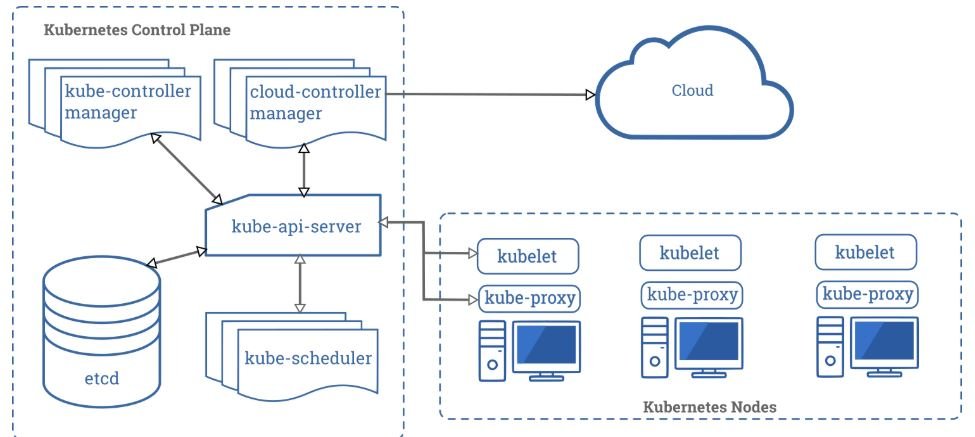
References / 参考
- Kubernetes: Securing a Cluster) (Kubernetes:保护集群安全)
- Kubernetes Security Checklist) (Kubernetes 安全清单)