C-Based Toolchain Hardening Cheat Sheet / 基于C的工具链加固技巧清单
Introduction / 介绍
C-Based Toolchain Hardening is a treatment of project settings that will help you deliver reliable and secure code when using C, C++ and Objective C languages in a number of development environments. This article will examine Microsoft and GCC toolchains for the C, C++ and Objective C languages. It will guide you through the steps you should take to create executables with firmer defensive postures and increased integration with the available platform security. Effectively configuring the toolchain also means your project will enjoy a number of benefits during development, including enhanced warnings and static analysis, and self-debugging code.
基于C的工具链加固是一种处理项目设置的方法,可以帮助您在使用C、C++和Objective C语言在多个开发环境中时,交付可靠和安全的代码。本文将探讨C、C++和Objective C语言的Microsoft和GCC工具链。它将指导您采取的步骤,以创建具有更坚固防御姿态和与平台安全增强集成的可执行文件。有效地配置工具链还意味着您的项目在开发期间将享受许多好处,包括增强的警告和静态分析,以及自调试代码。
There are four areas to be examined when hardening the toolchain: configuration, preprocessor, compiler, and linker. Nearly all areas are overlooked or neglected when setting up a project. The neglect appears to be pandemic, and it applies to nearly all projects including Auto-configured projects, makefile-based, Eclipse-based, Visual Studio-based, and Xcode-based. It's important to address the gaps at configuration and build time because it's difficult to impossible to add hardening on a distributed executable after the fact on some platforms.
在加固工具链时,有四个领域需要检查:配置、预处理器、编译器和链接器。几乎所有领域在设置项目时都被忽视或忽略。这种忽视似乎是一种流行病,它适用于几乎所有项目,包括自动配置的项目、基于makefile的项目、基于Eclipse的项目、基于Visual Studio的项目和基于Xcode的项目。在配置和构建时解决这些差距非常重要,因为在某些平台上,在事后[添加加固到分布式可执行文件](https://sourceware.org/ml/binutils/2012-03/msg00309.html)是困难甚至不可能的。
This is a prescriptive article, and it will not debate semantics or speculate on behavior. Some information, such as the C/C++ committee's motivation and pedigree for program diagnostics, NDEBUG, assert, and abort(), appears to be lost like a tale in the Lord of the Rings. As such, the article will specify semantics (for example, the philosophy of 'debug' and 'release' build configurations), assign behaviors (for example, what an assert should do in 'debug' and 'release' build configurations), and present a position. If you find the posture is too aggressive, then you should back off as required to suit your taste.
这是一篇规定性的文章,它不会辩论语义或推测行为。一些信息,如C/C++委员会对程序诊断、NDEBUG、assert和abort()的动机和血统(https://groups.google.com/a/isocpp.org/forum/?fromgroups=#!topic/std-discussion/ak8e1mzBhGs),似乎像《指环王》中的一个故事一样丢失了。因此,文章将指定语义(例如,'调试'和'发布'构建配置的哲学),分配行为(例如,在'调试'和'发布'构建配置中assert应该做什么),并提出立场。如果您觉得这种姿态过于激进,那么您应该根据您的口味适当退让。
A secure toolchain is not a silver bullet. It is one piece of an overall strategy in the engineering process to help ensure success. It will complement existing processes such as static analysis, dynamic analysis, secure coding, negative test suites, and the like. Tools such as Valgrind and Helgrind will still be needed, and a project will still require solid designs and architectures.
安全的工具链不是万能的。它是确保成功过程中整体策略的一部分。它将补充现有的过程,如静态分析、动态分析、安全编码、负测试套件等。仍然需要像Valgrind和Helgrind这样的工具,并且项目仍然需要坚实的设计和架构。
The OWASP ESAPI C++ project eats its own dog food. Many of the examples you will see in this article come directly from the ESAPI C++ project.
OWASP ESAPI C++ 项目是自食其果的。您将在本文中看到的许多示例直接来自ESAPI C++项目。
Wisdom / 智慧
Code must be correct. It should be secure. It can be efficient.
代码必须正确。它应该是安全的。它可以是高效的。
Dr. Jon Bentley) (乔恩·本特利博士): "If it doesn't have to be correct, I can make it as fast as you'd like it to be".
Dr. Gary McGraw) (加里·麦格劳博士): "Thou shalt not rely solely on security features and functions to build secure software as security is an emergent property of the entire system and thus relies on building and integrating all parts properly".
Configuration / 配置
Configuration is the first opportunity to configure your project for success. Not only do you have to configure your project to meet reliability and security goals, you must also configure integrated libraries properly. You typically have three choices. First, you can use auto-configuration utilities if on Linux or Unix. Second, you can write a makefile by hand. This is predominant on Linux, macOS, and Unix, but it applies to Windows, as well. Finally, you can use an integrated development environment or IDE.
配置是第一次为项目成功配置的机会。您不仅要配置项目以满足可靠性和安全目标,还必须正确配置集成库。通常您有三个选择。首先,如果您使用的是 Linux 或 Unix,可以使用自动配置工具。其次,您可以手动编写一个 makefile。这在 Linux、macOS 和 Unix 中很常见,但也适用于 Windows。最后,您可以使用集成开发环境或 IDE。
Build Configurations / 构建配置
At this stage in the process, you should concentrate on configuring for two builds: Debug and Release. Debug will be used for development and include full instrumentation. Release will be configured for production. The difference between the two settings is usually optimization level and debug level. A third build configuration is Test, and it's usually a special case of Release.
在处理过程的这个阶段,您应该专注于配置两个构建:调试和发布。调试将用于开发,并包含完整的功能测试。发布将配置为生产环境。这两个设置之间的区别通常是 优化级别 和 调试级别。第三个构建配置是测试,它通常是发布的一个特殊情况。
For debug and release builds, the settings are typically diametrically opposed. Debug configurations have no optimizations and full debug information, while Release builds have optimizations and minimal to moderate debug information. In addition, debug code has full assertions and additional library integration, such as mudflaps and malloc guards such as dmalloc.
对于调试和发布构建,设置通常是截然相反的。调试配置没有优化,包含完整的调试信息,而发布构建有优化,包含最小到中等的调试信息。此外,调试代码包含完整的断言和额外的库集成,例如 mudflaps 和 dmalloc 这样的 malloc 守护者。
The Test configuration is often a Release configuration that makes everything public for testing and builds a test harness. For example, all member functions that are public (C++ class) and all interfaces (library or shared object) should be made available for testing. Many Object Oriented purists oppose testing private interfaces, but this is not about object oriented-ness. This (q.v.) is about building reliable and secure software.
测试配置通常是一个发布配置,它将所有内容公开以供测试,并构建测试工具。例如,所有公共成员函数(C++ 类)和所有接口(库或共享对象)都应可供测试使用。许多面向对象的纯粹主义者反对测试私有接口,但这并不是关于面向对象的问题。这是关于构建可靠和安全的软件。
GCC 4.8 introduced an optimization of -Og. Note that it is only an optimization, and still requires a customary debug level via -g.
Debug Builds
Debug builds are where developers spend most of their time when vetting problems, so this build should concentrate forces and tools or be a 'force multiplier'. Though many do not realize, debug code is more highly valued than release code because it's adorned with additional instrumentation. The debug instrumentation will cause a program to become nearly "self-debugging", and help you catch mistakes such as bad parameters, failed API calls, and memory problems.
Self-debugging code reduces your time during troubleshooting and debugging. Reducing time under the debugger means you have more time for development and feature requests. If code is checked in without debug instrumentation, it should be fixed by adding instrumentation or rejected.
For GCC, optimizations and debug symbolication are controlled through two switches: -O and -g. You should use the following as part of your CFLAGS and CXXFLAGS for a minimal debug session:
-O0 -g3 -ggdb
-O0 turns off optimizations and -g3 ensures maximum debug information is available. You may need to use -O1 so some analysis is performed. Otherwise, your debug build will be missing a number of warnings not present in release builds. -g3 ensures maximum debugging information is available for the debug session, including symbolic constants and #defines. -ggdb includes extensions to help with a debug session under GDB. For completeness, Jan Krachtovil stated -ggdb currently has no effect in a private email.
For x86 builds, choose speculative-execution mitigations for the target CPU and operating system. GCC's -mindirect-branch=thunk replaces indirect calls and jumps with call-and-return thunks; -mfunction-return=thunk transforms function returns. Retpoline mitigates specific Spectre variant 2 attack paths, not speculative-execution vulnerabilities in general. Follow current platform guidance rather than assuming these flags protect against every Spectre variant or Meltdown.
Debug build should also define DEBUG, and ensure NDEBUG is not defined. NDEBUG removes "program diagnostics" and has undesirable behavior and side effects which are discussed below in more detail. The defines should be present for all code, and not just the program. You use it for all code (your program and included libraries) because you need to know how they fail, too (remember, you take the bug report - not the third party library).
In addition, you should use other relevant flags, such as -fno-omit-frame-pointer. Ensuring a frame pointer exists makes it easier to decode stack traces. Since debug builds are not shipped, it's OK to leave symbols in the executable. Programs with debug information do not suffer performance hits. See, for example, How does the gcc -g option affect performance?
Finally, you should ensure your project includes additional diagnostic libraries, such as dmalloc and Address Sanitizer. A comparison of some memory checking tools can be found at Comparison Of Memory Tools. If you don't include additional diagnostics in debug builds, then you should start using them since it's OK to find errors you are not looking for.
Release Builds
Release builds are what your customer receives. They are meant to be run on production hardware and servers, and they should be reliable, secure, and efficient. A stable release build is the product of the hard work and effort during development.
For release builds, you should use the following as part of CFLAGS and CXXFLAGS for release builds:
-On -g2
-On sets optimizations for speed or size (for example, -Os or -O2), and -g2 ensure debugging information is created.
Debugging information should be stripped and retained in case of symbolication for a crash report from the field. While not desired, debug information can be left in place without a performance penalty. See How does the gcc -g option affect performance? for details.
Release builds should also define NDEBUG, and ensure DEBUG is not defined. The time for debugging and diagnostics is over, so users get production code with full optimizations, no "programming diagnostics", and other efficiencies. If you can't optimize or you are performing excessive logging, it usually means the program is not ready for production.
If you have been relying on an assert and then a subsequent abort(), you have been abusing "program diagnostics" since it has no place in production code. If you want a memory dump, create one so users don't have to worry about secrets and other sensitive information being written to the filesystem and emailed in plain text.
如果你一直依赖 assert 和随后的 abort(),那么你已经在生产代码中滥用 "程序诊断" 了,因为它根本不适合生产环境。如果你想生成内存转储,请创建一个,这样用户就不必担心敏感信息(如机密信息)被写入文件系统并以明文形式发送电子邮件。
For Windows, you would use /Od for debug builds and /Ox, /O2 or /Os for release builds. See Microsoft's /O Options (Optimize Code) for details.
对于 Windows,你将使用 /Od 用于调试构建,以及 /Ox、/O2 或 /Os 用于发布构建。有关详细信息,请参阅 Microsoft 的 /O 选项(优化代码)。
Test Builds / 测试构建
Test builds are used to provide heuristic validation by way of positive and negative test suites. Under a test configuration, all interfaces are tested to ensure they perform to specification and satisfaction. "Satisfaction" is subjective, but it should include no crashing and no trashing of your memory arena, even when faced with negative tests.
测试构建用于通过正负测试套件提供启发式验证。在测试配置下,所有接口都将被测试,以确保它们符合规范并令人满意。"满意" 是主观的,但它应该包括没有崩溃,即使在面对负面测试时也不会破坏你的内存区域。
Because all interfaces are tested (and not just the public ones), your CFLAGS and CXXFLAGS should include:
因为所有接口都将被测试(而不仅仅是公共接口),你的 CFLAGS 和 CXXFLAGS 应该包括:
-Dprotected=public -Dprivate=public
You should also change __attribute__ ((visibility ("hidden"))) to __attribute__ ((visibility ("default"))).
你还应该将 __attribute__ ((visibility"hidden"))) 改为 __attribute__ ((visibility"default")))。
Nearly everyone gets a positive test right, so no more needs to be said. The negative self tests are much more interesting, and you should concentrate on trying to make your program fail so you can verify it fails gracefully. Remember, a bad actor is not going to be courteous when they attempt to cause your program to fail, and it's your project that takes egg on the face by way of a bug report or guest appearance on Full Disclosure or Bugtraq - not <some library> you included.
几乎每个人都做对了正测试,所以无需再说什么。负面的自我测试更有趣,你应该专注于尝试使你的程序失败,以便你可以验证它是否优雅地失败。记住,恶意行为者在尝试使你的程序失败时不会礼貌,而且如果出现错误报告或在 Full Disclosure 或 Bugtraq 上出现,那么丢脸的是你的项目,而不是你包含的 <some library>。
Sanitizers and Valgrind / Sanitizers 和 Valgrind
Run your tests with runtime checks enabled to catch bugs on paths the tests exercise. AddressSanitizer (ASan) can detect out-of-bounds accesses and use-after-free; UndefinedBehaviorSanitizer (UBSan) can detect undefined behavior such as signed integer overflow. With GCC or Clang, add these flags when compiling and linking a test build:
使用启用运行时检查的测试来捕获测试路径上的错误。地址空间检查器(ASan)可以检测越界访问和使用后释放;未定义行为检查器(UBSan)可以检测未定义行为,如有符号整数溢出。使用 GCC 或 Clang 编译和链接测试构建时,添加以下标志:
-O1 -g -fsanitize=address,undefined -fno-omit-frame-pointer -fno-sanitize-recover=all
-O1, -g, and -fno-omit-frame-pointer help produce useful error reports. Most UBSan checks report errors and continue by default, so a test can pass despite a reported bug; -fno-sanitize-recover=all makes detected errors terminate the program with a nonzero exit status. Use this combined ASan/UBSan build during development and continuous integration (CI), but do not ship it: ASan's runtime is intended for testing and typically doubles execution time.
-O1,-g 和 -fno-omit-frame-pointer有助于生成有用的错误报告。大多数 UBSan 检查默认情况下报告错误并继续,因此即使报告了错误,测试也可以通过;-fno-sanitize-recover=all使检测到的错误以非零退出状态终止程序。在开发和持续集成(CI)期间使用此 ASan/UBSan 构建版本,但不要将其发布:ASan 的运行时旨在用于测试并且通常加倍执行时间。
On a supported platform, run an executable built without ASan under Valgrind Memcheck when you cannot rebuild it or a library it uses. For example, valgrind --leak-check=full --error-exitcode=1 ./test_suite checks for memory errors and reports leaks in detail; --error-exitcode makes reported errors fail the test. Memcheck cannot detect overruns of static or stack arrays. For code you can rebuild, use ASan in a separate test run.
在支持的平台上,当您无法重新构建它或它使用的库时,在Valgrind Memcheck下运行未启用 ASan 的可执行文件。例如,valgrind --leak-check=full --error-exitcode=1 ./test_suite检查内存错误并详细报告泄漏;--error-exitcode使报告的错误导致测试失败。Memcheck无法检测静态或栈数组的越界。对于可以重新构建的代码,在单独的测试运行中使用 ASan。
Autotools
Auto configuration tools are popular on many Linux and Unix based systems, and the tools include Autoconf, Automake, config, and Configure. The tools work together to produce project files from scripts and template files. After the process completes, your project should be set up and ready to be made with make.
自动配置工具在许多基于 Linux 和 Unix 的系统上很受欢迎,这些工具包括 Autoconf、Automake、config 和 Configure。这些工具协同工作,从脚本和模板文件生成项目文件。在过程完成后,您的项目应该已经设置好,准备好使用 make 进行构建。
When using auto configuration tools, there are a few files of interest worth mentioning. The files are part of the Autotools chain and include m4 and the various *.in, *.ac (Autoconf), and *.am (Automake) files. At times, you will have to open them, or the resulting makefiles, to tune the "stock" configuration.
在使用自动配置工具时,有一些值得注意的文件。这些文件是 Autotools 链的一部分,包括 m4 和各种 *.in、*.ac(Autoconf)和 *.am(Automake)文件。有时,您需要打开它们,或者生成的 makefile,以调整“标准”配置。
There are three downsides to the command-line configuration tools in the toolchain: (1) they often ignore user requests, (2) switching build flags may reuse objects from an earlier configuration, and (3) security is often not a goal.
工具链中的命令行配置工具有三个缺点:(1)它们经常忽略用户请求,(2)切换构建标志可能会重用早期配置的对象,(3)安全性通常不是目标。
To demonstrate the first issue, configure your project with the following: configure CFLAGS="-Wall -fPIE" CXXFLAGS="-Wall -fPIE" LDFLAGS="-pie". You will probably find that Autotools ignored your request, which means the command below will not produce expected results. As a workaround, you will have to open an m4 script, makefile.in or makefile.am, and fix the configuration.
为了说明第一个问题,使用以下命令配置您的项目:configure CFLAGS="-Wall -fPIE" CXXFLAGS="-Wall -fPIE" LDFLAGS="-pie"。您可能会发现 Autotools 忽略了您的请求,这意味着下面的命令不会产生预期的结果。作为解决方案,您将不得不打开一个 m4 脚本、makefile.in 或 makefile.am,并修复配置。
$ configure CFLAGS="-Wall -Wextra -Wconversion -fPIE -Wno-unused-parameter
    -Wformat=2 -Wformat-security -fstack-protector-all -Wstrict-overflow"
    LDFLAGS="-pie -z,noexecstack -z,noexecheap -z,relro -z,now"
For the second point, use separate build directories for different configurations. Make checks modification times of prerequisites and targets, so changing CFLAGS or CXXFLAGS alone does not ensure that existing objects are rebuilt. Separate debug, test, and release build directories help prevent reuse of objects compiled with different hardening flags.
关于第二点,使用为不同配置创建独立的构建目录。进行检查依赖项和目标文件的修改时间,仅更改CFLAGS或CXXFLAGS并不能确保现有对象被重新构建。独立的调试、测试和发布构建目录有助于防止使用不同加固标志编译的对象被重复使用。
Finally, you will probably be disappointed to learn tools such as Autoconf and Automake miss many security related opportunities and ship insecure out of the box. There are a number of compiler switches and linker flags that improve the defensive posture of a program, but they are not 'on' by default. Tools like Autoconf - which are supposed to handle this situation - often provide settings to serve the lowest of all denominators.
最后,你可能会对了解到像Autoconf和Automake这样的工具缺少许多安全相关机会,并且默认情况下不安全感到失望。有许多编译器和链接器标志可以提高程序的安全防御态势,但它们默认是关闭的。像Autoconf这样的工具——本应处理这种情况——通常提供设置以服务于所有最低标准。
A recent discussion on the Automake mailing list illuminates the issue: Enabling compiler warning flags. Attempts to improve default configurations were met with resistance and no action was taken. The resistance is often of the form, "<some useful warning> also produces false positives" or "<some obscure platform> does not support <established security feature>". It's noteworthy that David Wheeler, the author of Secure Programming for Linux and Unix HOWTO, was one of the folks trying to improve the posture.
Automake邮件列表上最近的一次讨论阐明了这个问题:启用编译器警告标志.试图改进默认配置的努力遭到了抵制,并且没有采取任何行动。抵制通常表现为,"<某些有用的警告>也会产生误报"或"<某些不为人知的平台>不支持<已建立的安全功能>"。值得注意的是,David Wheeler,_Linux和Unix安全编程HOWTO_的作者,是试图改善态势的人之一。
Makefiles
Make is one of the earliest build tools dating back to the 1970s. It's available on Linux, macOS and Unix, so you will frequently encounter projects using it. Unfortunately, Make has a number of shortcomings (Recursive Make Considered Harmful and What's Wrong With GNU make?), and can cause some discomfort. Despite issues with Make, ESAPI C++ uses Make primarily for three reasons: first, it's omnipresent; second, it's easier to manage than the Autotools family; and third, libtool was out of the question.
Make是1970年代早期出现的构建工具之一。它在Linux、macOS和Unix上可用,因此你经常会遇到使用它的项目。不幸的是,Make有一些缺点(递归Make被认为是有害的_和GNU make的问题在哪里?_),可能会引起一些不适。尽管存在Make的问题,ESAPI C++主要使用Make的三个原因:首先,它无处不在;其次,它比Autotools家族更容易管理;第三,libtool是不可能的。
Consider what happens when you: (1) type make debug, and then type make release. Each build would require different CFLAGS due to optimizations and level of debug support. In your makefile, you would extract the relevant target and set CFLAGS and CXXFLAGS similar to below (taken from ESAPI C++ makefile):
考虑以下情况会发生什么:当你(1)输入make debug,然后输入make release。每个构建都需要不同的CFLAGS,因为优化和调试支持级别不同。在你的makefile中,你会提取相关的目标并设置CFLAGS和CXXFLAGS,如下所示(取自ESAPI C++ makefile):
## makefile
DEBUG_GOALS = $(filter $(MAKECMDGOALS), debug)
ifneq ($(DEBUG_GOALS),)
    WANT_DEBUG := 1
    WANT_TEST := 0
    WANT_RELEASE := 0
endif
…

ifeq ($(WANT_DEBUG),1)
    ESAPI_CFLAGS += -DDEBUG=1 -UNDEBUG -g3 -ggdb -O0
    ESAPI_CXXFLAGS += -DDEBUG=1 -UNDEBUG -g3 -ggdb -O0
endif

ifeq ($(WANT_RELEASE),1)
    ESAPI_CFLAGS += -DNDEBUG=1 -UDEBUG -g -O2
    ESAPI_CXXFLAGS += -DNDEBUG=1 -UDEBUG -g -O2
endif

ifeq ($(WANT_TEST),1)
    ESAPI_CFLAGS += -DESAPI_NO_ASSERT=1 -g2 -ggdb -O2 -Dprivate=public
                                                      -Dprotected=public
    ESAPI_CXXFLAGS += -DESAPI_NO_ASSERT=1 -g2 -ggdb -O2 -Dprivate=public
                                                        -Dprotected=public
endif
…

## Merge ESAPI flags with user supplied flags. We perform the extra step to ensure
## user options follow our options, which should give user option's a preference.
override CFLAGS := $(ESAPI_CFLAGS) $(CFLAGS)
override CXXFLAGS := $(ESAPI_CXXFLAGS) $(CXXFLAGS)
override LDFLAGS := $(ESAPI_LDFLAGS) $(LDFLAGS)
…
Make will first build the program in a debug configuration for a session under the debugger using a rule similar to:
Make将首先使用类似于以下规则的规则在调试配置下构建程序,以便在调试器会话中使用:
%.cpp:%.o:
        $(CXX) $(CPPFLAGS) $(CXXFLAGS) -c $< -o $@
When you want the release build, Make will do nothing because it considers everything up to date despite the fact CFLAGS and CXXFLAGS have changed. Hence, your program will actually be in a debug configuration and risk a SIGABRT at runtime because debug instrumentation is present (recall assert calls abort() when NDEBUG is not defined). In essence, you have DoS'd yourself due to make.
当你想要发布构建时,Make将不会做任何事情,因为它认为一切都已经是最新的,尽管CFLAGS和CXXFLAGS已经更改。因此,你的程序实际上将处于调试配置,并在运行时存在SIGABRT的风险,因为存在调试工具(回想一下,当NDEBUG未定义时,assert调用abort())。本质上,你因为make而自己进行了拒绝服务攻击。
In addition, many projects do not honor the user's command-line. ESAPI C++ does its best to ensure a user's flags are honored via override as shown above, but other projects do not. For example, consider a project that should be built with Position Independent Executable (PIE or ASLR) enabled and data execution prevention (DEP) enabled. Dismissing user settings combined with insecure out of the box settings (and not picking them up during auto-setup or auto-configure) means a program built with the following will likely have neither defense:
此外,许多项目不尊重用户的命令行。ESAPI C++ 尽力通过 override 如上所示尊重用户的标志,但其他项目则不然。例如,考虑一个应该启用位置无关可执行文件(PIE 或 ASLR)和数据执行预防(DEP)的项目。忽略用户设置,结合不安全的默认设置(以及不在自动设置或自动配置期间获取它们),意味着使用以下方式构建的程序可能没有以下防御措施:
make CFLAGS="-fPIE" CXXFLAGS="-fPIE" LDFLAGS="-pie -z,noexecstack, -z,noexecheap"
Defenses such as ASLR and DEP are especially important on Linux because Data Execution - not Prevention - is the norm.
ASLR 和 DEP 等防御措施在 Linux 上尤为重要,因为 数据执行 - 而不是预防 - 是常态。
Integration / 集成
Project level integration presents opportunities to harden your program or library with domain specific knowledge. For example, if the platform supports Position Independent Executables (PIE or ASLR) and data execution prevention (DEP), then you should integrate with it. The consequences of not doing so could result in exploitation. As a case in point, see KingCope's 0-days for MySQL in December, 2012 (CVE-2012-5579 and CVE-2012-5612, among others). Integration with platform security would have neutered a number of the 0-days.
项目级别的集成提供了利用领域特定知识加固你的程序或库的机会。例如,如果平台支持位置无关可执行文件(PIE 或 ASLR)和数据执行预防(DEP),那么你应该与之集成。不这样做可能导致被利用。以 2012 年 12 月 KingCope 对 MySQL 的 0 天漏洞(CVE-2012-5579 和 CVE-2012-5612 等)为例。与平台安全集成可以消除许多 0 天漏洞。
You also have the opportunity to include helpful libraries that are not needed for business logic support. For example, if you are working on a platform with DMalloc or Address Sanitizer, you should probably use it in your debug builds.
你还有机会包含一些不是业务逻辑支持所必需的有用库。例如,如果你在一个支持 DMalloc 或 Address Sanitizer 的平台上工作,你可能会在调试构建中使用它们。
For Ubuntu, DMalloc is available from the package manager and can be installed with sudo apt install libdmalloc5. For Apple platforms, it's available as a scheme option. Address Sanitizer is available in GCC 4.8 and above for many platforms.
对于 Ubuntu,DMalloc 可以通过包管理器获取,并可以使用 sudo apt install libdmalloc5 安装。对于 Apple 平台,它作为方案选项可用。Address Sanitizer 在 GCC 4.8 及以上版本的许多平台上可用。
In addition, project level integration is an opportunity to harden third party libraries you chose to include. Because you chose to include them, you and your users are responsible for them. If you or your users endure a SP800-53 audit, third party libraries will be in scope because the supply chain is included (specifically, item SA-12, Supply Chain Protection). The audits are not limited to those in the US Federal arena - financial institutions perform reviews, too. A perfect example of violating this guidance is CVE-2012-1525, which was due to Adobe's inclusion of a defective Sablotron library.
此外,项目级别的集成是加固你选择包含的第三方库的机会。因为你选择了它们,你和你的用户对它们负责。如果你或你的用户接受了 SP800-53 审计,第三方库将包含在内,因为供应链包含在内(特别是项目 SA-12,供应链保护)。这些审计不仅限于美国联邦领域,金融机构也会进行审查。违反此指南的一个完美例子是 CVE-2012-1525,这是由于 Adobe 包含了有缺陷的 Sablotron 库。
Another example is including OpenSSL. You know (1) SSLv2 is insecure, (2) SSLv3 is insecure, and (3) compression is insecure (among others). In addition, suppose you don't use hardware and engines, and only allow static linking. Given the knowledge and specifications, you would configure the OpenSSL library as follows:
另一个例子是包含 OpenSSL。你知道(1)SSLv2 不安全,(2)SSLv3 不安全,(3)压缩不安全(以及其他)。此外,假设你不使用硬件和引擎,并且只允许静态链接。根据知识和规范,你会按照以下方式配置 OpenSSL 库:
$ Configure darwin64-x86_64-cc -no-hw -no-engine -no-comp -no-shared
    -no-dso -no-ssl2 -no-ssl3 --openssldir=…
Note Well: you might want engines, especially on Ivy Bridge microarchitectures (3rd generation Intel Core i5 and i7 processors). To have OpenSSL use the processor's random number generator (via the rdrand instruction), you will need to call OpenSSL's ENGINE_load_rdrand() function and then ENGINE_set_default with ENGINE_METHOD_RAND. See OpenSSL's Random Numbers for details.
If you configure without the switches, then you will likely have vulnerable code/libraries and risk failing an audit. If the program is a remote server, then the following command will reveal if compression is active on the channel:
echo "GET / HTTP1.0" | openssl s_client -connect <nowiki>example.com:443</nowiki>
nm or openssl s_client will show that compression is enabled in the client. In fact, any symbol within the OPENSSL_NO_COMP preprocessor macro will bear witness since -no-comp is translated into a CFLAGS define.
$ nm /usr/local/ssl/iphoneos/lib/libcrypto.a 2>/dev/null | egrep -i "(COMP_CTX_new|COMP_CTX_free)"
0000000000000110 T COMP_CTX_free
0000000000000000 T COMP_CTX_new
Even more egregious is the answer given to auditors who specifically ask about configurations and protocols: "we don't use weak/wounded/broken ciphers" or "we follow best practices." The use of compression tells the auditor that you are using wounded protocols in an insecure configuration and you don't follow best practices. That will likely set off alarm bells, and ensure the auditor dives deeper on more items.
Preprocessor
The preprocessor is crucial to setting up a project for success. The C committee provided one macro - NDEBUG - and the macro can be used to derive a number of configurations and drive engineering processes. Unfortunately, the committee also left many related items to chance, which has resulted in programmers abusing built-in facilities. This section will help you set up your projects to integrate well with other projects and ensure reliability and security.
There are three topics to discuss when hardening the preprocessor. The first is well defined configurations which produce well-defined behaviors, the second is useful behavior from assert, and the third is proper use of macros when integrating vendor code and third party libraries.
Configurations
To remove ambiguity, you should recognize two configurations: Release and Debug. Release is for production code on live servers, and its behavior is requested via the C/C++ NDEBUG macro. It's also the only macro observed by the C and C++ Committees and Posix. Diametrically opposed to release is Debug. While there is a compelling argument for !defined(NDEBUG), you should have an explicit macro for the configuration and that macro should be DEBUG. This is because vendors and outside libraries use the DEBUG (or similar) macro for their configuration. For example, Carnegie Mellon's Mach kernel uses DEBUG, Microsoft's CRT uses _DEBUG, and Wind River Workbench uses DEBUG_MODE.
为了消除歧义,您应该识别两种配置:发布和调试。发布用于生产环境中的服务器代码,其行为通过C/C++的NDEBUG宏请求。它也是C和C++委员会以及Posix观察到的唯一宏。与发布相反的是调试。虽然对于!defined(NDEBUG)有令人信服的论点,但您应该有一个显式的宏来表示配置,并且该宏应该是DEBUG。这是因为供应商和外部库使用DEBUG(或类似)宏来配置它们。例如,卡内基梅隆大学的Mach内核使用DEBUG,微软的CRT使用_DEBUG(https://www.microsoft.com/en-us/download/details.aspx?id=55979),而Wind River Workbench使用DEBUG_MODE。
In addition to NDEBUG (Release) and DEBUG (Debug), you have two additional cross products: both are defined or neither are defined. Defining both should be an error, and defining neither should default to a release configuration. Below is from ESAPI C++ EsapiCommon.h, which is the configuration file used by all source files:
除了NDEBUG(发布)和DEBUG(调试)之外,您还有两个额外的交叉产品:两者都定义或两者都没有定义。定义两者应该是一个错误,而两者都没有定义应该默认为发布配置。以下来自ESAPI C++ EsapiCommon.h,这是所有源文件使用的配置文件:
// Only one or the other, but not both
##if (defined(DEBUG) || defined(_DEBUG)) && (defined(NDEBUG)
                                           || defined(_NDEBUG))
## error Both DEBUG and NDEBUG are defined.
##endif

// The only time we switch to debug is when asked.
// NDEBUG or {nothing} results
// in release build (fewer surprises at runtime).
##if defined(DEBUG) || defined(_DEBUG)
## define ESAPI_BUILD_DEBUG 1
##else
## define ESAPI_BUILD_RELEASE 1
##endif
When DEBUG is in effect, your code should receive full debug instrumentation, including the full force of assertions.
当DEBUG生效时,您的代码应该接收完整的调试工具,包括断言的全部力量。
ASSERT / 断言
Asserts will help you create self-debugging code by helping you find the point of first failure quickly and easily. Asserts should be used throughout your program, including parameter validation, return value checking and program state. The assert will silently guard your code through its lifetime. It will always be there, even when not debugging a specific component of a module. If you have thorough code coverage, you will spend less time debugging and more time developing because programs will debug themselves.
断言可以帮助您通过快速轻松地找到首次失败点来创建自调试代码。断言应该贯穿整个程序,包括参数验证、返回值检查和程序状态。assert将默默地保护您的代码在其生命周期内。它始终存在,即使在没有调试模块的特定组件时也是如此。如果您有全面的代码覆盖率,您将花费更少的时间进行调试,更多的时间进行开发,因为程序将自行调试。
To use asserts effectively, you should assert everything. That includes parameters upon entering a function, return values from function calls, and any program state. Everywhere you place an if statement for validation or checking, you should have an assert. Everywhere you have an assert for validation or checking, you should have an if statement. They go hand-in-hand.
为了有效地使用断言,您应该断言一切。这包括函数进入时的参数、函数调用的返回值以及任何程序状态。在您放置if语句进行验证或检查的任何地方,都应该有一个断言。在您有断言进行验证或检查的任何地方,都应该有一个if语句。它们是相辅相成的。
If you are still using printf's, then you have an opportunity for improvement. In the time it takes for you to write a printf or NSLog statement, you could have written an assert. Unlike the printf or NSLog which are often removed when no longer needed, the assert stays active forever. Remember, this is all about finding the point of first failure quickly so you can spend your time doing other things.
如果您仍然在使用printf,那么您有机会进行改进。在您编写printf或NSLog语句所需的时间内,您本可以写一个assert。与通常在不再需要时被删除的printf或NSLog不同,assert将永远保持活跃。记住,这一切都是为了快速找到首次失败点,这样您就可以花时间做其他事情。
There is one problem with using asserts - Posix states assert should call abort() if NDEBUG is not defined. When debugging, NDEBUG will never be defined since you want the "program diagnostics" (quote from the Posix description). The behavior makes assert and its accompanying abort() completely useless for development. The result of "program diagnostics" calling abort() due to standard C/C++ behavior is disuse - developers simply don't use them. It's incredibly bad for the development community because self-debugging programs can help eradicate so many stability problems.
使用断言有一个问题 - Posix指出,如果NDEBUG未定义,assert应该调用abort()。当调试时,NDEBUG永远不会定义,因为您想要“程序诊断”(引用自Posix描述)。这种行为使得assert及其伴随的abort()对于开发来说完全无用。由于标准C/C++行为导致的“程序诊断”调用abort()的结果是弃用 - 开发者根本不使用它们。这对开发社区来说非常糟糕,因为自调试程序可以帮助消除许多稳定性问题。
Since self-debugging programs are so powerful, you will have to supply your own assert and signal handler with improved behavior. Your assert will exchange auto-aborting behavior for auto-debugging behavior. The auto-debugging facility will ensure the debugger snaps when a problem is detected, and you will find the point of first failure quickly and easily.
由于自调试程序非常强大,您必须提供自己的断言和信号处理程序以改进行为。您的断言将自动终止行为替换为自动调试行为。自动调试功能将确保在检测到问题时调试器会立即捕获,您将能够快速轻松地找到首次失败点。
ESAPI C++ supplies its own assert with the behavior described above. In the code below, ASSERT raises SIGTRAP when in effect or it evaluates to void in other cases.
ESAPI C++ 提供了上述行为的断言。在下面的代码中,ASSERT 在有效时引发 SIGTRAP,在其他情况下评估为 void。
// A debug assert which should be sprinkled liberally.
// This assert fires and then continues rather
// than calling abort(). Useful when examining negative
// test cases from the command-line.
##if (defined(ESAPI_BUILD_DEBUG) && defined(ESAPI_OS_STARNIX))
##  define ESAPI_ASSERT1(exp) {                                    \
    if(!(exp)) {                                                  \
        std::ostringstream oss;                                     \
        oss << "Assertion failed: " << (char*)(__FILE__) << "("     \
            << (int)__LINE__ << "): " << (char*)(__func__)          \
            << std::endl;                                           \
        std::cerr << oss.str();                                     \
        raise(SIGTRAP);                                             \
    }                                                             \
    }
##  define ESAPI_ASSERT2(exp, msg) {                               \
    if(!(exp)) {                                                  \
        std::ostringstream oss;                                     \
        oss << "Assertion failed: " << (char*)(__FILE__) << "("     \
            << (int)__LINE__ << "): " << (char*)(__func__)          \
            << ": \"" << (msg) << "\"" << std::endl;                \
        std::cerr << oss.str();                                     \
        raise(SIGTRAP);                                             \
    }                                                             \
    }
##elif (defined(ESAPI_BUILD_DEBUG) && defined(ESAPI_OS_WINDOWS))
##  define ESAPI_ASSERT1(exp)      assert(exp)
##  define ESAPI_ASSERT2(exp, msg) assert(exp)
##else
##  define ESAPI_ASSERT1(exp)      ((void)(exp))
##  define ESAPI_ASSERT2(exp, msg) ((void)(exp))
##endif

##if !defined(ASSERT)
##  define ASSERT(exp)     ESAPI_ASSERT1(exp)
##endif
At program startup, a SIGTRAP handler will be installed if one is not provided by another component:
在程序启动时,如果没有其他组件提供,将安装 SIGTRAP 处理程序:
    struct DebugTrapHandler
    {
      DebugTrapHandler()
      {
        struct sigaction new_handler, old_handler;

        do
          {
            int ret = 0;

            ret = sigaction (SIGTRAP, NULL, &old_handler);
            if (ret != 0) break; // Failed

            // Don't step on another's handler
            if (old_handler.sa_handler != NULL) break;

            new_handler.sa_handler = &DebugTrapHandler::NullHandler;
            new_handler.sa_flags = 0;

            ret = sigemptyset (&new_handler.sa_mask);
            if (ret != 0) break; // Failed

            ret = sigaction (SIGTRAP, &new_handler, NULL);
            if (ret != 0) break; // Failed

          } while(0);
      }

      static void NullHandler(int /*unused*/) { }

    };

    // We specify a relatively low priority, to make sure we run before other CTORs
    // http://gcc.gnu.org/onlinedocs/gcc/C_002b_002b-Attributes.html#C_002b_002b-Attributes
    static const DebugTrapHandler g_dummyHandler __attribute__ ((init_priority (110)));
On a Windows platform, you would call _set_invalid_parameter_handler (and possibly set_unexpected or set_terminate) to install a new handler.
在 Windows 平台上,您将调用 _set_invalid_parameter_handler(可能还需要 set_unexpected 或 set_terminate)来安装新的处理程序。
Live hosts running production code should always define NDEBUG (i.e., release configuration), which means they do not assert or auto-abort. Auto-abortion is not acceptable behavior, and anyone who asks for the behavior is completely abusing the functionality of "program diagnostics". If a program wants a core dump, then it should create the dump rather than crashing.
运行生产代码的实时主机应始终定义 NDEBUG(即发布配置),这意味着它们不会断言或自动终止。自动终止不是可接受的行为,任何要求此行为的人都在完全滥用“程序诊断”功能。如果程序想要生成核心转储,那么它应该创建转储而不是崩溃。
For more reading on asserting effectively, please see one of John Robbin's books, such as Debugging Applications. John is a legendary bug slayer in Windows circles, and he will show you how to do nearly everything, from debugging a simple program to bug slaying in multithreaded programs.
有关有效断言的更多信息,请参阅 John Robbin 的书籍之一,例如 调试应用程序。John 是 Windows 圈内的传奇虫子杀手,他将向您展示如何几乎做任何事情,从调试简单程序到多线程程序中的虫子杀手技术。
Additional Macros / 附加宏
Additional macros include any macros needed to integrate properly and securely. It includes integrating the program with the platform (for example MFC or Cocoa/CocoaTouch) and libraries (for example, Crypto++ or OpenSSL). It can be a challenge because you have to have proficiency with your platform and all included libraries and frameworks. The list below illustrates the level of detail you will need when integrating.
附加宏包括任何需要正确和安全集成的宏。它包括将程序与平台(例如 MFC 或 Cocoa/CocoaTouch)和库(例如 Crypto++ 或 OpenSSL)集成。这可能是一个挑战,因为您必须熟悉您的平台以及所有包含的库和框架。下面的列表说明了集成时所需的详细程度。
Though Boost is missing from the list, it appears to lack recommendations, additional debug diagnostics, and a hardening guide. See BOOST Hardening Guide (Preprocessor Macros) for details. In addition, Tim Day points to [boost.build] should we not define _SECURE_SCL=0 by default for all msvc toolsets for a recent discussion related to hardening (or lack thereof).
尽管 Boost 未出现在列表中,但它似乎缺少推荐、额外的调试诊断和加固指南。有关详情,请参阅 BOOST 加固指南(预处理器宏)。此外,Tim Day 指出了 [boost.build] 我们是否应该为所有 msvc 工具集默认定义 _SECURE_SCL=0,这是关于加固(或缺乏加固)的最近讨论。
In addition to what you should define, defining some macros and undefining others should trigger a security related defect. For example, -U_FORTIFY_SOURCES on Linux and _CRT_SECURE_NO_WARNINGS=1, _SCL_SECURE_NO_WARNINGS, _ATL_SECURE_NO_WARNINGS or STRSAFE_NO_DEPRECATE on Windows.
除了你应该定义的内容之外,定义一些宏并取消定义其他宏可能会触发与安全相关的缺陷。例如,在 Linux 上使用 -U_FORTIFY_SOURCES,在 Windows 上使用 _CRT_SECURE_NO_WARNINGS=1、_SCL_SECURE_NO_WARNINGS、_ATL_SECURE_NO_WARNINGS 或 STRSAFE_NO_DEPRECATE。
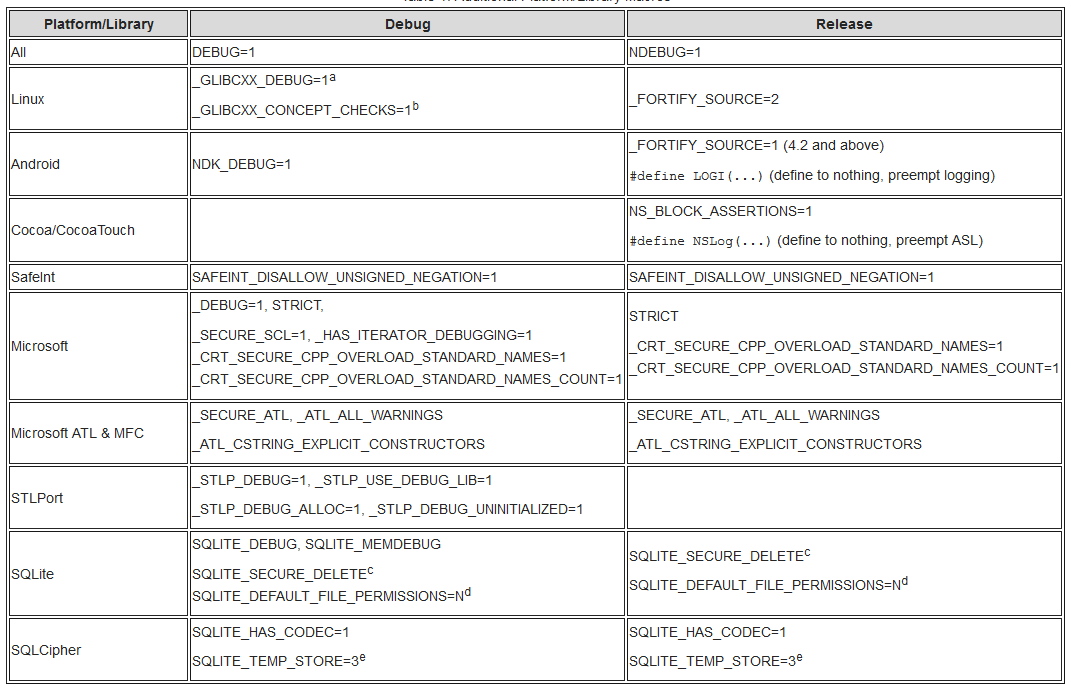
a) Be careful with _GLIBCXX_DEBUG when using pre-compiled libraries such as Boost from a distribution. There are ABI incompatibilities, and the result will likely be a crash. You will have to compile Boost with _GLIBCXX_DEBUG or omit _GLIBCXX_DEBUG.
a) 使用来自发行版的预编译库(如 Boost)时,请注意 _GLIBCXX_DEBUG。存在 ABI 不兼容性,结果可能会崩溃。您必须使用 _GLIBCXX_DEBUG 编译 Boost 或省略 _GLIBCXX_DEBUG。
b) See Chapter 5, Diagnostics of the libstdc++ manual for details.
b) 有关详情,请参阅 libstdc++ 手册的 第 5 章,诊断。
c) SQLite secure deletion zeroizes memory on destruction. Define as required, and always define in US Federal since zeroization is required for FIPS 140-2, Level 1.
c) SQLite 在销毁时将内存清零。根据需要定义,并始终在 US Federal 中定义,因为 FIPS 140-2,Level 1 要求清零。
d) N is 0644 by default, which means everyone has some access.
d) _N_ 默认为 0644,这意味着每个人都有一些访问权限。
e) Force temporary tables into memory (no unencrypted data to disk).
e) 强制临时表进入内存(不将未加密数据写入磁盘)。
Compiler and Linker / 编译器和链接器
Compiler warnings catch some common flaws, such as format string bugs and sign conversion mistakes, before code ships. Binary mitigation flags make memory safety bugs harder to exploit. They can be bypassed and do not replace fixing the bug.
编译器警告可以在代码发布前捕获一些常见错误,例如格式字符串错误和符号转换错误。二进制缓解标志使内存安全漏洞更难利用。它们可以被绕过,并不能替代修复漏洞。
The flags below are a subset of the OpenSSF Compiler Options Hardening Guide for C and C++ baseline. Start there for the full list, the rationale, and compiler and operating system version requirements.
以下标志是OpenSSF C和C++编译器选项强化指南基线的一个子集。从这里开始,您可以找到完整的列表、理由以及编译器和操作系统版本要求。
GCC and Clang / GCC和Clang
GCC and Clang use mostly the same hardening flags. The -Wl,-z,... linker options below apply to ELF targets such as Linux and BSD, not macOS. See GCC Instrumentation Options, GCC Warning Options, and the Clang Command Line Reference.
GCC和Clang主要使用相同的强化标志。以下 -Wl,-z,... 链接器选项适用于ELF目标,如Linux和BSD,不适用于macOS。请参阅GCC仪器选项、GCC警告选项和Clang命令行参考。
Compile-Time Diagnostics and Warnings / 编译时诊断和警告
-Wall -Wextra: Enables baseline diagnostic warnings covering some undefined behavior, uninitialized variables, and common implementation flaws; does not catch deeper logic defects or architectural vulnerabilities.
中文:-Wall -Wextra:启用基线诊断警告,涵盖一些未定义的行为、未初始化的变量和常见的实现缺陷;不能捕获更深的逻辑缺陷或架构漏洞。-Wformat=2 -Wformat-security -Werror=format-security: Warns about non-literal format strings and makes it an error when one is passed with no arguments, such asprintf(s); reduces but does not remove format string bugs, so always use a literal format string.
中文:-Wformat=2 -Wformat-security -Werror=format-security:警告关于非字面量格式字符串,并在没有参数传递时将其视为错误,例如printf(s);可以减少但不消除格式字符串错误,因此始终使用字面量格式字符串。-Wconversion: Warns on implicit type conversions that may alter values or signs; can produce noisy diagnostics on benign conversions that require explicit casting.
中文:-Wconversion:警告关于可能改变值或符号的隐式类型转换;在需要显式转换的良性转换上可能会产生嘈杂的诊断。-Wimplicit-fallthrough: Warns when a switch case falls through without a break, return, or fallthrough annotation; requires explicitly annotating intentional fallthrough cases.
中文:-Wimplicit-fallthrough:当 switch case 语句在没有 break、return 或 fallthrough 注解的情况下直接执行时发出警告;需要显式注释有意跳过的情况。-Werror(or selective-Werror=<warning>): Treats compiler warnings as fatal errors to prevent ignoring compiler-diagnosed flaws; can break builds when updating toolchains that introduce new diagnostics.
中文:-Werror(或选择性的-Werror=<warning>):将编译器警告视为致命错误,以防止忽略编译器诊断的错误;在更新引入新诊断的工具链时可能会中断构建。
Stack and Memory Protections / 堆栈和内存保护
-fstack-protector-strong: Inserts stack canaries into functions with vulnerable buffers and checks them when the function returns; detects linear overflows that reach the return address, but not heap overflows, overwrites of other local variables, or arbitrary writes.
中文:-fstack-protector-strong:在具有易受攻击缓冲区的函数中插入堆栈海星,并在函数返回时检查它们;检测到达返回地址的线性溢出,但不能检测堆溢出、其他局部变量的覆盖或任意写入。-fstack-clash-protection: Protects against stack-clash attacks by probing the stack page-by-page so dynamic stack allocations cannot bypass the guard page; does not prevent stack exhaustion or buffer overflows within an allocated frame.
中文:-fstack-clash-protection:通过逐页探测堆栈来防止堆栈冲突攻击,这样动态堆栈分配就不能绕过保护页;不能防止分配帧内的堆栈耗尽或缓冲区溢出。-D_FORTIFY_SOURCE=3(or-D_FORTIFY_SOURCE=2): Hardens standard C library memory and string functions by validating buffer bounds at compile time and runtime; requires optimization (-O1or higher) and cannot check buffers whose size the compiler cannot determine.
中文:-D_FORTIFY_SOURCE=3(或-D_FORTIFY_SOURCE=2):通过在编译时和运行时验证缓冲区边界来强化标准 C 库的内存和字符串函数;需要优化(-O1或更高)且不能检查编译器无法确定大小的缓冲区。-D_GLIBCXX_ASSERTIONS(libstdc++) or-D_LIBCPP_HARDENING_MODE=_LIBCPP_HARDENING_MODE_FAST(libc++): Enables runtime bounds checks for C++ standard library containers; adds runtime overhead.
中文:-D_GLIBCXX_ASSERTIONS(libstdc++)或-D_LIBCPP_HARDENING_MODE=_LIBCPP_HARDENING_MODE_FAST(libc++):启用 C++ 标准库容器的运行时边界检查;增加运行时开销。
Binary Layout and Control-Flow Mitigations / 二进制布局和控制流缓解
-fPIE(compiler) and-pie(linker): Produces Position Independent Executables to enable full Address Space Layout Randomization (ASLR); applies only to executable binaries and does not prevent address leaks (information disclosure).
中文:-fPIE(编译器)和-pie(链接器):生成位置无关的可执行文件以启用完整的地址空间布局随机化(ASLR);仅适用于可执行二进制文件,并不能防止地址泄露(信息泄露)-Wl,-z,relro -Wl,-z,now: Enables full Relocation Read-Only (RELRO) by resolving symbols at load time and marking relocation tables and the Global Offset Table read-only; increases program startup time for binaries with many dynamic symbols.
中文:-Wl,-z,relro -Wl,-z,now:通过在加载时解析符号并标记重定位表和全局偏移表为只读,启用完整的重定位只读(RELRO);对于具有许多动态符号的二进制文件,会增加程序启动时间-Wl,-z,noexecstack: Marks the stack as non-executable (NX), so code injected on the stack cannot run; does not prevent code-reuse attacks that repurpose existing executable memory.
中文:-Wl,-z,noexecstack:将堆栈标记为不可执行(NX),因此注入堆栈上的代码无法运行;并不能防止重用现有可执行内存的代码重用攻击-fcf-protection=full(x86 only): Emits markers for Intel Control-flow Enforcement Technology (CET) shadow stacks and indirect branch tracking (IBT). In Linux user space only the shadow stack is enforced, which protects return addresses against return-oriented programming (ROP); IBT, which targets jump-oriented programming (JOP), is not. Requires CPU, kernel, and C library support.
中文:-fcf-protection=full(仅限 x86): 发出 Intel 控制流强制执行技术 (CET) 阴影堆栈和间接分支跟踪 (IBT) 标记。在 Linux 用户空间中 仅强制执行阴影堆栈,以保护返回地址免受返回导向编程 (ROP) 的攻击;IBT,针对跳转导向编程 (JOP),则不强制执行。需要 CPU、内核和 C 库支持。
Verification / 验证
Use a tool such as checksec to confirm which mitigations a Linux binary has (RELRO, stack canaries, NX, PIE, _FORTIFY_SOURCE).
使用诸如checksec之类的工具来确认Linux二进制文件具有哪些缓解措施(RELRO、堆栈保护、NX、PIE、_FORTIFY_SOURCE)
Microsoft Visual C++ (MSVC) / Microsoft Visual C++(MSVC)
Microsoft Visual C++ provides compiler and linker switches for security hardening on Windows platforms. Official reference documentation includes MSVC Compiler Options Listed by Category, MSVC Linker Options, and Microsoft Security Best Practices for C++.
Microsoft Visual C++为Windows平台上的安全强化提供了编译器和链接器开关。官方参考文档包括按类别列出的MSVC编译器选项、MSVC链接器选项和Microsoft C++安全最佳实践
Compiler Warnings and Static Analysis / 编译器警告和静态分析
/W4: Enables a strict, practical warning level covering uninitialized variables, data truncation, and sign mismatches; does not enable all possible informational warnings provided by/Wall./WX: Treats all compiler warnings as fatal errors to ensure diagnostics are resolved before deployment; can break builds when updating toolchains that introduce new warnings./sdl: Enables additional Security Development Lifecycle checks by treating security-relevant warnings as errors and enforcing strict runtime buffer checks; limited to the specific set of warnings and checks defined by the compiler./analyze: Runs compile-time static code analysis to detect memory safety issues, null pointer dereferences, and API misuse; increases build times.
Stack and Memory Protections / 堆栈和内存保护
/GS(Buffer Security Check): On by default; do not disable it. Places a security cookie before the return address (and, on x86, the exception handler address) of functions with vulnerable buffers; does not protect heap buffers or locals that the compiler does not treat as vulnerable.
Control-Flow Integrity and Binary Layout / 控制流完整性与二进制布局
/guard:cf(Control Flow Guard): Mitigates control-flow hijacking by verifying that indirect call targets point to compiler-approved functions; must be enabled in both compiler and linker and does not protect return addresses on the stack./guard:ehcont(Exception Handling (EH) Continuation Guard): Generates metadata listing valid exception handling continuation targets to prevent control-flow hijacking during exception unwinding. Pass it to both the compiler and the linker. Supported only for 64-bit processes and meant to work with CET shadow stacks; modules built without it are not protected./DYNAMICBASE(Linker, on by default): Enables ASLR by instructing the operating system loader to randomize the binary load address; does not prevent memory disclosure attacks that reveal relocated base addresses./HIGHENTROPYVA(Linker): Enables 64-bit high-entropy ASLR to increase address randomization space; applies only to 64-bit targets and requires/DYNAMICBASE./NXCOMPAT(Linker, on by default): Marks the executable as compatible with Data Execution Prevention (DEP), preventing code execution from data pages; does not prevent code-reuse attacks executing from existing executable memory./CETCOMPAT(Linker): Marks the executable image as compatible with CET shadow stack; x64 only, and requires a CET-capable processor and operating system.
Warning Suppression / 警告抑制
Strict warning levels produce some false positives because the compiler cannot know every runtime invariant. Suppress individual false positives in the code. Do not turn warnings off globally.
严格的警告级别会产生一些误报,因为编译器无法知道每个运行时不变量。在代码中抑制个别误报。不要全局关闭警告。
Silencing spurious warnings lets you focus on the ones that matter. First is an unused parameter (for example, argc or argv). In modern C++ (C++17 and later), prefer the standard [[maybe_unused]] attribute; in C or earlier standards, define an unused parameter macro or cast the parameter to void:
抑制虚假警告让您能够专注于重要的警告。首先是未使用的参数(例如,argc 或 argv)。在现代 C++(C++17 及以后),建议使用标准的 [[maybe_unused]] 属性;在 C 或更早的标准中,定义一个未使用参数宏或将参数转换为 void:
#define UNUSED_PARAMETER(x) ((void)(x))
…

int main(int argc, char* argv[])
{
    UNUSED_PARAMETER(argc);
    UNUSED_PARAMETER(argv);
    …
}
A potential minefield lies near "comparing unsigned and signed" values, and -Wconversion will catch it for you. This is because C/C++ promotion rules state the signed value will be promoted to an unsigned value and then compared. That means -1 > 1 after promotion! To fix this, you cannot blindly cast - you must first range test the value:
在比较无符号数和有符号数附近存在一个潜在的雷区,-Wconversion 会为您捕捉到它。这是因为 C/C++ 提升规则指出,有符号值将被提升为无符号值,然后进行比较。这意味着提升后 -1 > 1!要修复这个问题,您不能盲目转换 - 您必须首先测试值的范围:
int x = GetX();
unsigned int y = GetY();

ASSERT(x >= 0);
if(!(x >= 0))
    throw runtime_error("WTF??? X is negative.");

if(static_cast<unsigned int>(x) > y)
    cout << "x is greater than y" << endl;
else
    cout << "x is not greater than y" << endl;
Notice the code above will debug itself - you don't need to set a breakpoint to see if there is a problem with x. Just run the program and wait for it to tell you there is a problem. If there is a problem, the program will snap the debugger (and more importantly, not call a useless abort() as specified by POSIX). It beats the snot out of printfs that are removed when no longer needed or that pollute outputs.
注意上面的代码会自行调试 - 您不需要设置断点来查看 x 是否存在问题。只需运行程序,等待它告诉您存在问题。如果存在问题,程序将触发调试器(更重要的是,不会调用 POSIX 指定的无用的 abort())。这比在不再需要时删除或污染输出的 printf 强得多。
Another conversion problem you will encounter is conversion between types, and -Wconversion will also catch it for you. The following will always have an opportunity to fail, and should light up like a Christmas tree:
您还会遇到另一个转换问题,即类型之间的转换,-Wconversion 也会为您捕捉到它。以下代码总是有可能失败,并且应该像圣诞树一样亮起:
struct sockaddr_in addr;
…

addr.sin_port = htons(atoi(argv[2]));
The following would probably serve you much better. Notice atoi and friends are not used because they can silently fail. In addition, the code is instrumented so you don't need to waste a lot of time debugging potential problems: Check the 16-bit transport port range before narrowing the value; the maximum value of unsigned int may be larger than a port can represent.
以下代码可能更适合您。注意 atoi 和其他函数没有被使用,因为它们可能会静默失败。此外,代码已经过检测,您不需要浪费大量时间调试潜在的问题:在缩小值之前检查 16 位传输端口范围;unsigned int 的最大值可能大于端口号可以表示的值。
const char* cstr = GetPortString();

ASSERT(cstr != NULL);
if(!(cstr != NULL))
    throw runtime_error("WTF??? Port string is not valid.");

istringstream iss(cstr);
long long t = 0;
iss >> t;

ASSERT(!(iss.fail()));
if(iss.fail())
    throw runtime_error("WTF??? Failed to read port.");

// Should this be a port above the reserved range ([0-1024] on Unix)?
ASSERT(t > 0);
if(!(t > 0))
    throw runtime_error("WTF??? Port is too small");

ASSERT(t <= 65535);
if(!(t <= 65535))
    throw runtime_error("WTF??? Port is too large");

// OK to use port
unsigned short port = static_cast<unsigned short>(t);
…
Again, notice the code above will debug itself - you don't need to set a breakpoint to see if there is a problem with port. This code will continue checking conditions, years after being instrumented (assuming to write code to read a config file early in the project). There's no need to remove the ASSERTs as with printf since they are silent guardians.
再次注意,上面的代码会自行调试 - 你不需要设置断点来查看port是否存在问题。此代码将在被注入(假设在项目早期写入读取配置文件的代码)多年后继续检查条件。无需像printf那样移除ASSERT,因为它们是沉默的守护者。
Another useful suppression trick is to avoid ignoring return values. Not only is it useful to suppress the warning, it's required for correct code. For example, snprintf will alert you to truncations through its return value. You should not make them silent truncations by ignoring the warning or casting to void:
另一个有用的抑制技巧是避免忽略返回值。抑制警告不仅有用,而且是编写正确代码的必要条件。例如,snprintf会通过其返回值提醒你截断。你不应该通过忽略警告或将其转换为void来使它们成为无声的截断:
char path[PATH_MAX];
…

int ret = snprintf(path, sizeof(path), "%s/%s", GetDirectory(), GetObjectName());
ASSERT(ret != -1);
ASSERT(!(ret >= sizeof(path)));

if(ret == -1 || ret >= sizeof(path))
    throw runtime_error("WTF??? Unable to build full object name");

// OK to use path
…
The problem is pandemic, and not just boring user-land programs. Projects which offer high integrity code, such as SELinux, suffer silent truncations. The following is from an approved SELinux patch even though a comment was made that it suffered silent truncations in its security_compute_create_name function from compute_create.c.
问题是普遍存在的,而不仅仅是无聊的用户空间程序。提供高完整性代码的项目,如SELinux,也会遭受无声的截断。以下是从一个经过批准的SELinux补丁中摘录的内容,尽管有一个注释指出,它在compute_create.c中的security_compute_create_name函数中遭受了无声的截断。
12  int security_compute_create_raw(security_context_t scon,
13                                  security_context_t tcon,
14                                  security_class_t   tclass,
15                                  security_context_t * newcon)
16  {
17    char path[PATH_MAX];
18    char *buf;
19    size_t size;
20    int fd, ret;
21
22    if (!selinux_mnt) {
23      errno = ENOENT;
24      return -1;
25    }
26
27    snprintf(path, sizeof path, "%s/create", selinux_mnt);
28    fd = open(path, O_RDWR);
Unlike other examples, the above code will not debug itself, and you will have to set breakpoints and trace calls to determine the point of first failure. (And the code above gambles that the truncated file does not exist or is not under an adversary's control by blindly performing the open).
与其它示例不同,上面的代码不会自行调试,你必须设置断点并跟踪调用以确定首次失败点。(上面的代码通过盲目执行open来赌注截断的文件不存在或不在对手的控制之下。)
Runtime / 运行时
The previous sections concentrated on setting up your project for success. This section will examine additional hints for running with increased diagnostics and defenses. Not all platforms are created equal - GNU Linux is difficult to impossible to add hardening to a program after compiling and static linking, while Windows allows post-build hardening through a download. Remember, the goal is to find the point of first failure quickly so you can improve the reliability and security of the code.
前几节集中在为你的项目成功设置。本节将探讨运行时增加诊断和防御的额外提示。并非所有平台都是平等的 - GNU Linux在编译和静态链接后难以(甚至不可能)增强程序的安全性,而Windows允许通过下载进行构建后的加固。记住,目标是快速找到首次失败点,以便你可以提高代码的可靠性和安全性。
Xcode
Xcode offers additional Code Diagnostics that can help find memory errors and object use problems. Schemes can be managed through Products menu item, Scheme submenu item, and then Edit. From the editor, navigate to the Diagnostics tab. In the figure below, four additional instruments are enabled for the debugging cycle: Scribble guards, Edge guards, Malloc guards, and Zombies.
Xcode提供了额外的代码诊断,可以帮助找到内存错误和对象使用问题。可以通过Products菜单项、Scheme子菜单项和Edit来管理方案。从编辑器中,导航到Diagnostics选项卡。在下图中,调试周期中启用了四个额外的工具:Scribble guards、Edge guards、Malloc guards和Zombies。
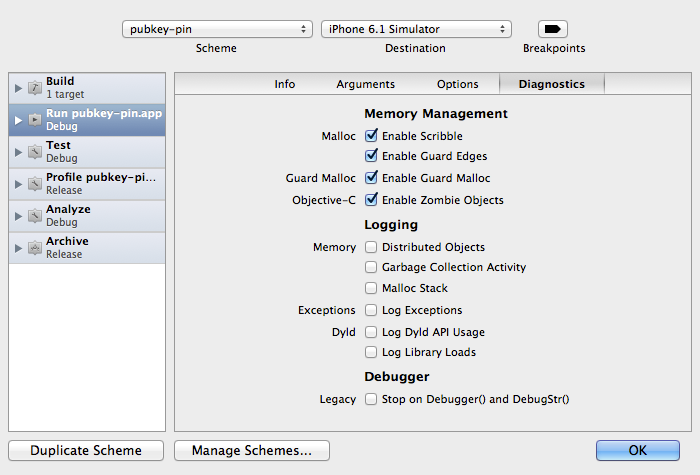
There is one caveat with using some of the guards: Apple only provides them for the simulator, and not a device. In the past, the guards were available for both devices and simulators.
使用某些守卫存在一个注意事项:苹果只为模拟器提供它们,而不是设备。在过去,守卫对设备和模拟器都可用。
Windows
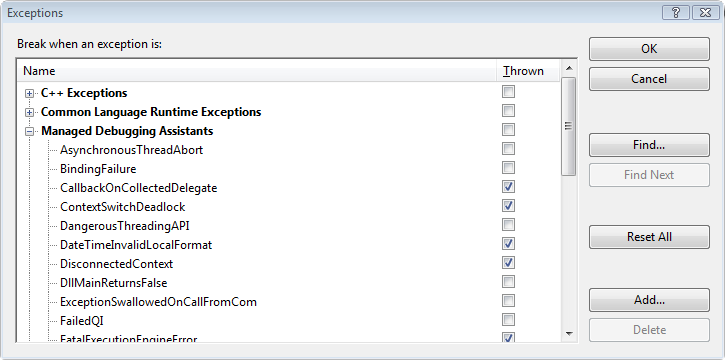
Visual Studio offers a number of debugging aids for use during development. The aids are called Managed Debugging Assistants (MDAs). You can find the MDAs on the Debug menu, then Exceptions submenu. MDAs allow you to tune your debugging experience by, for example, filtering exceptions for which the debugger should snap. For more details, see Stephen Toub's Let The CLR Find Bugs For You With Managed Debugging Assistants.
Visual Studio在开发期间提供了一些调试辅助工具。这些辅助工具被称为[托管调试助手(MDAs)](https://docs.microsoft.com/en-us/dotnet/framework/debug-trace-profile/diagnosing-errors-with-managed-debugging-assistants)。您可以在_Debug_ 菜单下找到MDAs,然后是_Exceptions_ 子菜单。MDAs允许您通过例如过滤调试器应该捕获的异常等方式调整您的调试体验。有关更多详细信息,请参阅Stephen Toub的_让CLR为您查找托管调试助手中的错误_。
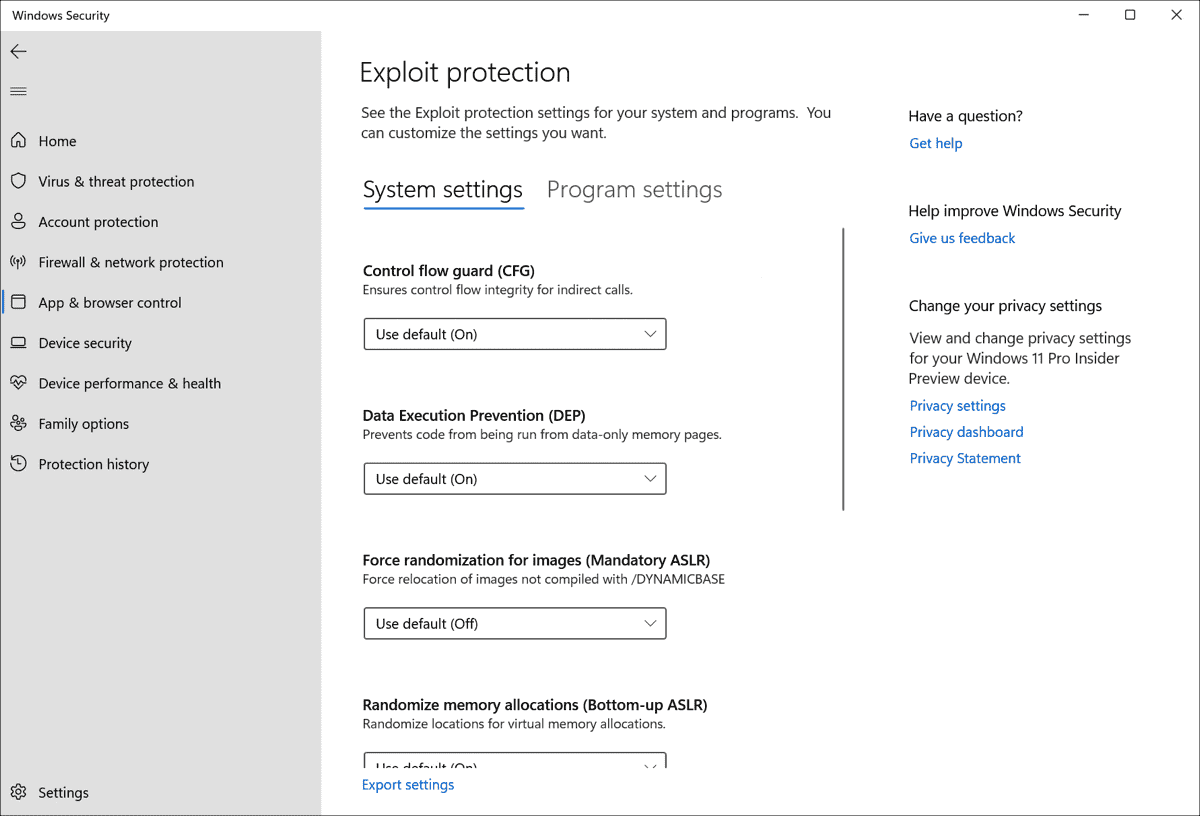
Finally, for runtime hardening, Microsoft provides Windows Defender Exploit Guard and the Process Mitigation Management Tool.
最后,对于运行时加固,Microsoft 提供了 Windows Defender Exploit Guard 和 进程缓解管理工具。 Windows Defender Exploit Guard replaces EMET and offers advanced exploit protection features.
Additionally, the Process Mitigation Management Tool (ProcessMitigations module) allows administrators to configure exploit mitigation policies via PowerShell and Group Policy.
此外,进程缓解管理工具(ProcessMitigations模块)允许管理员通过PowerShell和组策略配置漏洞缓解策略。
References / 参考
- OpenSSF: Compiler Options Hardening Guide for C and C++) (OpenSSF:C和C++编译器选项加固指南)
- GCC: Instrumentation Options) (GCC:工具选项)
- Clang Compiler User’s Manual) (Clang编译器用户手册)
- Microsoft: Security Best Practices for C++) (微软:C++ 安全最佳实践)