Bean Validation Cheat Sheet / Bean Validation 快速参考
Introduction / 介绍
This article is focused on providing clear, simple, actionable guidance for providing Java Bean Validation security functionality in your applications.
本文旨在提供清晰、简单、可操作性的指导,帮助您在应用程序中实现 Java Bean Validation 安全功能。
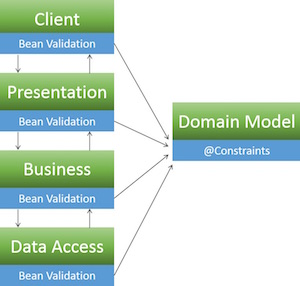
Bean validation (aka Jakarta Validation) is one of the most common ways to perform input validation in Java. It is an application layer agnostic validation spec which provides the developer with the means to define a set of validation constraints on a domain model and then perform validation of those constraints through out the various application tiers.
Bean validation(即 Jakarta Validation)是 Java 中执行 输入验证 最常见的方式之一。它是一个与应用层无关的验证规范,为开发者提供了在领域模型上定义一组验证约束并在各个应用层执行这些约束验证的手段。
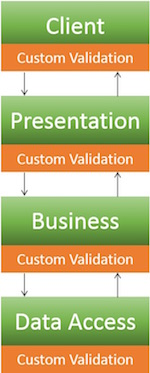
One advantage of this approach is that the validation constraints and the corresponding validators are only written once, thus reducing duplication of effort and ensuring uniformity:
这种方法的优点是验证约束和相应的验证器只需编写一次,从而减少了重复劳动并确保了一致性:
Typical Validation / 典型验证
Bean Validation
Setup / 设置
The illustrative examples below use the legacy javax.validation API, including its built-in constraint package, with Hibernate Validator. Jakarta Validation 3.0 uses jakarta.validation; use API and provider versions compatible with your application.
以下示例使用遗留的 javax.validation API,包括其 内置约束包,与 Hibernate Validator 一起使用。Jakarta Validation 3.0 使用 jakarta.validation;请使用与您的应用程序兼容的 API 和提供者版本。
Add Hibernate Validator to your pom.xml:
将 Hibernate Validator 添加到您的 pom.xml 中:
<dependency>
   <groupId>org.hibernate</groupId>
   <artifactId>hibernate-validator</artifactId>
   <version>USE_LATEST_VERSION</version>
</dependency>
Enable bean validation support in Spring's context.xml:
在 Spring 的 context.xml 中启用 Bean Validation 支持:
<beans:beans ...
   ...
   <mvc:annotation-driven />
   ...
</beans:beans>
For more info, please see the setup guide
更多信息,请参阅 设置指南
Basics / 基础知识
In order to get started using Bean Validation, you must add validation constraints (@Pattern, @Digits, @Min, @Max, @Size, @Past, @Future, @CreditCardNumber, @Email, @URL, etc.) to your model and then utilize the @Valid annotation when passing your model around in various application layers.
为了开始使用 Bean Validation,您必须将验证约束(@Pattern、@Digits、@Min、@Max、@Size、@Past、@Future、@CreditCardNumber、@Email、@URL 等)添加到您的模型中,然后在各种应用层传递模型时使用 @Valid 注解。
Constraints can be applied in several places:
约束可以应用于几个地方:
- Fields
中文:字段 - Properties
中文:属性 - Classes
For Bean Validation 1.1 also on:
对于 Bean Validation 1.1 也适用:
- Parameters
中文:参数 - Return values
中文:返回值 - Constructors
中文:构造函数
For the sake of simplicity all the examples below feature field constraints and all validation is triggered by the controller. Refer to the Bean Validation documentation for a full list of examples.
为了简化,以下所有示例都包含字段约束,并且所有验证都由控制器触发。有关示例的完整列表,请参阅 Bean Validation 文档。
When it comes to error handling, the Hibernate Validator returns a BindingResult object which contains a List<ObjectError>. The examples below feature simplistic error handling, while a production ready application would have a more elaborate design that takes care of logging and error page redirection.
在错误处理方面,Hibernate Validator 返回一个 BindingResult 对象,该对象包含一个 List<ObjectError>。以下示例展示了简单的错误处理,而一个生产就绪的应用程序将具有更复杂的设计,负责日志记录和错误页面重定向。
Predefined Constraints / 预定义约束
@Pattern
Annotation:
@Pattern(regexp=,flags=)
Data Type:
CharSequence
Use:
Checks if the annotated string matches the regular expression regex considering the given flag match. Please visit OWASP Validation Regex Repository for other useful regex's.
Reference:
Documentation) (文档)
Model:
模型:
import javax.validation.constraints.Pattern;

public class Article  {
 //Constraint: One or more ASCII letters, digits, or spaces
 @Pattern(regexp = "[a-zA-Z0-9 ]+")
 private String articleTitle;
 public String getArticleTitle()  {
  return  articleTitle;
 }
 public void setArticleTitle(String  articleTitle)  {
   this.articleTitle  =  articleTitle;
  }

  ...

}
Controller:
控制器:
import javax.validation.Valid;
import com.company.app.model.Article;

@Controller
public class ArticleController  {

 ...

 @RequestMapping(value = "/postArticle",  method = RequestMethod.POST)
 public @ResponseBody String postArticle(@Valid  Article  article,  BindingResult  result,
 HttpServletResponse  response) {
  if (result.hasErrors()) {
   String errorMessage  =  "";
   response.setStatus(HttpServletResponse.SC_BAD_REQUEST);
   List<ObjectError> errors = result.getAllErrors();
   for(ObjectError  e :  errors) {
    errorMessage += "ERROR: " +  e.getDefaultMessage();
   }
   return  errorMessage;
  } else {
   return  "Validation Successful";
  }
 }
}
@Digits
Annotation:
@Digits(integer=,fraction=)
Data Type:
BigDecimal, BigInteger, CharSequence, byte, short, int, long and the respective wrappers of the primitive types; Additionally supported by HV: any sub-type of Number
BigDecimal, BigInteger, CharSequence, byte, short, int, long 以及这些原始类型的相应包装器;此外,HV 支持任何 Number 的子类型
Use:
Checks whether the annotated value is a number having up to integer digits and fraction fractional digits
检查注解的值是否为具有最多整数位和分数小数位的数字
Reference:
Documentation) (文档)
Model:
模型:
import javax.validation.constraints.Digits;

public class Customer {
  //Constraint: Age can only be 3 digits long or less
  @Digits(integer = 3, fraction = 0)
  private int age;

  public int getAge()  {
    return age;
  }

  public void setAge(int age)  {
      this.age = age;
    }

    ...
}
Controller:
控制器:
import javax.validation.Valid;
import com.company.app.model.Customer;

@Controller
public class CustomerController  {

 ...

 @RequestMapping(value = "/registerCustomer",  method = RequestMethod.POST)
 public @ResponseBody String registerCustomer(@Valid Customer customer, BindingResult result,
 HttpServletResponse  response) {

  if (result.hasErrors()) {
   String errorMessage = "";
   response.setStatus(HttpServletResponse.SC_BAD_REQUEST);
   List<ObjectError> errors = result.getAllErrors();

   for( ObjectError  e :  errors) {
    errorMessage += "ERROR: "  +  e.getDefaultMessage();
   }
   return  errorMessage;
  } else {
   return  "Validation Successful";
  }
 }
}
@Size
Annotation:
@Size(min=, max=)
Data Type:
CharSequence, Collection, Map and Arrays
Use:
Checks if the annotated element's size is between min and max (inclusive)
检查注解元素的尺寸是否在 min 和 max 之间(包含两端)
Reference:
Documentation) (文档)
Model:
模型:
import javax.validation.constraints.Size;

public class Message {

   //Constraint: Message must contain 10 to 500 characters, inclusive
   @Size(min = 10, max = 500)
   private String message;

   public String getMessage() {
      return message;
   }

   public void setMessage(String message) {
      this.message = message;
   }

...
}
Controller:
控制器:
import javax.validation.Valid;
import com.company.app.model.Message;

@Controller
public class MessageController {

...

@RequestMapping(value="/sendMessage", method=RequestMethod.POST)
public @ResponseBody String sendMessage(@Valid Message message, BindingResult result,
HttpServletResponse response){

   if(result.hasErrors()){
      String errorMessage = "";
      response.setStatus(HttpServletResponse.SC_BAD_REQUEST);
      List<ObjectError> errors = result.getAllErrors();
      for( ObjectError e : errors){
         errorMessage+= "ERROR: " + e.getDefaultMessage();
      }
      return errorMessage;
   }
   else{
      return "Validation Successful";
   }
}
}
@Past / @Future
Annotation:
@Past, @Future
Data Type:
java.util.Date, java.util.Calendar, java.time.chrono.ChronoZonedDateTime, java.time.Instant, java.time.OffsetDateTime
Use:
Checks whether the annotated date is in the past / future. Use a supported date type, such as java.util.Date; @Future does not validate date strings.
检查注解的日期是否在过去/未来。使用支持的日期类型,例如 java.util.Date;[@Future] 不验证日期字符串](https://docs.hibernate.org/beanvalidation/spec/1.1/api/javax/validation/constraints/Future.html)。
Reference:
Documentation) (文档)
Model:
模型:
import java.util.Date;
import javax.validation.constraints.Past;
import javax.validation.constraints.Future;

public class DoctorVisit {

   //Constraint: Birthdate must be in the past
   @Past
   private Date birthDate;

   public Date getBirthDate() {
      return birthDate;
   }

   public void setBirthDate(Date birthDate) {
      this.birthDate = birthDate;
   }

   //Constraint: Schedule visit date must be in the future
   @Future
   private Date scheduledVisitDate;

   public Date getScheduledVisitDate() {
      return scheduledVisitDate;
   }

   public void setScheduledVisitDate(Date scheduledVisitDate) {
      this.scheduledVisitDate = scheduledVisitDate;
   }

...
}
Controller:
控制器:
import javax.validation.Valid;
import com.company.app.model.DoctorVisit;

@Controller
public class DoctorVisitController {

   ...

   @RequestMapping(value="/scheduleVisit", method=RequestMethod.POST)
   public @ResponseBody String scheduleVisit(@Valid DoctorVisit doctorvisit, BindingResult result,
   HttpServletResponse response){

      if(result.hasErrors()){
         String errorMessage = "";
         response.setStatus(HttpServletResponse.SC_BAD_REQUEST);
         List<ObjectError> errors = result.getAllErrors();
         for( ObjectError e : errors){
            errorMessage+= "ERROR: " + e.getDefaultMessage();
         }
         return errorMessage;
      }
      else{
         return "Validation Successful";
      }
   }
}
Combining Constraints / 约束组合
Validation annotations can be combined in any suitable way. For instance, to specify a valid reviewRating value between 1 and 5, specify the validation like this :
验证注解可以以任何合适的方式进行组合。例如,要指定有效的 reviewRating 值在 1 到 5 之间,可以这样指定验证:
Annotation:
@Min(value=), @Max(value=)
Data Type:
BigDecimal, BigInteger, byte, short, int, long and the respective wrappers of the primitive types; Additionally supported by HV: any sub-type of CharSequence (the numeric value represented by the character sequence is evaluated), any sub-type of Number
BigDecimal, BigInteger, byte, short, int, long 以及这些原始类型的包装器;此外,HV 还支持:任何 CharSequence 的子类型(字符序列表示的数值将被评估),任何 Number 的子类型
Use:
Checks whether the annotated value is higher/lower than or equal to the specified minimum
检查注解的值是否高于/低于或等于指定的最小值
Reference:
参考:
Documentation) (文档)
Model:
模型:
import javax.validation.constraints.Min;
import javax.validation.constraints.Max;

public class Review {

 //Constraint: Review rating must be between 1 and 5
 @Min(1)
 @Max(5)
 private int reviewRating;

 public int getReviewRating() {
   return reviewRating;
 }

 public void setReviewRating(int reviewRating) {
   this.reviewRating = reviewRating;
}
 ...
}
Controller:
控制器:
import javax.validation.Valid;
import com.company.app.model.ReviewRating;

@Controller
public class ReviewController {

   ...

   @RequestMapping(value="/postReview", method=RequestMethod.POST)
   public @ResponseBody String postReview(@Valid Review review, BindingResult result,
   HttpServletResponse response){

      if(result.hasErrors()){
         String errorMessage = "";
         response.setStatus(HttpServletResponse.SC_BAD_REQUEST);
         List<ObjectError> errors = result.getAllErrors();
         for( ObjectError e : errors){
            errorMessage+= "ERROR: " + e.getDefaultMessage();
         }
         return errorMessage;
      }
       else{
         return "Validation Successful";
      }
   }
}
Cascading Constraints / 级联约束
Validating one bean is a good start, but often, beans are nested or in a complete graph of beans. To validate that graph in one go, apply cascading validation with @Valid
验证一个 Bean 是一个好的开始,但通常 Bean 是嵌套的或在 Bean 的完整图中。要一次性验证该图,请使用带有 @Valid 的级联验证
Additional Constraints / 附加约束
In addition to providing the complete set of JSR303 constraints, Hibernate Validator also defines some additional constraints for convenience:
除了提供完整的 JSR303 约束集外,Hibernate Validator 还定义了一些额外的约束以方便使用:
@CreditCardNumber
中文:@信用卡号@EAN@Email
中文:@邮箱@Length
中文:@长度@Range
中文:@范围@ScriptAssert
中文:@脚本断言@URL
Take a look at this list for the complete list.
查看这个列表以获取完整列表。
Note that @SafeHtml, a previously valid constraint, has been deprecated according to the Hibernate Validator 6.1.0.Final and 6.0.18.Final release blogpost. Please refrain from using the @SafeHtml constraint.
请注意,@SafeHtml,一个之前有效的约束,根据Hibernate Validator 6.1.0.Final和6.0.18.Final版本发布博客已被弃用。请避免使用@SafeHtml约束。
Custom Constraints / 自定义约束
One of the most powerful features of bean validation is the ability to define your own constraints that go beyond the simple validation offered by built-in constraints.
Bean验证最强大的功能之一是能够定义自己的约束,这些约束超越了内置约束提供的简单验证。
Creating custom constraints is beyond the scope of this guide. Please see this documentation.
创建自定义约束超出了本指南的范围。请参阅此文档。
Error Messages / 错误信息
It is possible to specify a message ID with the validation annotation, so that error messages are customized :
可以使用验证注解指定消息ID,以便自定义错误信息:
@Pattern(regexp = "[a-zA-Z0-9 ]+", message="article.title.error")
private String articleTitle;
Spring MVC will then look up a message with ID article.title.error in a defined MessageSource. More on this documentation.
Spring MVC将然后在定义的MessageSource中查找ID为article.title.error的消息。更多关于此的文档。
References / 参考
- Jakarta Bean Validation 3.0 Specification) (Jakarta Bean Validation 3.0规范)
- Hibernate Validator 9.0: Interpolating Constraint Error Messages) (Hibernate Validator 9.0:约束错误消息插值)