Clickjacking Defense Cheat Sheet / 点击劫持防御速查表
Introduction / 介绍
This cheat sheet is intended to provide guidance for developers on how to defend against Clickjacking, also known as UI redress attacks.
本速查表旨在为开发者提供指导,说明如何防御点击劫持,也称为用户界面重定向攻击。
There are three main mechanisms that can be used to defend against these attacks:
可以用来防御这些攻击的主要机制有三种:
- Preventing the browser from loading the page in frame using the X-Frame-Options or Content Security Policy (frame-ancestors) HTTP headers.
中文:通过使用 X-Frame-Options 或 内容安全策略 (frame-ancestors) HTTP 头部,防止浏览器在框架中加载页面。 - Preventing session cookies from being included in cross-site iframe requests using the SameSite cookie attribute.
中文:通过使用 SameSite cookie 属性,防止会话 cookie 包含在跨站 iframe 请求中。 - Implementing JavaScript code in the page to attempt to prevent it being loaded in a frame (known as a "frame-buster").
中文:在页面中实现JavaScript代码,尝试防止其被加载到框架中(称为“框架破坏者”)。
These mechanisms address frame-based clickjacking. DoubleClickjacking uses separate windows and requires additional safeguards for sensitive actions.
这些机制针对基于框架的点击劫持。双重点击劫持使用单独的窗口,并且对于敏感操作需要额外的安全措施。
Note that these mechanisms are all independent of each other, and where possible more than one of them should be implemented in order to provide defense in depth.
请注意,这些机制都是相互独立的,并且尽可能多地实现它们,以提供深度防御。
Defending with Content Security Policy (CSP) frame-ancestors directive / 使用内容安全策略(CSP)的frame-ancestors指令进行防御
The frame-ancestors directive can be used in a Content-Security-Policy HTTP response header to indicate whether or not a browser should be allowed to render a page in a <frame> or <iframe>. Sites can use this to avoid Clickjacking attacks by ensuring that their content is not embedded into other sites.
可以在Content-Security-Policy HTTP响应头中使用frame-ancestors指令来指示浏览器是否应该允许在<frame>或<iframe>中渲染页面。网站可以使用此功能通过确保其内容不被嵌入到其他网站中来避免点击劫持攻击。
frame-ancestors allows a site to authorize multiple domains using the normal Content Security Policy semantics.
frame-ancestors 允许站点使用正常的 Content Security Policy 语义授权多个域名。
Content-Security-Policy: frame-ancestors Examples / Content-Security-Policy: frame-ancestors 示例
Common uses of CSP frame-ancestors:
CSP frame-ancestors 的常见用法:
Content-Security-Policy: frame-ancestors 'none';- This prevents any domain from framing the content. This setting is recommended unless a specific need has been identified for framing.
中文:这阻止了任何域名对内容进行框架化。除非有特定的框架化需求,否则建议使用此设置。
- This prevents any domain from framing the content. This setting is recommended unless a specific need has been identified for framing.
Content-Security-Policy: frame-ancestors 'self';- This only allows the current site to frame the content.
中文:这仅允许当前站点对内容进行框架化。
- This only allows the current site to frame the content.
Content-Security-Policy: frame-ancestors 'self' https://*.somesite.com https://myfriend.site.com;- For an HTTPS page, this allows its own origin, HTTPS subdomains of
somesite.com, andhttps://myfriend.site.comto frame it. The two HTTPS host expressions use the default port (443). The wildcard matches subdomains, not the baresomesite.comhost; add that host explicitly if required.
中文:对于HTTPS页面,这允许其自身域、somesite.com的HTTPS子域以及https://myfriend.site.com对其进行框架化。这两个HTTPS主机表达式使用默认端口(443)。通配符匹配子域,而不是裸露的somesite.com主机;如果需要,请显式添加该主机。
- For an HTTPS page, this allows its own origin, HTTPS subdomains of
Note that the single quotes are required around self and none, but may not occur around other source expressions.
请注意,self 和 none 必须用单引号括起来,但其他源表达式可能不需要。
See the following documentation for further details and more complex examples:
查看以下文档以获取更多细节和更复杂的示例:
- https://w3c.github.io/webappsec-csp/#directive-frame-ancestors
- https://developer.mozilla.org/en-US/docs/Web/HTTP/Headers/Content-Security-Policy/frame-ancestors
Limitations / 限制
X-Frame-Options takes priority: Section "Relation to X-Frame-Options" of the CSP Spec says: "If a resource is delivered with a policy that includes a directive named frame-ancestors and whose disposition is "enforce", then the X-Frame-Options header MUST be ignored", but older browser versions (e.g., Chrome 40 & Firefox 35) ignored this requirement and followed the X-Frame-Options header instead.
X-Frame-Options 具有优先级: CSP 规范中 "与 X-Frame-Options 的关系" 部分 说明:"如果一个资源通过包含名为 frame-ancestors 的指令且处置为 "enforce" 的策略交付,那么必须忽略 X-Frame-Options 头部",但较老的浏览器版本(例如 Chrome 40 和 Firefox 35)忽略了这一要求,而是遵循了 X-Frame-Options 头部。
Browser Support / 浏览器支持
The following browsers support CSP frame-ancestors.
以下 浏览器 支持 CSP frame-ancestors。
References:
参考资料:
- Mozilla Developer Network) (Mozilla 开发者网络)
Defending with X-Frame-Options Response Headers / 使用 X-Frame-Options 响应头部进行防御
The X-Frame-Options HTTP response header can be used to indicate whether or not a browser should be allowed to render a page in a <frame> or <iframe>. Sites can use this to avoid Clickjacking attacks, by ensuring that their content is not embedded into other sites. Set the X-Frame-Options header for all responses containing HTML content. The possible values are "DENY", "SAMEORIGIN", or "ALLOW-FROM uri"
X-Frame-Options HTTP响应头可以用来指示浏览器是否允许在<frame>或<iframe>中渲染页面。网站可以使用此功能来防止点击劫持攻击,确保其内容不会被嵌入到其他网站中。为包含HTML内容的所有响应设置X-Frame-Options头。可能的值有"DENY"、"SAMEORIGIN"或"ALLOW-FROM uri"
X-Frame-Options Header Types / X-Frame-Options头类型
There are three possible values for the X-Frame-Options header:
X-Frame-Options头有三个可能的值:
- DENY, which prevents any domain from framing the content. The "DENY" setting is recommended unless a specific need has been identified for framing.
中文:DENY,阻止任何域名对内容进行框架化。除非有特定的框架化需求,否则推荐使用"DENY"设置。 - SAMEORIGIN, which only allows the current site to frame the content.
中文:SAMEORIGIN,仅允许当前站点对内容进行框架化。 - ALLOW-FROM uri, which permits the specified 'uri' to frame this page. (e.g.,
ALLOW-FROM http://www.example.com).
中文:ALLOW-FROM uri,允许指定的'uri'对页面进行框架化。(例如,ALLOW-FROM http://www.example.com)。- This is an obsolete directive that no longer works in modern browsers.
中文:这是一个已过时的指令,在现代浏览器中不再有效。 - Check limitations below because this will fail open if the browser does not support it.
中文:请检查以下限制,因为如果浏览器不支持它,这将失败打开。 - Other browsers support the new CSP frame-ancestors directive instead. A few support both.
中文:其他浏览器支持新的CSP frame-ancestors指令,一些同时支持两者。
- This is an obsolete directive that no longer works in modern browsers.
Browser Support / 浏览器支持
The following browsers support X-Frame-Options headers.
以下browsers支持X-Frame-Options头。
References:
参考资料:
- Mozilla Developer Network) (Mozilla 开发者网络)
- IETF Draft) (IETF 草案)
- X-Frame-Options Compatibility Test) (X-Frame-Options 兼容性测试) - Check this for the LATEST browser support info for the X-Frame-Options header
Implementation / 实现
To implement this protection, you need to add the X-Frame-Options HTTP Response header to any page that you want to protect from being clickjacked via framebusting. One way to do this is to add the HTTP Response Header manually to every page. A possibly simpler way is to implement a filter that automatically adds the header to every page or to add it at Web Application Firewall of Web/Application Server level.
要实现此保护,您需要将 X-Frame-Options HTTP 响应头添加到您想要保护的任何页面,以防止通过 framebusting 被点击劫持。一种方法是将 HTTP 响应头手动添加到每个页面。一种可能更简单的方法是实现一个过滤器,自动将头添加到每个页面,或者将其添加到 Web 应用程序防火墙或 Web/应用程序服务器级别。
Common Defense Mistakes / 常见防御错误
Meta-tags that attempt to apply the X-Frame-Options directive DO NOT WORK. For example, <meta http-equiv="X-Frame-Options" content="deny"> will not work. You must apply the X-FRAME-OPTIONS directive as HTTP Response Header as described above. The same rule also applies to the Content Security Policy (CSP) directive frame-ancestors, which must be configured as an HTTP Response Header, not in a <meta> tag.
尝试应用 X-Frame-Options 指令的元标签不起作用。例如,<meta http-equiv="X-Frame-Options" content="deny"> 将不会起作用。您必须像上面描述的那样将 X-FRAME-OPTIONS 指令作为 HTTP 响应头应用。相同的规则也适用于内容安全策略 (CSP) 指令 frame-ancestors,它必须配置为 HTTP 响应头,而不是在 <meta> 标签中。
Limitations / 限制
- Per-page policy specification: The policy needs to be specified for every page, which can complicate deployment. Providing the ability to enforce it for the entire site, at login time for instance, could simplify adoption.
中文:按页面策略指定:策略需要为每个页面指定,这可能会使部署复杂化。提供在整个站点上强制执行的能力,例如在登录时,可以简化采用过程。 - Problems with multi-domain sites: The current implementation does not allow the website administrator to provide a list of domains that are allowed to frame the page. While listing allowed domains can be dangerous, in some cases a website administrator might have no choice but to use more than one hostname.
中文:多域名站点的問題:当前实现不允许网站管理员提供允许框架页面的域名列表。虽然列出允许的域名可能很危险,但在某些情况下,网站管理员可能别无选择,只能使用多个主机名。 - ALLOW-FROM browser support: The ALLOW-FROM option is obsolete and no longer works in modern browsers. BE CAREFUL ABOUT DEPENDING ON ALLOW-FROM. If you apply it and the browser does not support it, then you will have NO clickjacking defense in place.
中文:允许来自浏览器的支持:ALLOW-FROM选项已过时,在现代浏览器中不再工作。请小心依赖ALLOW-FROM。如果您应用了它,而浏览器不支持,那么您将没有点击劫持防御措施。 - Multiple options not supported: There is no way to allow the current site and a third-party site to frame the same response. Browsers only honor one X-Frame-Options header and only one value on that header.
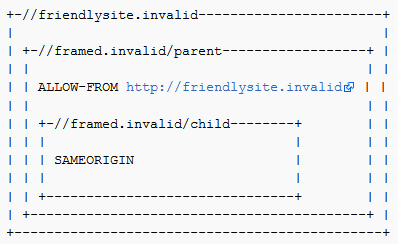
中文:不支持多个选项:无法允许当前站点和第三方站点对同一响应进行框架。浏览器只尊重一个X-Frame-Options头,并且只尊重该头上的一个值。 - Nested Frames don't work with SAMEORIGIN and ALLOW-FROM: In the following situation, the
http://framed.invalid/childframe does not load because ALLOW-FROM applies to the top-level browsing context, not that of the immediate parent. The solution is to use ALLOW-FROM in both the parent and child frames (but this prevents the child frame loading if the//framed.invalid/parentpage is loaded as the top level document).
中文:嵌套框架与SAMEORIGIN和ALLOW-FROM不兼容:在以下情况下,http://framed.invalid/child框架无法加载,因为ALLOW-FROM应用于顶级浏览上下文,而不是直接父上下文。解决方案是在父框架和子框架中都使用ALLOW-FROM(但这样做会阻止子框架加载,如果//framed.invalid/parent页面被加载为顶级文档)。
- X-Frame-Options Deprecated While the X-Frame-Options header is supported by the major browsers, it has been obsoleted in favor of the frame-ancestors directive from the CSP Level 2 specification.
中文:X-Frame-Options已弃用虽然X-Frame-Options头被主流浏览器支持,但它已被CSP Level 2规范中的frame-ancestors指令所取代。 - Proxies Web proxies are notorious for adding and stripping headers. If a web proxy strips the X-Frame-Options header then the site loses its framing protection.
中文:代理网络代理以添加和删除头信息而闻名。如果网络代理删除了X-Frame-Options头,那么该站点将失去其框架保护。
Defending with SameSite Cookies / 使用SameSite Cookies进行防御
Cookies marked SameSite=Strict or SameSite=Lax are withheld from cross-site iframe requests. This can prevent clickjacking that depends on those cookies for authentication. See the CSRF guidance on SameSite for its other security uses.
标记为SameSite=Strict或SameSite=Lax的Cookies将不会从跨站iframe请求中发送。这可以防止依赖于这些Cookies进行身份验证的点击劫持。有关其其他安全用途,请参阅SameSite的CSRF指南。
SameSite does not block framing or withhold cookies from same-site requests. An attacker-controlled sibling subdomain with the same scheme can be same-site while remaining a different origin. Use CSP frame-ancestors to restrict which origins may frame the page, even when SameSite cookies are configured.
SameSite不会阻止框架或从同站请求中撤回Cookies。一个由攻击者控制的具有相同方案的兄弟子域可以是同站但不同源。使用CSP frame-ancestors来限制可以框架页面的源,即使当SameSite Cookies已配置时也是如此。
Limitations / 限制
If the Clickjacking attack does not require the user to be authenticated, this attribute will not provide any protection.
如果点击劫持攻击不需要用户进行身份验证,则此属性不会提供任何保护。
Additionally, while SameSite attribute is supported by most modern browsers, there are still some users (approximately 6% as of November 2020) with browsers that do not support it.
此外,尽管大多数现代浏览器支持SameSite属性,但仍有一些用户(截至2020年11月,约占6%)使用的浏览器不支持该属性。
The use of this attribute should be considered as part of a defense-in-depth approach, and it should not be relied upon as the sole protective measure against Clickjacking.
使用此属性应被视为多层次防御策略的一部分,而不应将其作为防止点击劫持的唯一防护措施。
Defending against DoubleClickjacking / 防御双重点击劫持
DoubleClickjacking) (双重点击劫持) tricks a user into activating a sensitive control in another window during a double-click. The target page is a top-level window, so framing restrictions such as X-Frame-Options and CSP frame-ancestors do not prevent this attack.
SameSite controls whether cookies accompany cross-site requests) (SameSite属性控制是否将cookie携带到跨站请求中). Lax permits cookies on top-level navigations using safe HTTP methods, while Strict withholds them on the initial cross-site request. Neither policy verifies that the user intended the resulting action.
For pages your application controls, such as consent screens, payment confirmations, and account security settings:
对于您应用程序控制的页面,例如同意屏幕、支付确认和账户安全设置:
- For high-risk actions, require the user to review the action's details and complete transaction authorization. Enforce authorization on the server; an extra confirmation button alone is not a complete defense against UI redress.
中文:对于高风险操作,要求用户审查操作详情并完成交易授权。在服务器上强制执行授权;仅一个额外的确认按钮并不能完全防御UI重定向。 - Treat disabling sensitive controls until prior interaction as a proposed supplementary mitigation, as described in Paulos Yibelo's disclosure. Mouse movement or a key press alone does not establish that the user understands or approves the action.
中文:将敏感控制禁用直到之前的交互作为一个建议的补充缓解措施,如Paulos Yibelo的披露中所述。仅鼠标移动或按键操作本身并不能证明用户理解或批准该操作。 - If you use this mitigation, render the controls disabled from the start and test that users can enable and activate them with mouse, keyboard, touch, and assistive technology. Click events support all these input methods; do not require every user to move a mouse or press a key.
中文:如果您使用此缓解措施,应从开始就使控件处于禁用状态,并测试用户是否可以使用鼠标、键盘、触摸和辅助技术来启用和激活它们。点击事件支持所有这些输入方法;不要要求每个用户都必须移动鼠标或按键。 - Keep the framing defenses above for frame-based attacks. Client-side interaction checks supplement these defenses and do not replace transaction authorization.
中文:保留上述基于框架的攻击防御措施。客户端交互检查补充这些防御措施,但并不替代交易授权。
Best-for-now Legacy Browser Frame Breaking Script / 当前最佳方案:遗留浏览器框架破坏脚本
One way to defend against clickjacking is to include a "frame-breaker" script in each page that should not be framed. The following methodology will prevent a webpage from being framed even in legacy browsers, that do not support the X-Frame-Options-Header.
防御点击劫持的一种方法是在每个不应被框架化的页面上包含一个“框架破坏”脚本。以下方法可以防止网页在即使不支持X-Frame-Options-Header的遗留浏览器中被框架化。
In the document HEAD element, add the following:
在文档的HEAD元素中添加以下内容:
First apply an ID to the style element itself:
首先为样式元素本身应用一个ID:
<style id="antiClickjack">
    body{display:none !important;}
</style>
Then, delete that style by its ID immediately after in the script:
然后,通过其ID立即在脚本中删除该样式:
<script type="text/javascript">
    if (self === top) {
        var antiClickjack = document.getElementById("antiClickjack");
        antiClickjack.parentNode.removeChild(antiClickjack);
    } else {
        top.location = self.location;
    }
</script>
This way, everything can be in the document HEAD and you only need one method/taglib in your API.
这样,所有内容都可以放在文档的HEAD中,你只需要在API中使用一个方法/标签库。
window.confirm() Protection / window.confirm() 保护
The use of X-Frame-Options or a frame-breaking script is a more fail-safe method of clickjacking protection. However, in scenarios where content must be frameable, then a window.confirm() can be used to help mitigate Clickjacking by informing the user of the action they are about to perform.
使用X-Frame-Options或框架破坏脚本是一种更安全的点击劫持防护方法。然而,在内容必须可被框架化的场景中,可以使用window.confirm()来通过通知用户他们即将执行的操作来帮助减轻点击劫持。
Treat window.confirm() as supplementary confirmation, not a guarantee that users will see a dialog or an origin label. Browsers can suppress simple dialogs, for example in a sandboxed frame without allow-modals; confirm() then returns false. Only perform the action after a true result, as below:
将 window.confirm() 视为辅助确认,而不是用户一定会看到对话框或源标签的保证。浏览器可以 抑制简单对话框,例如在未设置 allow-modals 的沙箱框架中;此时 confirm() 返回 false。只有当结果为 true 时才执行操作,如下所示:
<script type="text/javascript">
    var action_confirm = window.confirm("Are you sure you want to delete your youtube account?")
    if (action_confirm) {
        //... Perform action
    } else {
        //... The user does not want to perform the requested action.`
    }
</script>
Insecure Non-Working Scripts DO NOT USE / 不安全且无效的脚本 不要使用
Consider the following snippet which is NOT recommended for defending against clickjacking:
考虑以下代码片段,不推荐用于防御点击劫持:
<script>if (top!=self) top.location.href=self.location.href</script>
This simple frame breaking script attempts to prevent the page from being incorporated into a frame or iframe by forcing the parent window to load the current frame's URL. Unfortunately, multiple ways of defeating this type of script have been made public. We outline some here.
此简单的框架破坏脚本试图通过强制父窗口加载当前框架的 URL 来阻止页面被嵌入到框架或 iframe 中。不幸的是,已有多种击败此类脚本的方法被公开。我们在此概述一些方法。
Double Framing / 双重框架
Some frame busting techniques navigate to the correct page by assigning a value to parent.location. This works well if the victim page is framed by a single page. However, if the attacker encloses the victim in one frame inside another (a double frame), then accessing parent.location becomes a security violation in all popular browsers, due to the descendant frame navigation policy. This security violation disables the counter-action navigation.
一些框架破坏技术通过将值赋给 parent.location 来导航到正确的页面。如果受害页面被单个页面框架,这种方法效果很好。然而,如果攻击者将受害页面嵌套在一个框架内部(双重框架),那么在所有主流浏览器中访问 parent.location 都会因 后代框架导航策略 而成为安全违规,这将禁用反制导航。
Victim frame busting code:
受害框架破坏代码:
if(top.location != self.location) {
    parent.location = self.location;
}
Attacker top frame:
攻击者顶层框架:
<iframe src="attacker2.html">
Attacker sub-frame:
攻击者子框架:
<iframe src="http://www.victim.com">
The onBeforeUnload Event / onBeforeUnload 事件
A user can manually cancel any navigation request submitted by a framed page. To exploit this, the framing page registers an onBeforeUnload handler which is called whenever the framing page is about to be unloaded due to navigation. The handler function returns a string that becomes part of a prompt displayed to the user.
用户可以手动取消由框架页面提交的任何导航请求。为了利用这一点,框架页面注册了一个 onBeforeUnload 处理器,该处理器在框架页面因导航即将卸载时被调用。处理器函数返回的字符串将成为显示给用户的提示信息的一部分。
Say the attacker wants to frame PayPal. He registers an unload handler function that returns the string "Do you want to exit PayPal?". When this string is displayed to the user is likely to cancel the navigation, defeating PayPal's frame busting attempt.
假设攻击者想要框架 PayPal。他注册了一个返回字符串 "您想要退出 PayPal 吗?" 的卸载处理器函数。当这个字符串显示给用户时,很可能会取消导航,从而挫败 PayPal 的框架破坏尝试。
The attacker mounts this attack by registering an unload event on the top page using the following code:
攻击者通过以下代码在顶层页面注册卸载事件来实施这种攻击:
<script>
    window.onbeforeunload = function(){
        return "Asking the user nicely";
    }
</script>

<iframe src="http://www.paypal.com">
PayPal's frame busting code will generate a BeforeUnload event activating our function and prompting the user to cancel the navigation event.
PayPal 的框架破坏代码将生成一个 BeforeUnload 事件,激活我们的函数并提示用户取消导航事件。
No-Content Flushing / 无内容刷新
While the previous attack requires user interaction, the same attack can be done without prompting the user. Modern browsers enable an attacker to automatically cancel the incoming navigation request in an onBeforeUnload event handler by repeatedly submitting a navigation request to a site responding with "204 - No Content".
虽然之前的攻击需要用户交互,但可以使用相同的攻击方法而不提示用户。现代浏览器允许攻击者通过反复向响应 "204 - No Content" 的站点提交导航请求,在 onBeforeUnload 事件处理器中自动取消即将到来的导航请求。
Navigating to a No Content site is effectively a NOP, but flushes the request pipeline, thus canceling the original navigation request. Here is sample code to do this:
导航到无内容站点实际上是一个空操作(NOP),但会刷新请求管道,从而取消原始导航请求。以下是实现此操作的示例代码:
var preventbust = 0
window.onbeforeunload = function() { killbust++ }
setInterval( function() {
    if(killbust > 0){
    killbust = 2;
    window.top.location = 'http://nocontent204.com'
    }
}, 1);
<iframe src="http://www.victim.com">
Restricted zones / 受限区域
Most frame busting relies on JavaScript in the framed page to detect framing and bust itself out. If JavaScript is disabled in the context of the subframe, the frame busting code will not run. There are unfortunately several ways of restricting JavaScript in a subframe:
大多数框架破坏依赖于框架页面中的JavaScript来检测框架并自行破坏。如果子框架上下文中禁用了JavaScript,则框架破坏代码将不会运行。不幸的是,有几种方法可以限制子框架中的JavaScript:
In Chrome:
在Chrome中:
<iframe src="http://www.victim.com" sandbox></iframe>
Firefox:
在Firefox中:
Activate designMode in parent page. While designMode is still supported in modern browsers, its effectiveness as a clickjacking attack vector may vary in current browser versions.
在父页面中激活designMode。虽然现代浏览器仍然支持designMode,但其作为点击劫持攻击向量的有效性可能因当前浏览器版本而异。
document.designMode = "on";
References / 参考
- MDN: Content-Security-Policy frame-ancestors Directive) (MDN:内容安全策略(Content-Security-Policy)frame-ancestors指令)
- MDN: X-Frame-Options